What makes your calorie target change?
Imagine logging the same chicken, rice, vegetables, and oil dinner consistently, yet losing weight more slowly than intended for several weeks. The consequential difference is what each app does with that intake and weight history, not simply whether it offers coaching.
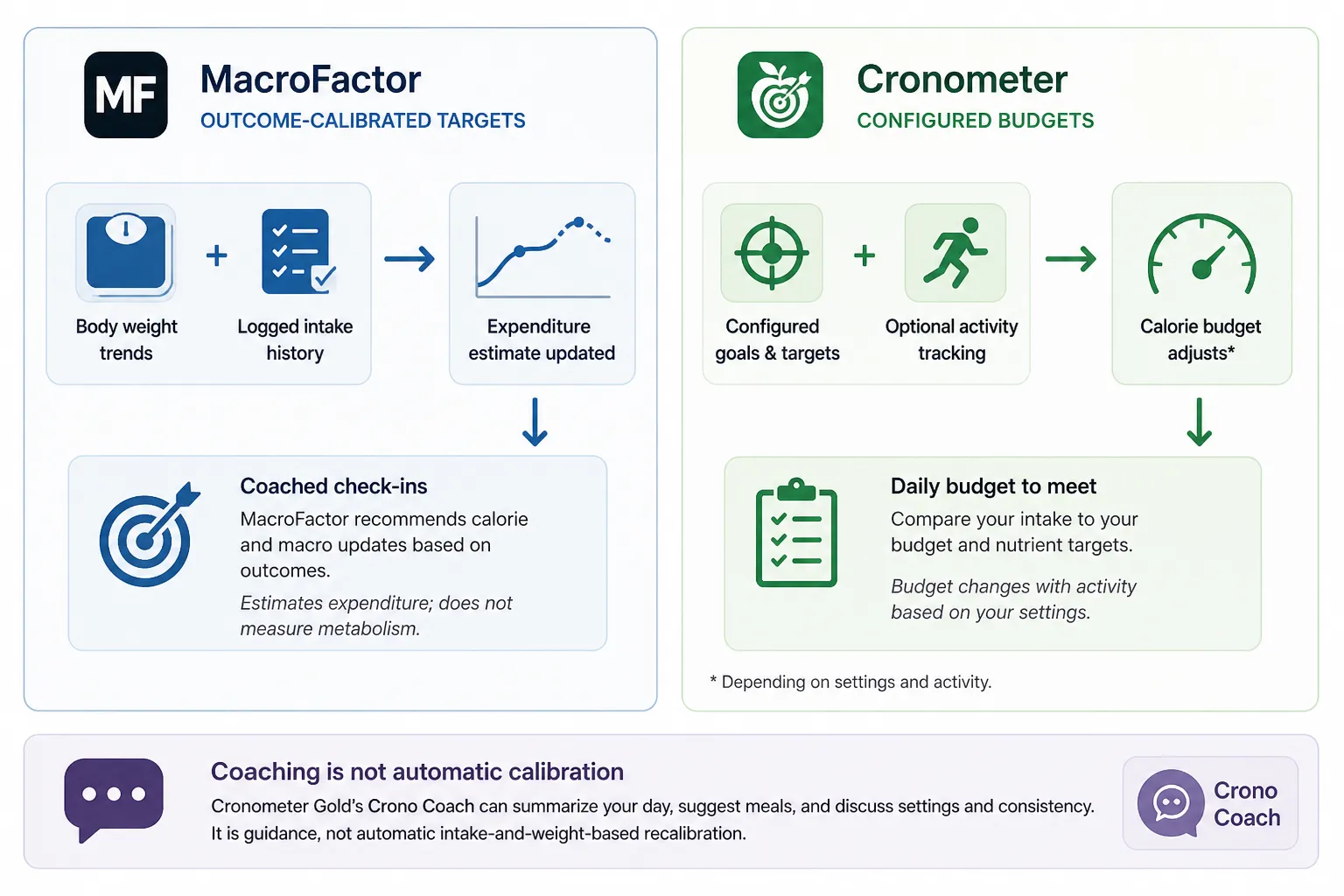
MacroFactor starts with an equation-based expenditure estimate, then revises that estimate using logged intake and weight trends. Its coached check-ins recommend calorie and macro updates, so slower-than-planned progress can inform later recommendations without guaranteeing a particular adjustment. It estimates expenditure; it does not directly measure metabolism or calories burned.
Cronometer compares your dinner with configured targets, supporting fixed targets, macro ratios, a keto calculator, and goal-based calorie budgets. Its energy allowance can also change with activity, depending on your settings, rather than changing solely because your weight trend differs from your goal.
An activity-adjusted calorie budget responds to recorded movement; an outcome-calibrated target responds to the relationship between logged intake and weight trends. Those are different feedback mechanisms, even when both produce a changing daily allowance.
Coaching is not necessarily automatic calibration
Cronometer Gold’s Crono Coach can summarize your day, suggest meals, and discuss settings and consistency. That is useful guidance, but the reviewed documentation does not establish automatic intake-and-weight-based TDEE recalibration equivalent to MacroFactor’s workflow.
Changing a target can also change what an older diary page displays without indicating any adaptive calculation. In a September 2026 discussion, Cronometer support reportedly clarified that changed macro settings also affect targets displayed on historical diary days: a display-history caveat, not outcome-based coaching.
The adaptive workflow needs usable data
MacroFactor Expenditure V3 requires at least four nutrition-logged days and one weight entry weekly to continue updating. Its recommended practice is daily food logging and at least three weekly weigh-ins, giving the system more information than the minimum.
A partially logged day can misleadingly suggest very low intake, unlike a completely unlogged day, which MacroFactor treats differently. Its partial-logging guidance recommends estimating omissions where possible and describes a check-in option for excluding suspected incomplete days; honest intake estimates matter more than maintaining a logging streak.
Choose the adaptive workflow if you want recommendations informed by outcomes and can sustain that logging commitment. If you already follow a dietitian’s or coach’s targets, manual control may matter more: Cronometer supports configured targets, while MacroFactor offers Coached, Collaborative, and Manual modes rather than requiring automatic coaching.
More nutrient detail does not automatically mean more accuracy
Cronometer is a strong choice for investigating nutrients, but not because MacroFactor lacks them. MacroFactor’s Nutrient Explorer includes nutrient targets, configurable views, contributing-food breakdowns, and summaries across different periods, giving you ways to look beyond calories and macros.
The useful distinction is between coverage, completeness, and portion accuracy. Nutrient coverage describes what an app can display; nutrient completeness describes what a selected food entry contains. Neither alone proves that your logged portion is accurate.
Database provenance also overlaps more than the coaching-versus-nutrients framing suggests. Both apps document using the NCC Food & Nutrient Database for common foods, according to MacroFactor’s nutrition-data explanation and Cronometer’s source documentation. Cronometer additionally lists several national and regional datasets, but that source diversity does not establish a universal accuracy advantage.
Return to the chicken, rice, vegetables, and oil dinner. Logging those ingredients separately with suitable common-food entries can produce a richer nutrient record than selecting one generic meal or branded packaged dinner, whose information may be limited to its label. MacroFactor’s guidance on complete micronutrient information recommends this common-food approach, and Cronometer’s documentation makes the same distinction.
A barcode identifies a database entry, not a laboratory measurement of your meal. Cronometer makes that limit explicit:
“Cronometer is not a lab and does not test foods for their nutrient content.” — Cronometer
Use the extra detail with a few practical checks:
- Match the food and preparation. Raw and cooked entries are not interchangeable for the same weighed amount.
- Check the portion. A detailed entry logged at twice the amount you ate still produces a misleading total.
- Treat missing values as unknown, not zero. An unreported nutrient does not mean the food contains none.
- Keep diary shortfalls in context. Falling below a nutrient target in your log is not a clinical diagnosis of deficiency.
Choose Cronometer for its nutrition-investigation workflow and free tracking access, not an unproven claim that every entry is more accurate. For another comparison centered on that workflow, see MyFitnessPal vs Cronometer; here, the distinction is how each app helps you use nutrition detail, not which advertises the largest nutrient count.
Daily logging: convenience matters, but so does fixing mistakes
For the same dinner, both apps let you log individual ingredients or build a reusable recipe. Cronometer Basic includes barcode scanning, custom foods, and recipes; Gold adds photo and voice logging. Those paid conveniences should not be confused with the free tier’s core logging tools.
MacroFactor’s May 2026 update adds Snap and Describe for photo- and text-based capture, and its documentation also covers editable AI recipe importing. The convenience overlap is substantial: neither photo capture nor recipe importing is exclusive to Cronometer.
Before accepting that dinner, check ingredient identity, cooked versus raw entries, serving amounts, and cooking oil. A photo can shorten the first draft without reliably resolving how much oil went into the pan or how much you ate. Neither feature list establishes more accurate meal capture.
Dated feedback illustrates that tradeoff. August 2026 MacroFactor reviews praise logging convenience and flexibility, while an August 24 reviewer reports difficulty with AI serving estimates, especially fluids. February 2026 Cronometer feedback praises exact-weight logging, a useful reminder that entering a measured amount can matter more than capture speed.
When the barcode disagrees with the package
A barcode match is a starting point, not a reason to ignore the label. MacroFactor acknowledges that regional formulations and outdated branded entries can affect coverage. In either app, check that the product and serving basis match your package before changing anything.
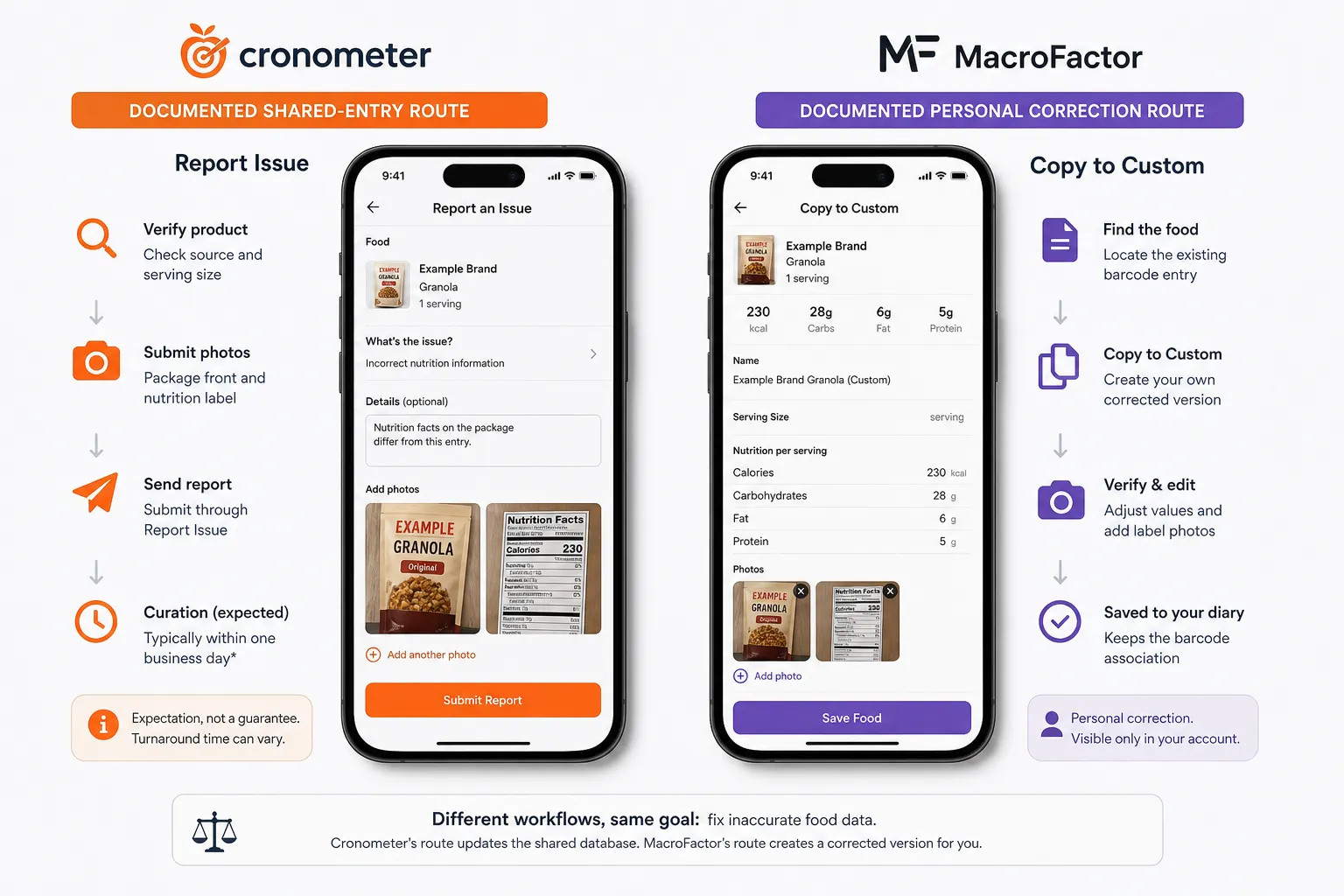
In Cronometer, the documented shared-entry route is Report Issue. After checking the source and serving size, submit package-front and nutrition-label photos. Cronometer says curation typically takes one business day, but that is an expectation, not a guaranteed turnaround.
MacroFactor documents Copy to Custom to create your corrected version while retaining its barcode association; label-photo creation is also available. This establishes a personal correction workflow. A directly comparable shared-database reporting process was not established in the supplied documentation, which does not prove none exists.
An August 12, 2026 Cronometer discussion likewise describes a package-label mismatch and correction questions. These individual reports illustrate friction, not comparative error rates. Fixing your own diary and correcting a shared database are different workflows; compare both before calling a food database easy to maintain.
What you get free and what the subscriptions buy
Cronometer Basic is enough for many tracking needs: calories, protein, and nutrients against targets you already know. Its free tier includes barcode scanning, custom foods and recipes, custom macro and micronutrient targets, device syncing, diary groups, and reports within a seven-day window.
Gold buys ad removal and additional convenience and analysis, including photo and voice logging and Crono Coach. MacroFactor instead makes sense when adjusting calorie and macro recommendations is the recurring problem you want automated; it is ad-free, with a seven-day trial but no continuing free tier.
US billing for MacroFactor Nutrition versus Cronometer Gold is $11.99 versus $10.99 monthly, or $71.99 versus $59.99 annually; Nutrition also offers six months for $47.99. Local prices and taxes may differ.
The $12 annual gap matters less than a workflow you use. Start with Basic for monitoring established targets, choose Gold for its paid tools, or pay for MacroFactor when adaptive recommendations justify the subscription.
Both subscriptions auto-renew; store descriptions advise canceling at least 24 hours before the period ends. Manage mobile subscriptions through the relevant store, and distinguish Nutrition from MacroFactor Workouts and the separate two-app bundle.
Individual reviews differ on coaching value and ad tolerance. Those are personal value judgments, not evidence of plan entitlements or better results.
Browser access, wearables, and using both apps together
Browser tracking can make Cronometer the more practical choice if you prefer entering recipes or reviewing nutrition on a larger screen. Its documented web tracker is a clear advantage; a current MacroFactor browser client was not established in the reviewed documentation. That is a browser-access distinction, not a claim about compatibility with any particular computer.
Both apps support iPhone/iPad, Android, and Apple Watch. Beyond those platforms, the useful question is not how many devices connect, but what imported data changes: your diary, your nutrition budget, or your coaching recommendations.
Will a recorded workout increase your allowance?
In MacroFactor, wearable calorie estimates do not set expenditure or dietary targets, according to its wearable expenditure guidance. It estimates expenditure from logged intake and weight trends rather than directly measuring metabolism or accepting your watch’s calorie-burn estimate. Recording a workout therefore does not automatically earn an equivalent increase in today’s allowance.
Cronometer can include activity in its energy budget, with an option to add expenditure above baseline. If you expect a logged run to increase what you can eat that day, this difference matters more than whether both apps connect to your watch.
MacroFactor connects through Apple Health and Android Health Connect, with up to 30 days of historical import. Cronometer documents direct connections including Garmin, Oura, WHOOP, and Withings. Its integration guidance also warns about overlapping import routes: sending the same workout through both a direct connection and a health hub can produce duplicate or incorrect data.
Can Cronometer log while MacroFactor coaches?
That workflow is possible in principle, not guaranteed to be seamless. MacroFactor’s bidirectional integration documentation supports importing nutrition and weight through health hubs. A conditional route is Cronometer nutrition totals to Apple Health or Health Connect, then into MacroFactor, with weight data also available for coaching.
Before relying on it, check permissions, which app writes each data type, and whether MacroFactor receives complete daily totals. Avoid logging the same intake twice, and inspect imported dates and values rather than assuming a successful connection means every entry arrived correctly.
An October 22, 2026 community discussion reported update-related Cronometer syncing trouble and a reported fix. That dated anecdote is a reminder to inspect imports after updates, not evidence of a permanent flaw. Using Cronometer to log and MacroFactor to coach is worth considering only if the resulting data flow is complete, consistent, and free of duplicates.
Choose the job you want the app to do
Pay for MacroFactor when adjusting your intake target is the problem; choose Cronometer when tracking against targets and investigating nutrition are the main jobs. That distinction is more useful than declaring either app universally better or more accurate.
For adaptive dieting, choose MacroFactor if consistent food logging and weight entries are realistic. Its intake-and-weight-informed recommendations address the recurring question of what to eat next, using estimated expenditure rather than directly measuring metabolism.
Choose Cronometer Basic for free tracking against known targets. Its free barcode scanning and custom nutrient targets make Gold unnecessary for basic tracking. Cronometer also fits nutrient investigation and browser use; consider Gold when its added analysis or conveniences solve a specific problem.
The overlap matters: MacroFactor can satisfy substantial micronutrient-tracking needs, while Cronometer Gold offers coaching-style guidance through Crono Coach. Neither fact erases the mechanism difference: Crono Coach’s documented assistance does not establish MacroFactor’s intake-and-weight-calibrated target adjustment.
If you already have coach-prescribed targets, adaptive coaching is not automatically worth paying for. MacroFactor’s Manual and Collaborative modes remain options, but the subscription should solve a need beyond following numbers you already have.
Before choosing, identify your recurring problem: “Do I need help choosing my next target, or help understanding and recording what I eat?” Let that answer guide the purchase, rather than paying for overlapping features you may not need.
- Key sources
- MacroFactor: How Accurate Is the Expenditure Algorithm?
- Cronometer: Energy Target
- Cronometer: Mobile - Crono Coach
- MacroFactor: Complete Micronutrient Information
- Cronometer: Data Sources
- Cronometer Gold
- MacroFactor: Subscription and Bundle Guide
- Cronometer US Apple App Store