Most calorie trackers can count calories. The problem is that many fall apart in real life because logging takes too long, corrections are annoying, or the app gets noisy right when you are trying to save lunch between meetings.
For busy people, the best app is the one you can keep using on a rushed Tuesday, not the one with the biggest feature list. If re-logging the same breakfast feels tedious, fixing an AI photo estimate takes too many taps, or ads slow down dinner entry, consistency usually disappears first.
This guide compares each calorie tracker app by the things that actually matter day to day: logging speed, correction ease, app friction, and how useful the guidance is after the food is logged. Kibora is the best overall fit for fast, calm tracking with useful insight, while other apps may win if you want a huge food database, deeper macro control, or more hands-on coaching.
The quick answer: choose by the logging job you repeat most
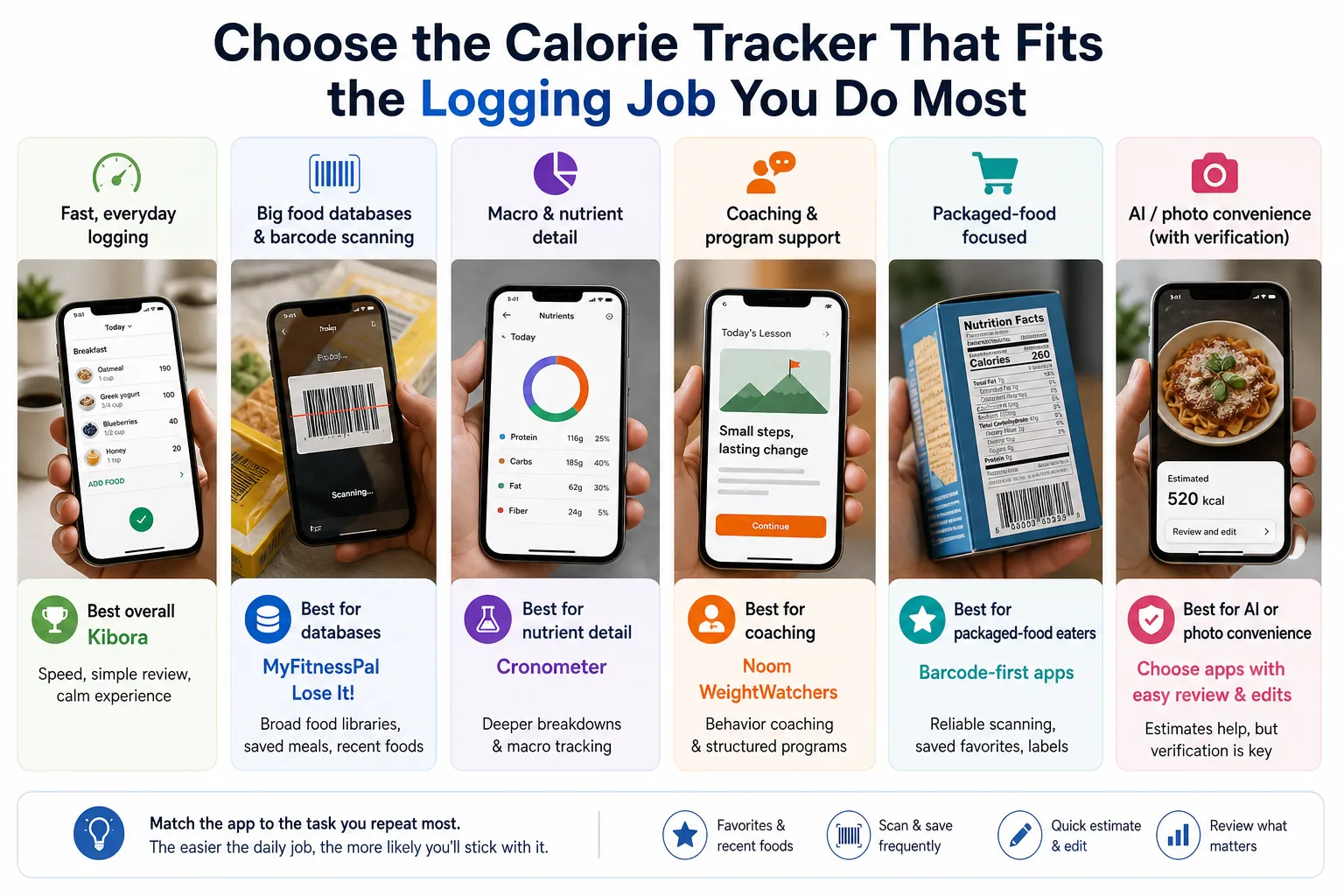
If you want the short version, pick the app that makes your most common logging task feel easy. For busy people, this ranking is based on daily usability, not total feature count or the longest settings menu.
That means speed, low-friction corrections, a calm interface, and data you can actually use matter more than having every possible tool. The goal is repeatable, reasonably accurate logging that helps awareness and behavior change, not perfection, which aligns with guidance from the NIDDK.
- Best overall for busy logging: Kibora. Best fit if you want fast food logging, simple review, a calmer experience, and science-based insights without heavy program baggage.
- Best for big food databases: MyFitnessPal and Lose It! Strong picks if you rely on broad food libraries, barcode scanning, saved meals, and recent foods.
- Best for macro and nutrient detail: Cronometer. Best if you care about deeper nutrient breakdowns. MyNetDiary and YAZIO are also worth a look depending on the workflow and premium features you prefer.
- Best for coaching and program support: Noom and WeightWatchers. Good if you want behavior coaching or a structured program, but they are not pure calorie tracker apps.
- Best for packaged-food eaters: Apps with strong barcode scanning plus saved favorites. If your lunch comes from boxes, wrappers, or meal prep labels, this usually matters more than photo logging.
- Best for AI or photo convenience with verification: Choose an AI calorie tracker or photo calorie tracker only if it also makes review and correction easy. Fast estimates help, but blind trust does not.
A few quick examples make this easier. If you eat the same breakfast every weekday, favorites and recent foods will save you more time than a complex nutrition dashboard.
If you buy packaged lunches, a reliable barcode calorie tracker will probably beat a camera-first app. If you travel or eat out often, the better choice is the one that lets you estimate quickly and then edit portions or ingredients without a fight.
This is also why free versus paid tiers matter more than many comparison pages admit. Barcode scanning, deeper insights, ad load, and saved convenience features can change the experience enough that the “best MyFitnessPal alternative” for one person feels completely different for another.
If you want more context on whether logging is even worth doing for your situation, see when calorie tracking is actually useful. For the rest of this guide, use the shortlist above as your filter: choose the app that matches the logging job you repeat most, then judge everything else by how easy it is to keep using.
Best overall for busy people: Kibora
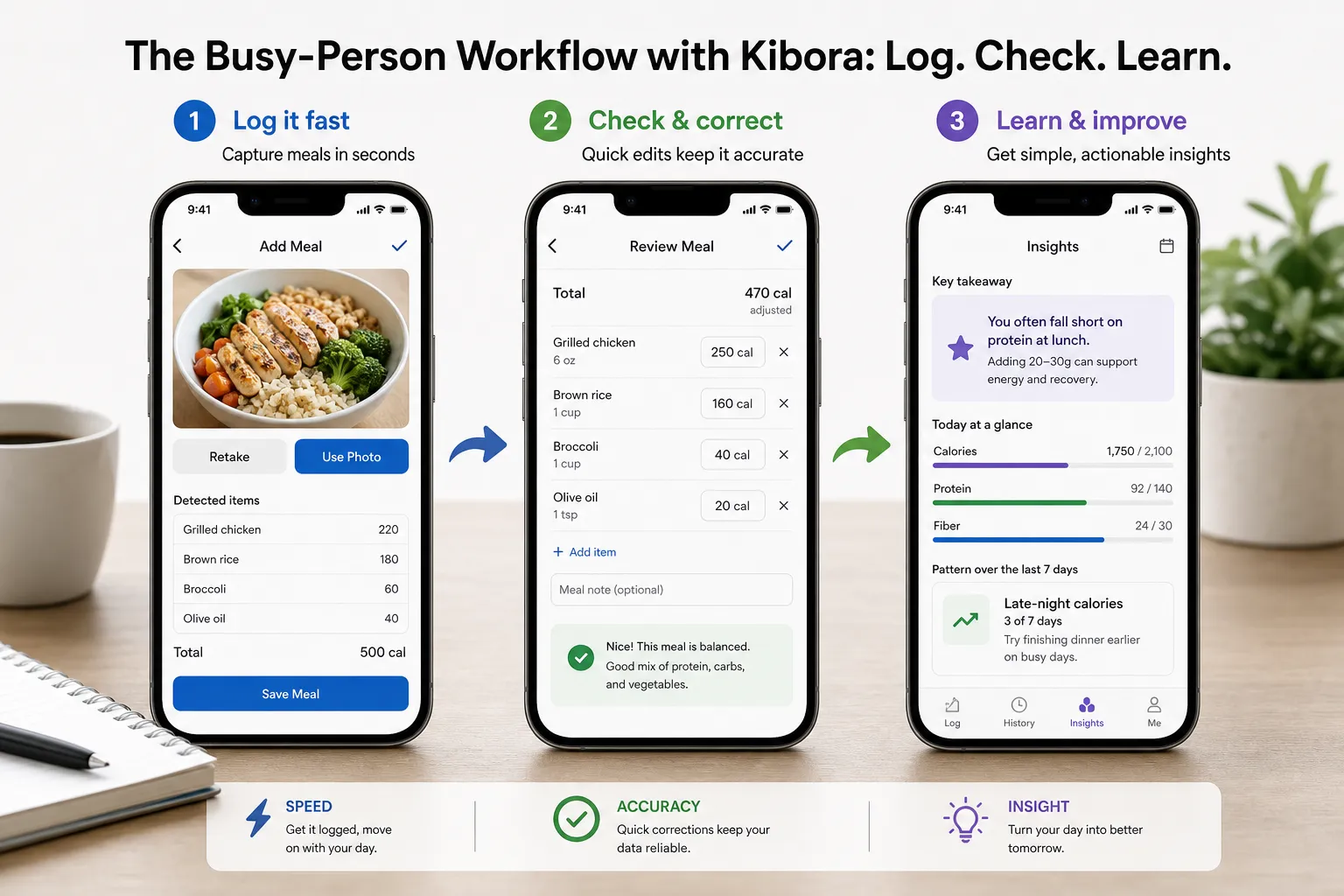
Kibora brings fast meal entry and useful feedback into one daily routine. Its meal-logging tools let you start with a photo, voice, text or barcode, then review the result. Favorites and meal history make familiar food quick to log again.
A busy day might look like this:
- Breakfast: reuse a familiar meal and adjust today's amount.
- Lunch: photograph or describe the plate, then correct the portion or a missing ingredient.
- Before dinner: check how your meals add up against your protein, fiber and calorie targets.
Kibora's daily insights and weekly recaps help you notice repeated gaps against your targets and changing habits. Dinner suggestions draw on meals you have logged before, so your food history can help with the next decision.
You stay in control of the details. Photo estimates need a check for portions and hidden ingredients, and Kibora lets you review and correct the result before saving.
in the dietary assessment literature
try Kibora here
Best for huge food databases: MyFitnessPal and Lose It!
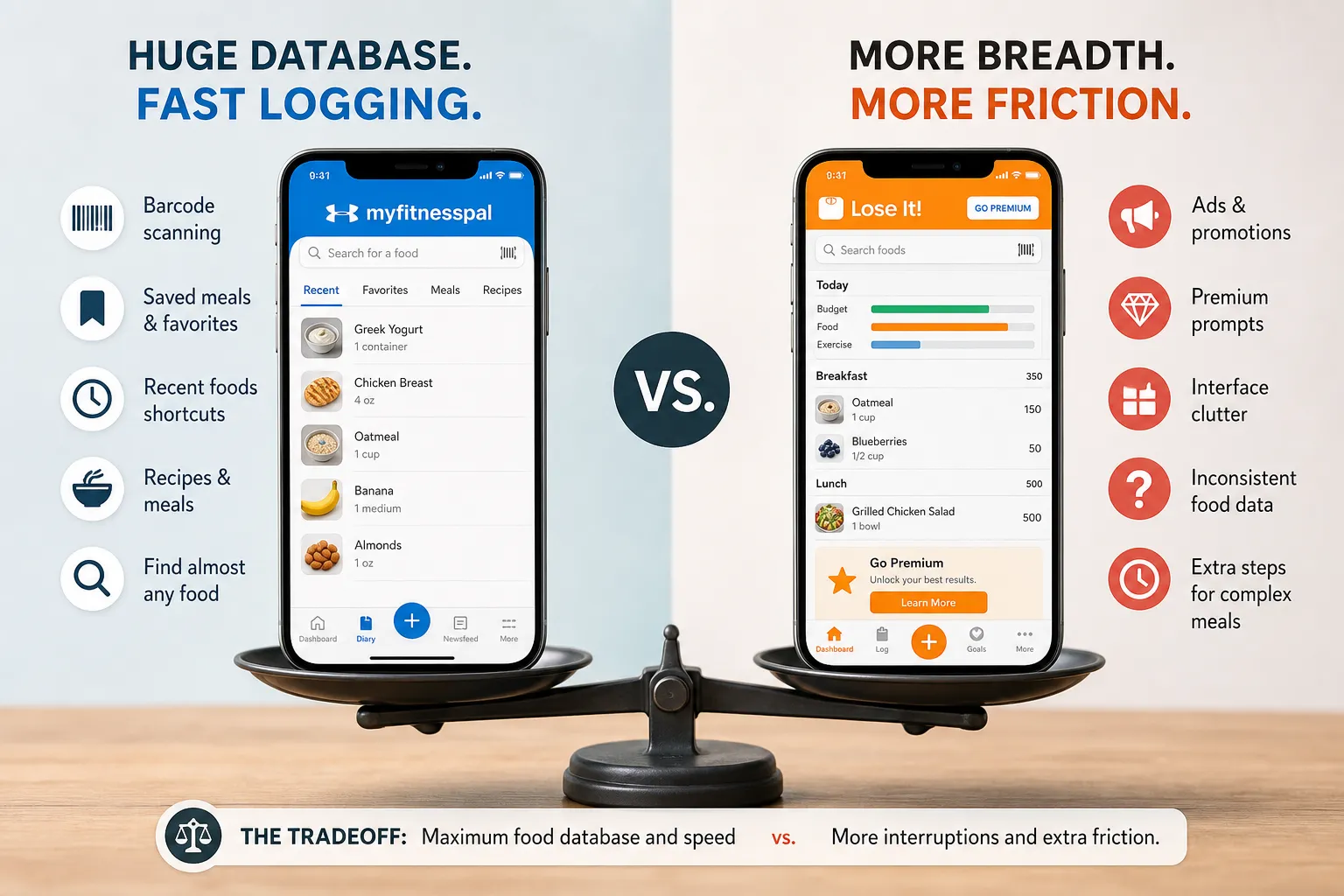
If your priority is finding familiar foods fast, MyFitnessPal and Lose It! remain strong mainstream picks. Both offer large food libraries, saved meals, recipes, and recent-food shortcuts. Barcode scanning can be quick too, but MyFitnessPal requires Premium, while Lose It! is moving scanning into Premium and some free accounts still have access during the transition.
MyFitnessPal is the familiar, broad-coverage option. Its official feature set includes food logging, barcode scanning, recipe tools, and premium add-ons for deeper insights and planning, which is why it remains a common default for people who want an established calorie tracker app with a very large database.
Lose It! covers much of the same ground and often feels especially practical for everyday calorie counting. Its official site highlights scan-based logging, meal tracking, and other repeat-use shortcuts, which helps explain why many users stick with it for routine meals and packaged foods rather than one-off nutrition deep dives.
When you have access to their shortcuts, these apps can be genuinely fast. A packaged-food lunch can be entered quickly with a barcode scan, and a repeated breakfast can be saved once and reused all week instead of rebuilt every morning.
The tradeoff is that speed depends on the shortcut working cleanly. A restaurant meal or homemade mixed dish can still push you back into searching, estimating, comparing similar entries, and checking whether the serving size or nutrition data looks right.
That is the real busy-person downside here. It is usually not a lack of features. It is the extra friction that can come from ads, premium prompts, interface clutter, and occasional database inconsistencies that interrupt what should be a quick task.
User reviews on the Apple App Store and Google Play Store regularly point in that direction, with complaints about paywall pressure, bugs, product changes, and noisy screens. That does not mean every user will have a bad experience, but it does suggest that these legacy trackers can feel powerful and efficient one moment, then a little busy the next.
For many people, that trade is still worth it. If you want breadth, familiarity, and a strong chance that the food you need is already in the system, both apps remain solid choices, especially for barcode-heavy logging and repeated meals.
If you are comparing that approach with a calmer, more guided alternative, see this deeper look at Kibora vs. MyFitnessPal. The key distinction is less about raw capability and more about whether you prefer maximum database breadth or a quieter workflow with fewer interruptions.
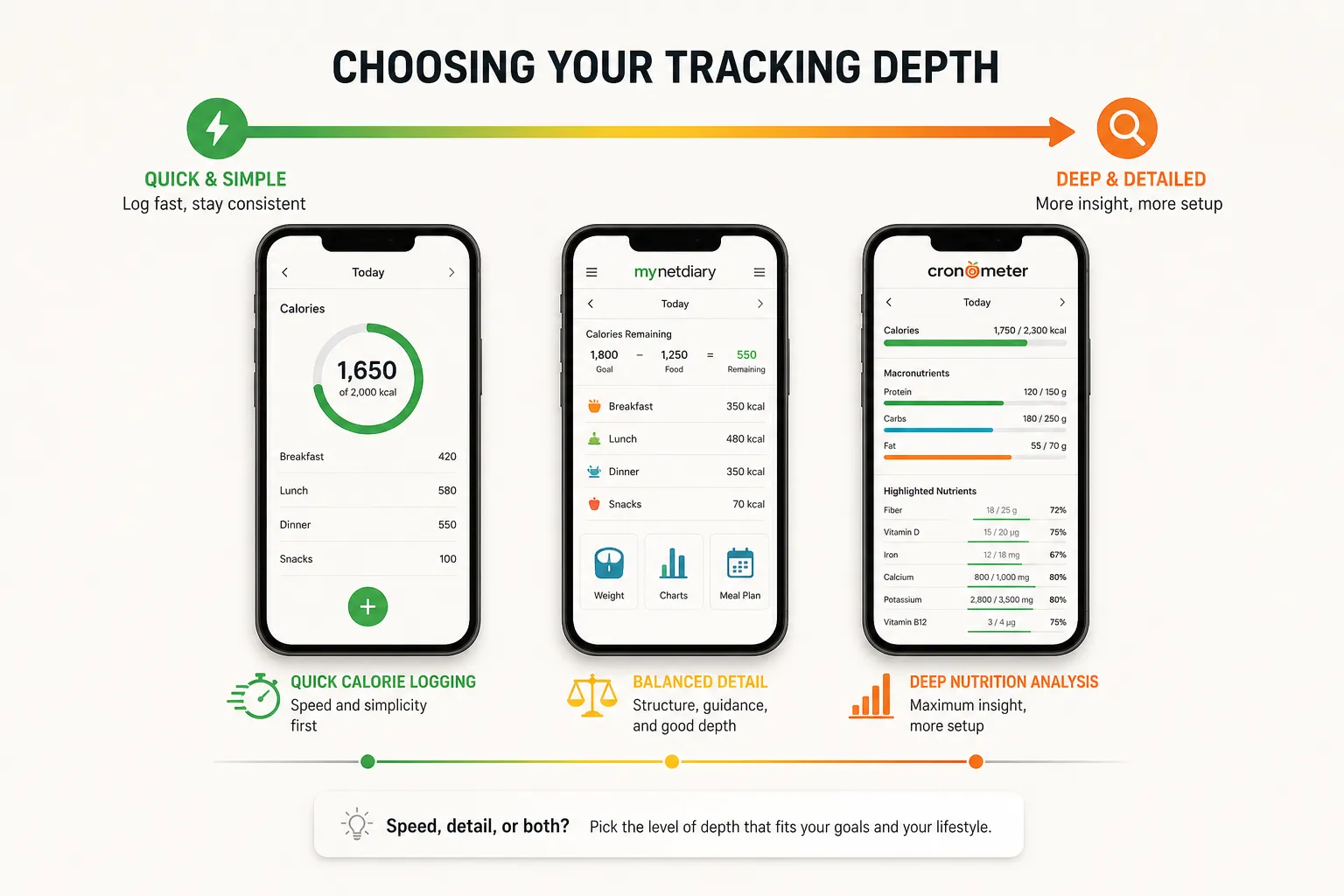
Best for people who want more nutrition detail: Cronometer, MyNetDiary, and YAZIO
Some people need more than a quick calorie total. If you want to track protein, carbs, fat, fiber, or even vitamins and minerals meal by meal, these apps can be a better fit than a simpler food logging app.
Cronometer is the clearest choice for detail-oriented nutrition tracking. Its core appeal is precision: it is built around macro tracking, micronutrient visibility, barcode scanning, and deeper nutrition breakdowns, as shown on the Cronometer official site.
That makes Cronometer especially useful for athletes, macro trackers, and people managing specific nutrition targets. If you want to see whether lunch hit your protein goal but left you short on fiber, potassium, or iron, this is the kind of dashboard that can actually help.
MyNetDiary sits a bit more in the middle. It combines calorie tracking with a large food database, barcode scanning, meal planning, and guided features, according to the MyNetDiary official site, so it can work well for users who want structure without going fully spreadsheet mode.
YAZIO leans more lifestyle-oriented, pairing food tracking with meal plans, barcode scanning, and premium planning tools, based on the YAZIO official site. That can be appealing if you want nutrition tracking to feel more like an everyday wellness app and less like a lab report.
The tradeoff is simple: more detail usually means more setup. You may spend more time choosing exact entries, checking nutrient screens, and moving through extra tabs before you get the data you want.
For a data-oriented user, that effort is worth it. For a busy person who mostly wants to log food fast and move on, all those charts and nutrition panels can feel like friction rather than value.
So these are strong options, but for a specific use case. If detailed nutrition quality, macro targets, or meal planning matter to you, Cronometer, MyNetDiary, and YAZIO deserve a look. If your priority is fast repeatable logging with just enough guidance to stay consistent, they may be more app than you need.
Best if you want accountability more than fast calorie math: Noom and WeightWatchers
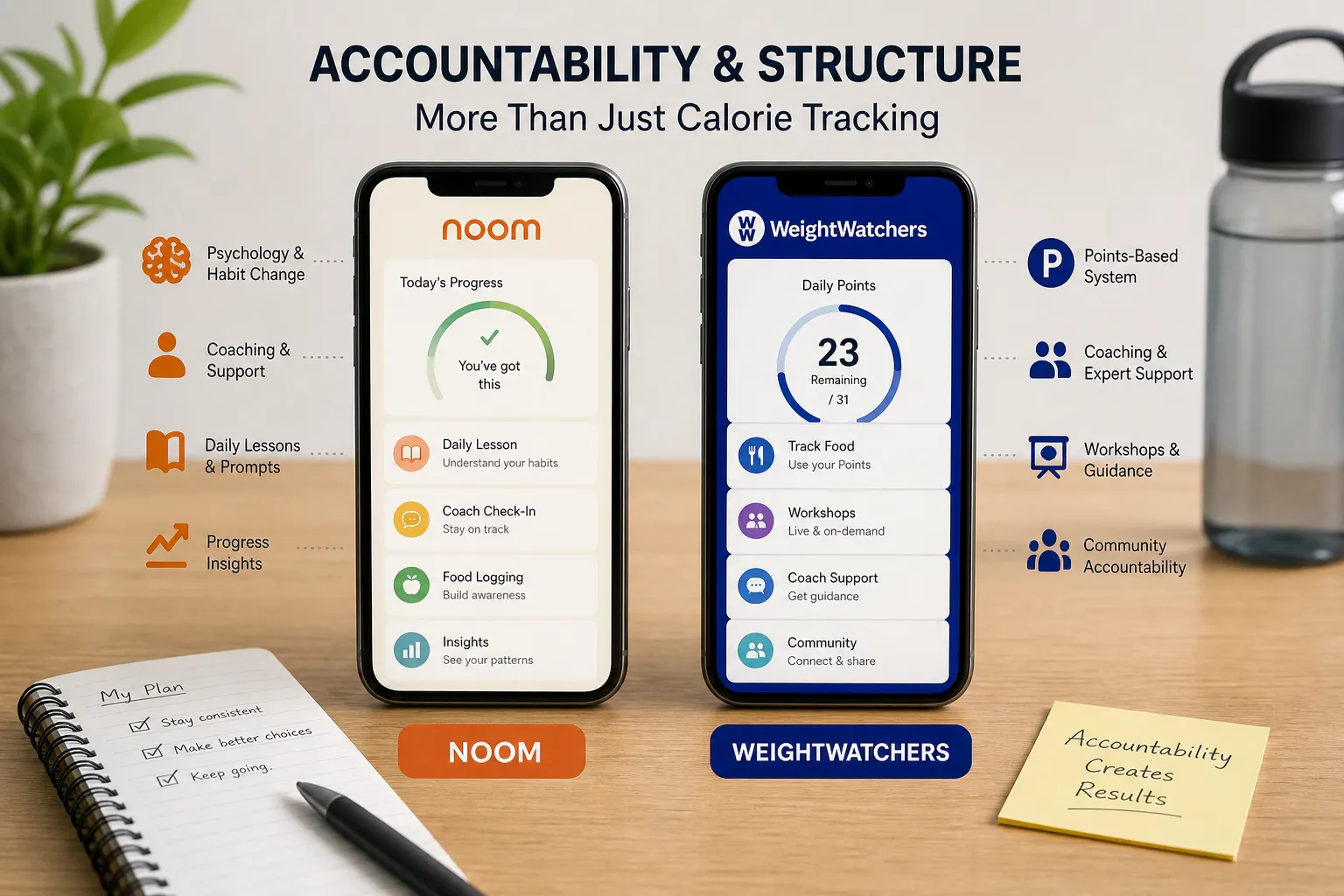
Noom and WeightWatchers make more sense as programs with tracking built in than as pure calorie counters. If you compare them only on how fast it is to log food, you will miss what they are actually selling: structure, prompts, coaching, and a system designed to keep you engaged.
Noom positions itself around psychology, habit change, and coaching rather than just calorie math, with a subscription model that includes lessons and support on top of tracking features. That framing comes directly from Noom’s official site, and it matters because the extra layers can help some people stay consistent even if logging itself is not the fastest part of the experience.
WeightWatchers works the same way in a different format. WW centers its points-based system, plus coaching and community features, instead of asking users to treat it like a basic calorie tracker app, according to the WW site.
That tradeoff can be useful if you get stuck on food decisions. A program that tells you what to prioritize each day can reduce decision fatigue, especially if you want reminders, check-ins, and a feeling that someone or something is keeping you on track.
For the right user, that extra structure is the product. Someone who wants daily prompts, lessons, or accountability may do better with Noom or WW than with a faster, lighter logging app.
But if your goal is to log lunch in 20 seconds and move on, these are usually not the best fit. The same structure that helps one person feel supported can feel too heavy for someone who just wants a fast calorie tracker without subscription commitment, coaching layers, or program rules.
Cost and program fit matter here more than they do with simpler trackers. You are typically paying for the broader experience, not just food entry, so Noom and WW make the most sense when you actually want accountability, lessons, or a guided weight-loss system rather than the fastest possible logging workflow.
That is the cleanest way to compare them fairly: choose Noom or WW if you want a structured program around your eating habits, and choose a pure tracker if your main priority is speed, low friction, and flexible food logging.
AI and photo logging are useful shortcuts, not autopilot
For busy people, AI and photo logging can be a genuinely helpful shortcut. Snapping a meal or speaking it out loud is often much faster than searching a database, choosing the closest match, and typing every ingredient into a calorie tracker app.
That speed matters most on chaotic days. If the alternative is skipping logging entirely, an AI calorie tracker or photo calorie tracker can make consistency a lot easier.
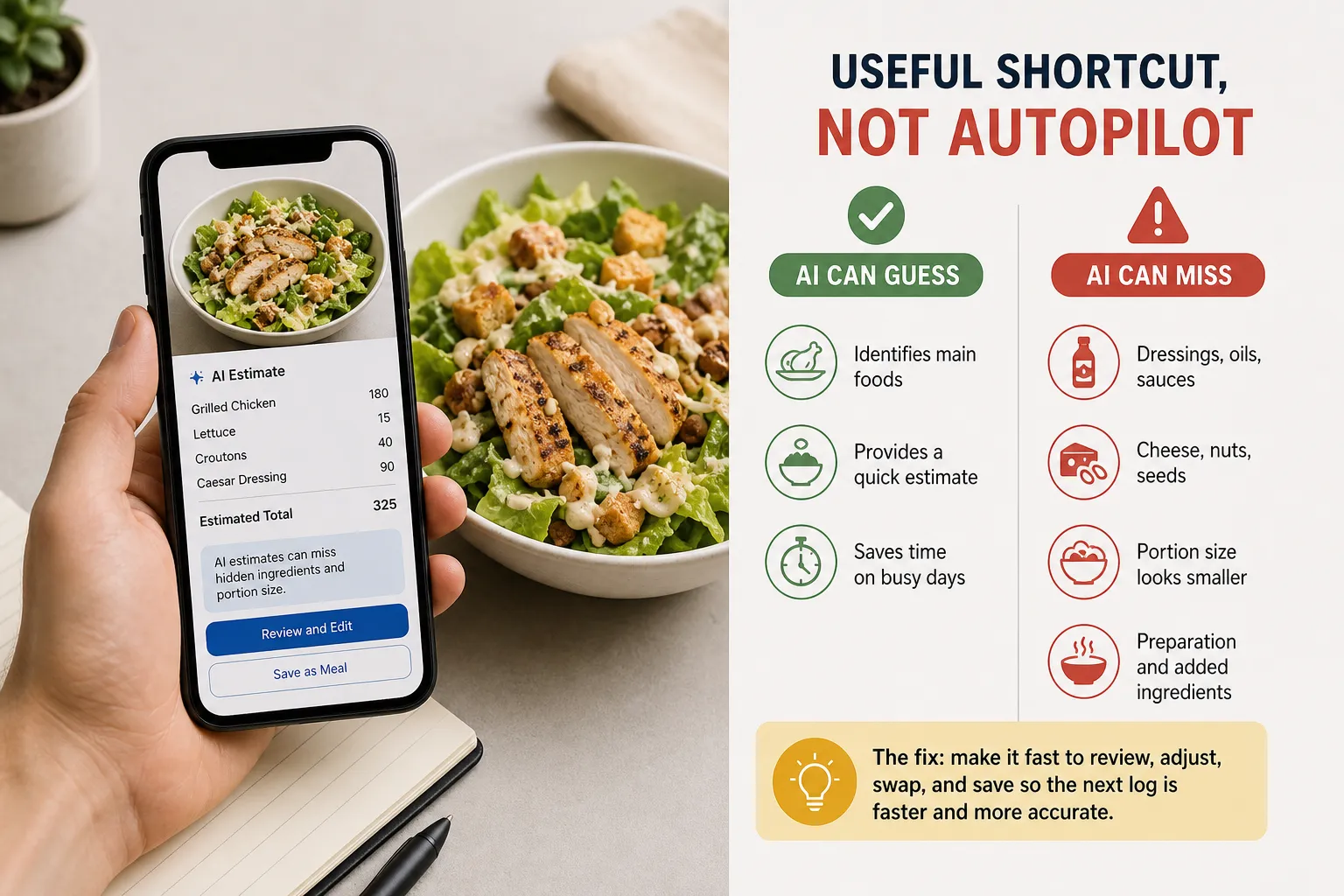
The catch is that food recognition is not the same as food understanding. Reviews of AI-assisted dietary assessment have found recurring limits with portion estimation, mixed dishes, preparation details, and foods that look similar but differ nutritionally, which is why image-based logging still needs human review according to the research literature on dietary image recognition.
A salad is the obvious example. A photo may catch lettuce and chicken, but miss dressing, cheese, nuts, seeds, or the fact that the bowl is twice the size it appears.
Restaurant meals are another common failure point. A grain bowl from a takeout spot may look similar to a lower-calorie homemade version, but the restaurant portion may be larger and cooked with more oil, sauces, or substituted ingredients.
That is why the real question is not whether an app has AI. It is whether the app makes it fast to verify and fix what the AI guessed.
The best fast calorie tracker for this workflow lets you do a few things quickly: adjust portions, swap one food for another, edit quantities, and remove ingredients the app guessed incorrectly. Voice logging can help here too, especially for simple meals, but it has the same rule as photo logging: speed is useful only if review is easy.
If you want a deeper look at why estimates can drift, this explanation of why AI calorie estimates are often wrong breaks down the common errors in plain English.
The other feature that matters is memory. If you correct a meal once and can save it as a custom meal, recent entry, or repeat favorite, the second log becomes much faster and usually more accurate.
That is the tension busy users should care about. AI saves time only when correction is almost frictionless. If an app gives you a clever estimate but makes edits slow, the shortcut disappears exactly when you need it most.
Pick the app that survives your busiest meal
If you want the best busy-person balance, start with Kibora. It is the best fit if your priority is fast logging, a calmer experience, and useful insight you can actually act on without getting pulled into program baggage, clutter, or overbuilt tracking.
If your main need is sheer database breadth, MyFitnessPal or Lose It! may suit you better. They are strong options for people who value having more entries and more familiar restaurant or packaged-food coverage, and who do not mind a busier interface or feature sprawl.
If you care most about nutrient detail, look at Cronometer, MyNetDiary, or YAZIO. Those tools make more sense when you want deeper analysis and are willing to spend a bit more attention on the data.
If you do better with a structured system, coaching, or a branded weight-loss program, choose Noom or WeightWatchers. They are not just calorie trackers, and that is exactly why they work better for some people than a pure logging app.
The practical decision rule is simple: choose the app you can still use at 8:15 p.m. when dinner was rushed, portions were approximate, and you have two minutes left to log. An estimate you can review and use consistently is more useful than a precise-looking setup you abandon after a week.
That is the real thesis here. The best calorie tracker for busy people is not the one with the longest feature list. It is the one that fits real life well enough that you keep logging, keep correcting, and keep getting data you can use.
- Key sources
- NIH / NIDDK nutrition and weight management resources
- MyFitnessPal Official Site / Features / Premium
- Lose It! Official Site
- Cronometer Official Site
- MyNetDiary Official Site
- YAZIO Official Site
- Noom Official Site
- WeightWatchers (WW) Official Site
- Apple App Store listings for MyFitnessPal, Lose It!, Cronometer, YAZIO, MyNetDiary, Noom, WW
- Google Play listings for MyFitnessPal, Lose It!, Cronometer, YAZIO, MyNetDiary, Noom, WW
- Peer-reviewed reviews on food image recognition / dietary assessment