


- What you'll learn
- Why FatSecret is usually the stronger free choice for everyday calorie tracking
- How MyFitnessPal’s polish and familiarity compare with its free-plan limits
- What barcode scanning, saved meals, and repeat logging mean in real use
- Where food database quality can help and where user-generated entries can cause errors
- How ads, upgrade prompts, and app friction affect long-term consistency
- When macro views and progress charts are useful, and when they are not enough
If you are choosing between FatSecret and MyFitnessPal, the problem is not the feature list. Both apps track calories, meals, weight, and macros, but the free experience can feel very different once you log food every day.
This comparison is for free users, not paid subscribers. We are looking at the stuff that actually changes daily friction: paywalls, barcode scanning, food database quality, saved meals, macro views, ads, overall polish, and whether the app still feels useful after the first few weeks. The short version: FatSecret is usually easier to live with for free, while MyFitnessPal is easier to like at first glance.
The free-user verdict: FatSecret is easier to live with, MyFitnessPal is easier to like
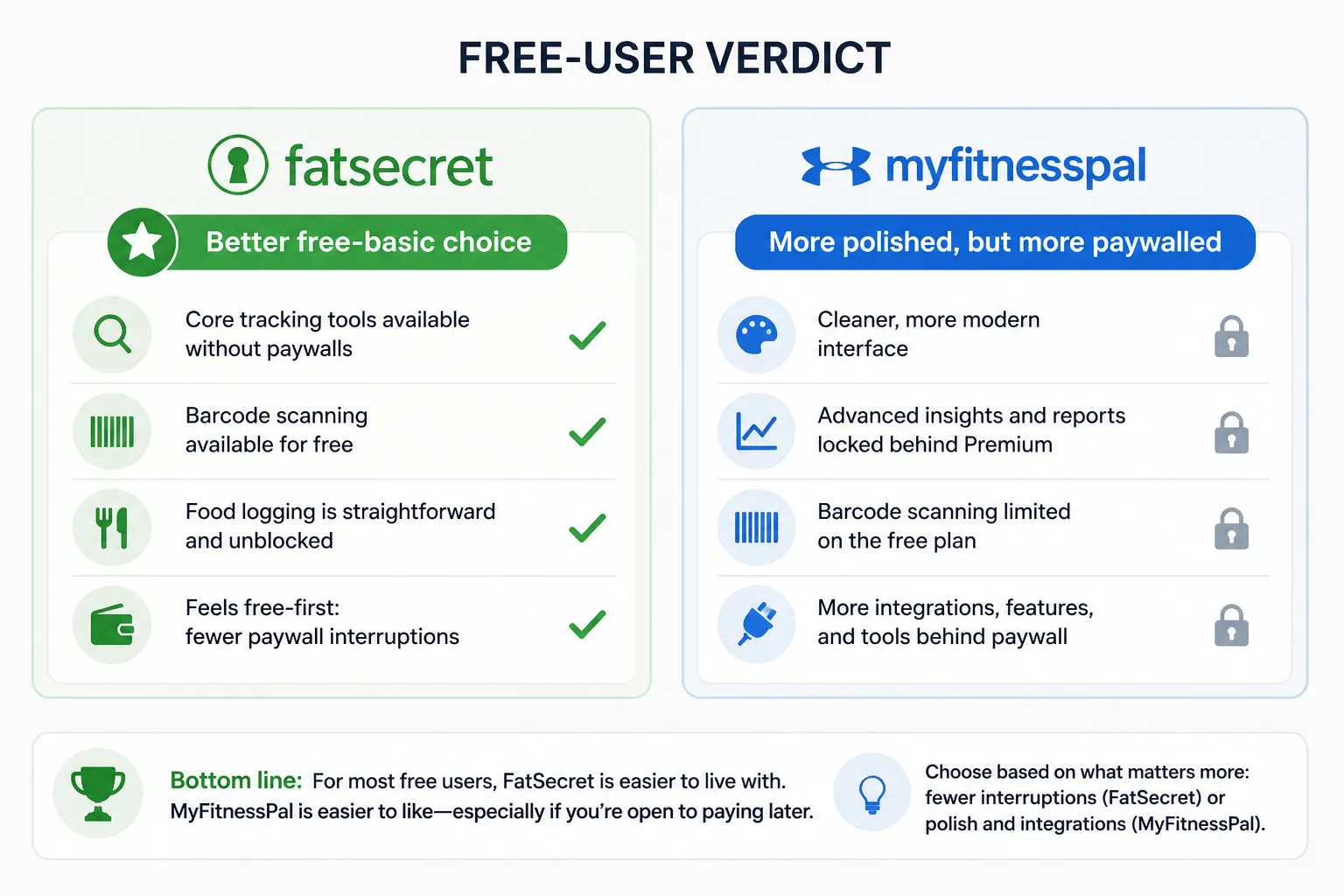
If the question is strictly which free calorie counter is better, FatSecret usually has the edge. For most free users, it is simply less restrictive for basic tracking, while MyFitnessPal often feels more polished but more eager to funnel people toward Premium features.
That does not make MyFitnessPal the wrong choice. It may still be the better fit if you value a smoother interface, stronger brand familiarity, broader integrations, and a setup that feels more refined from day one, especially if you are open to paying later. Regional and platform differences can affect what is available for free, so the practical answer can vary by device and market.
FatSecret’s advantage is that it presents itself more like a free-first calorie and food tracking app. That matters because daily consistency is often shaped less by total features than by whether the app interrupts you when you are trying to log lunch in 20 seconds.
The best free calorie app is not the one with the longest feature list; it’s the one whose limits do not interrupt your normal logging routine.
A useful way to judge these apps is interruption cost: how often the app gets in the way of logging the food you are actually eating. If barcode scanning is central to your routine, the free-plan gap may be decisive. If you mostly search common foods manually and want cleaner design, MyFitnessPal can still feel easier to stick with.
If neither tradeoff sounds ideal, it may help to compare a broader list of free calorie counter apps before committing.
What is actually free matters more than what is listed as a feature
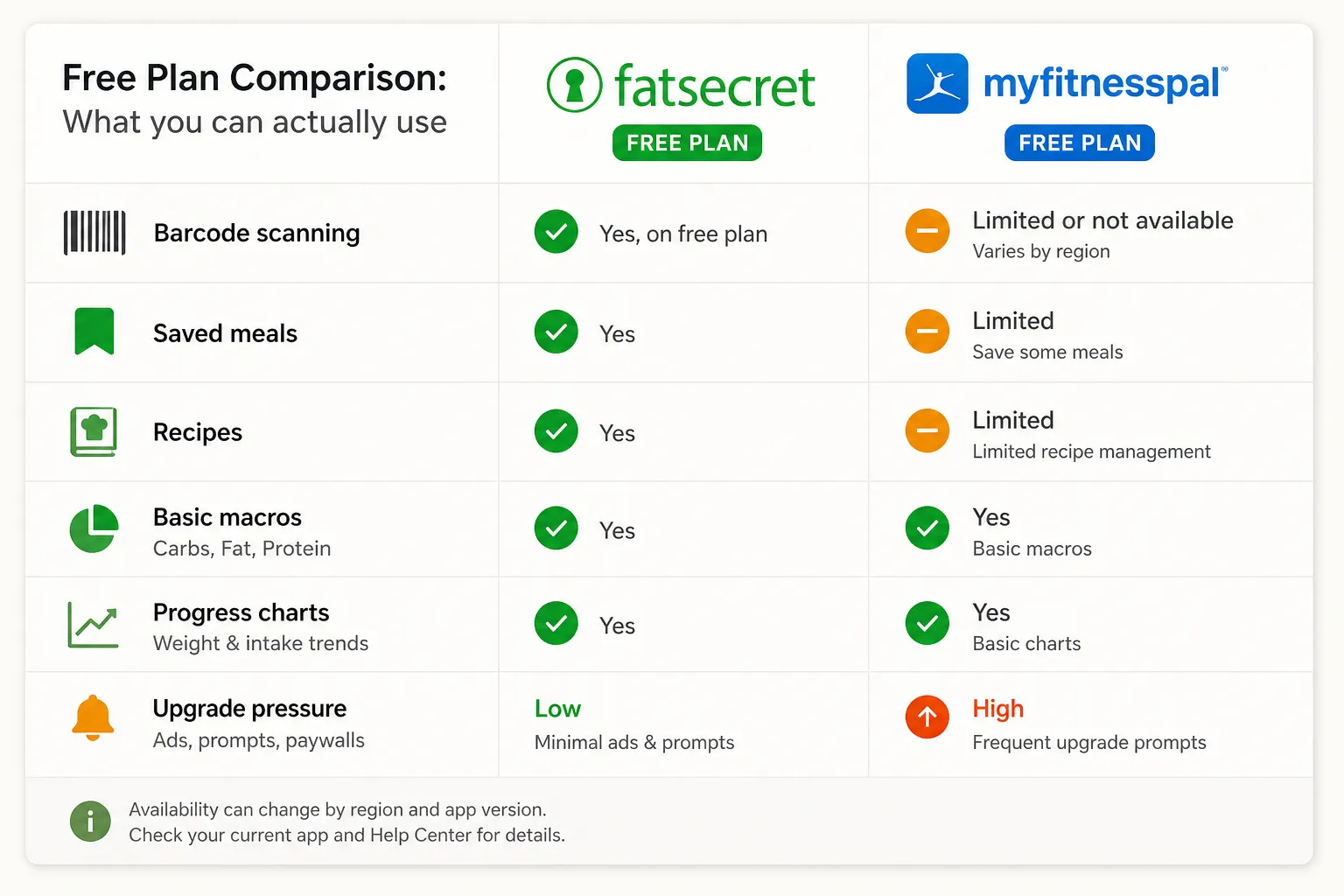
The practical question is not whether a feature exists somewhere in the app. It is whether you can use it regularly on the free plan, at the meals you actually log. A feature only counts for free users if they can use it often, without upgrading, during the meals they actually log.
That distinction shows up quickly in MyFitnessPal, where Premium is a visible part of the product experience. MyFitnessPal’s own Premium page makes clear that some tools sit behind the paid tier, so free users can run into limits sooner than they expect depending on what kind of tracking they want. FatSecret, by contrast, generally positions its core food logging features as part of the free experience on its official site, even if the app feels less polished.
The free-plan features most people actually feel
Barcode scanning is the biggest example because it changes logging speed immediately. A packaged snack, frozen meal, or protein bar is much faster to log by scanning than by typing and checking search results. In many markets, barcode access has been one of the most important points of separation between these apps, but availability can change, so it is worth checking your current app version and region in the MyFitnessPal Help Center.
Manual food logging still matters, but it is slower and easier to get wrong. If you mostly cook from scratch or log basic staples, that may be fine. If you eat a lot of packaged foods, the absence of free barcode access often becomes the difference between consistent tracking and giving up halfway through the week.
Saved meals and recipes matter more after week two than on day one. People who repeat breakfasts, meal prep lunches, or rotate the same dinners benefit a lot from being able to save and re-log meals quickly. FatSecret often feels more generous here for basic repeat-use logging, while MyFitnessPal free users may notice more prompts to upgrade as they try to streamline that routine.
Useful macro info is not the same as advanced macro tools
Many free users do not need deep nutrition analytics. They just want calories plus a simple view of carbs, fat, and protein. That is different from advanced macro targets, detailed nutrient breakdowns, or more customized analysis, which are more likely to be tied to Premium-style features.
Progress charts fall into a similar category. Basic weight and intake trends are useful for free users, but the question is whether those charts are easy to access and pleasant to use, not whether the app can technically generate them somewhere. A free app can be functional on paper and still feel tiring if ads, upgrade prompts, or interruptions keep getting in the way.
That is where FatSecret usually wins the free-plan argument in practical terms. MyFitnessPal is often the slicker app, but FatSecret more often lets free users do the everyday jobs that make calorie tracking sustainable: scan or log food quickly, reuse common meals, see basic macros, and review progress without feeling pushed toward payment at every turn.
Food database quality is where both apps can frustrate you
Both FatSecret and MyFitnessPal benefit from very large food databases, and that does matter. A bigger database usually means you can find obscure brands, chain restaurant meals, and user-added foods faster, which reduces the chance that you give up on logging altogether.
But size is not the same as quality. In calorie tracking, database quality means fewer wrong choices at the moment of logging, not simply more foods in search results. Both apps lean heavily on user-generated entries, which is useful for coverage but also creates duplicates, outdated listings, and serving sizes that do not match the real product or meal.
That is where false confidence creeps in. You might search for a chicken burrito, restaurant salad, or homemade curry and see several plausible options with very different calories and macros, even though they look nearly identical in the list.
Restaurant and packaged-food entries can be especially tricky. A packaged snack may have older formulas or versions from different countries, while a restaurant item may still be listed even after the portion or recipe changed. FatSecret’s own food-tracking pages emphasize broad food coverage, but broad coverage still requires judgment from the person logging source.
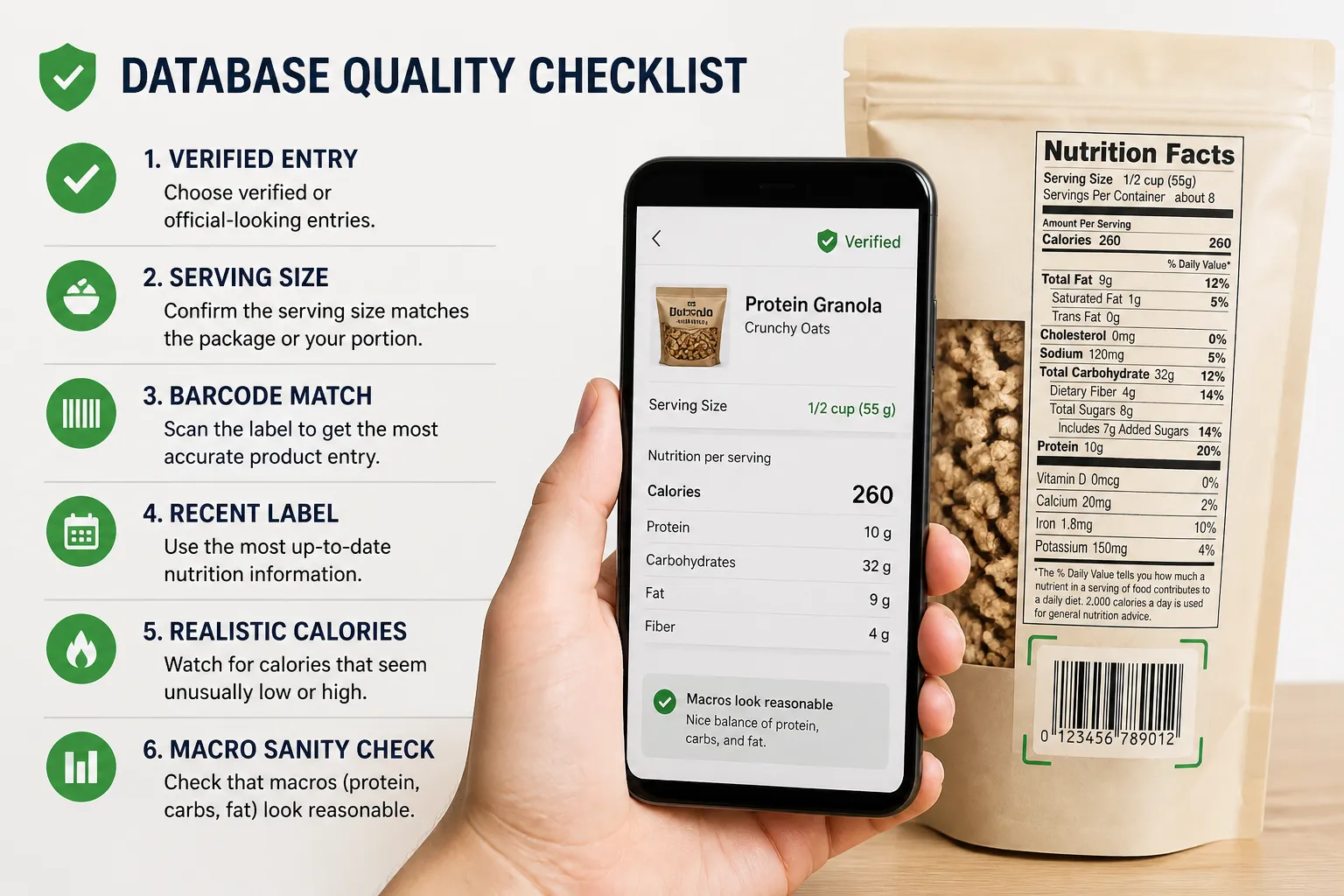
A practical way to judge either app is to test the foods you actually eat most:
- Prefer verified or official-looking entries when available
- Scan the label when that option is available in your region
- Check that serving sizes match the package or plate in front of you
- Sanity-check calories that seem unusually low or high
If your common foods come up cleanly and consistently, the database is good for you. If the search results are cluttered with near-duplicates, the bigger library may not help much in real daily use.
The daily logging experience comes down to speed versus polish
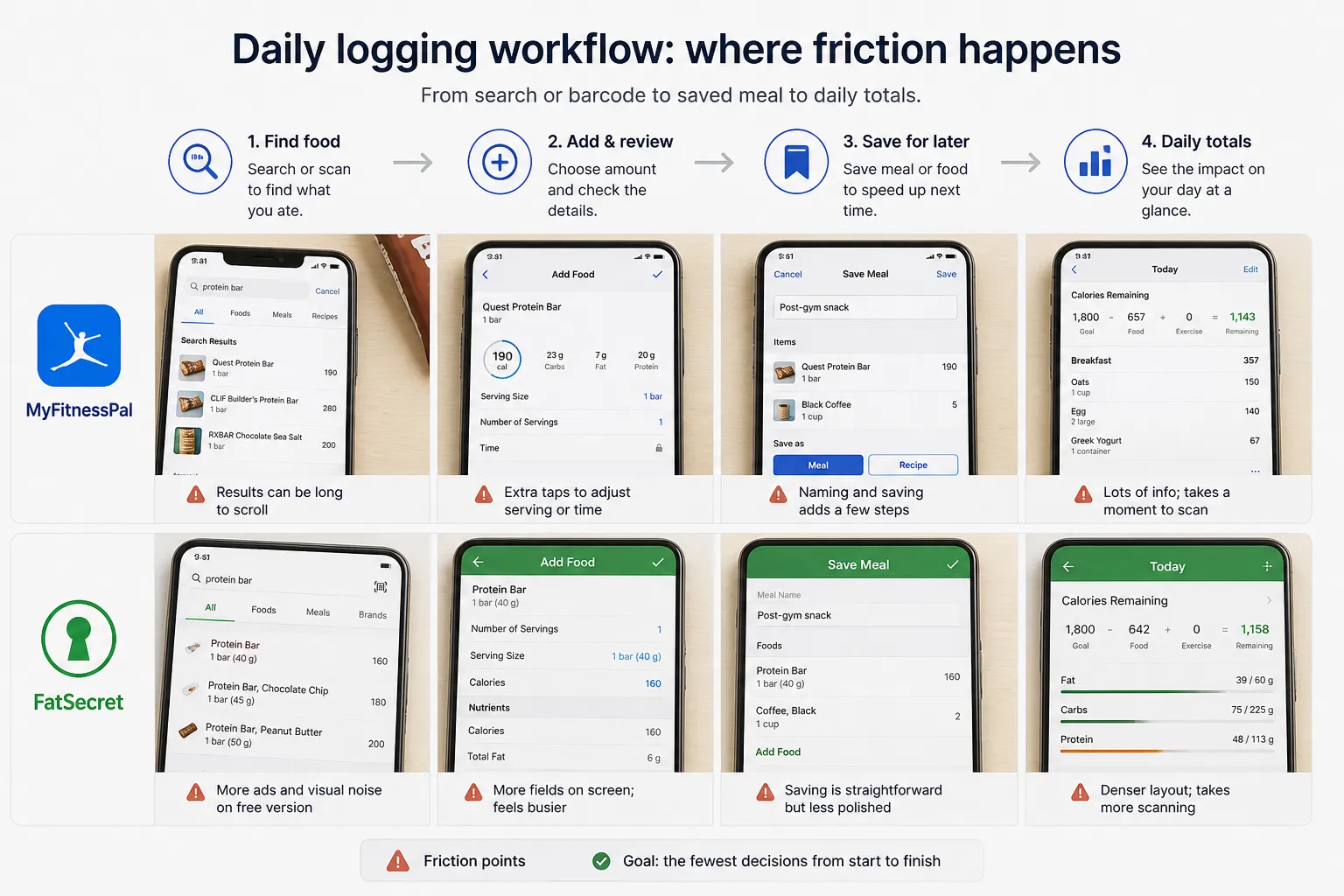
The difference gets obvious the moment you start logging real meals. MyFitnessPal usually feels more polished, with a cleaner interface and the sense that you are using the mainstream option. FatSecret can feel more utilitarian and a bit busier, but many free users will notice something else first: it often puts fewer upgrade nudges in the way of basic tracking.
Breakfast is the easiest example. If you eat oats, eggs, coffee, or yogurt most mornings, both apps get faster after the first few days because saved foods and recent entries start doing the heavy lifting. The practical question is not which dashboard looks nicer, but which app lets you rebuild your usual breakfast in the fewest taps.
That is the bigger long-term rule here: the app you keep using is usually the one that makes your most common meal take the fewest decisions to log. For repeated meals, saved meals and recipes matter more than visual polish because they remove friction day after day.
Packaged snacks create a different kind of test. If you grab a protein bar or a bag of chips, the faster app is usually the one that helps you find the exact product quickly, whether through search or barcode tools where available in your region. MyFitnessPal often feels smoother during that process, but FatSecret can still be the less annoying free experience if ads are easier to tolerate than frequent premium prompts.
Restaurant meals are where MyFitnessPal’s scale and familiarity can feel helpful. A chain meal may be easier to find because the listings look familiar to many users, but faster does not always mean more accurate, especially with user-generated entries. In practice, both apps can still require double-checking serving sizes and nutrition details before you trust the log.
Repeated dinners are where effort really compounds. If you meal prep chili, chicken and rice, or a standard homemade pasta dish, the winner is the app that makes it easy to save that meal once and reuse it without hunting through old entries. A good saved-meal flow reduces more logging pain over a month than a prettier home screen does.
Ads, prompts, and account friction also matter more than they seem on paper. Recurring app-store complaints for both apps mention issues like intrusive upsells, sync hiccups, and occasional login or performance frustrations, though those reviews should be read as themes rather than proof every user will hit the same problems. You can browse recent feedback on MyFitnessPal’s Google Play listing, FatSecret’s Google Play listing, and their iOS pages on the App Store and FatSecret App Store listing.
If your main problem with MyFitnessPal is not food data but the day-to-day friction around using it, this guide to easier-to-use MyFitnessPal alternatives may help you compare what kind of annoyance you are actually trying to avoid.
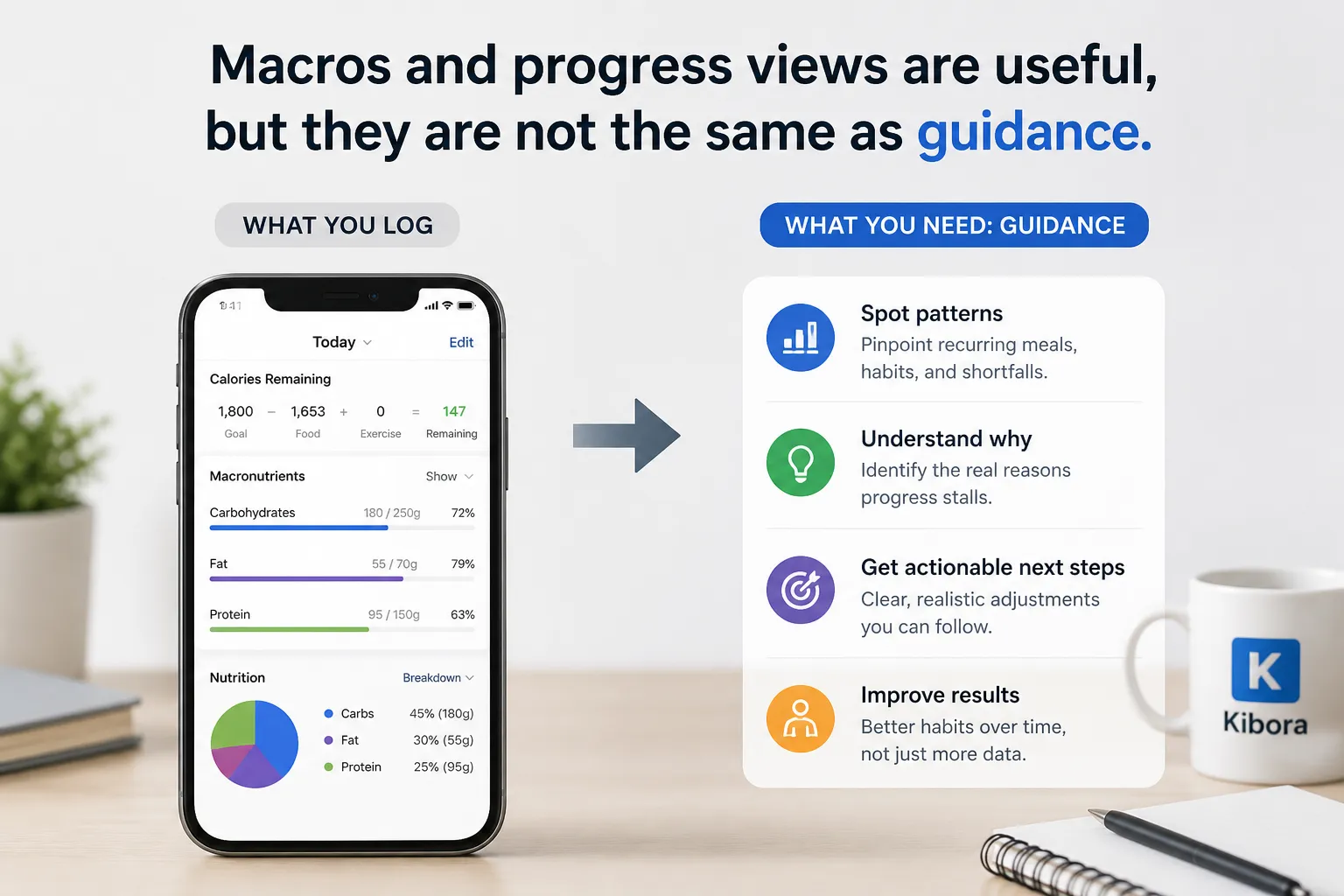
Macros and progress views are useful, but they are not the same as guidance
Both FatSecret and MyFitnessPal can show calories, carbs, fat, and protein clearly enough for basic awareness. For many free users, that is the main job of a calorie logging app, and FatSecret often covers that need without nudging you toward paid features as quickly.
MyFitnessPal can still be the better fit if you want a bigger ecosystem and are comfortable with its Premium upsell around more advanced tracking tools and analysis, as shown on its Premium page. But seeing macro totals is not the same as knowing what to fix if progress stalls.
A common example is hitting your calorie goal while missing protein over and over. The useful insight is not just that protein was low today, but that the same breakfast, restaurant lunch, or skipped snack keeps creating the same shortfall.
That is the bigger limitation of diary-style tracking. A calorie diary tells you what you logged; a useful tracking system helps you see which repeated choices are changing your results.
Progress charts have the same tradeoff. They can show a flat weight trend, but they usually cannot tell you whether the real issue is weekend intake, rough serving estimates, skipped logs, water fluctuation, or a calorie target that was unrealistic to begin with.
Research on nutrition self-monitoring consistently points to the same practical theme: tracking can help, but only when people can stick with it and actually use the feedback they collect. If the app adds too much friction or the data is hard to interpret, adherence drops and the numbers become less useful over time according to the broader literature.
If macro detail is your main priority, our MyFitnessPal vs Cronometer comparison is a better next read.
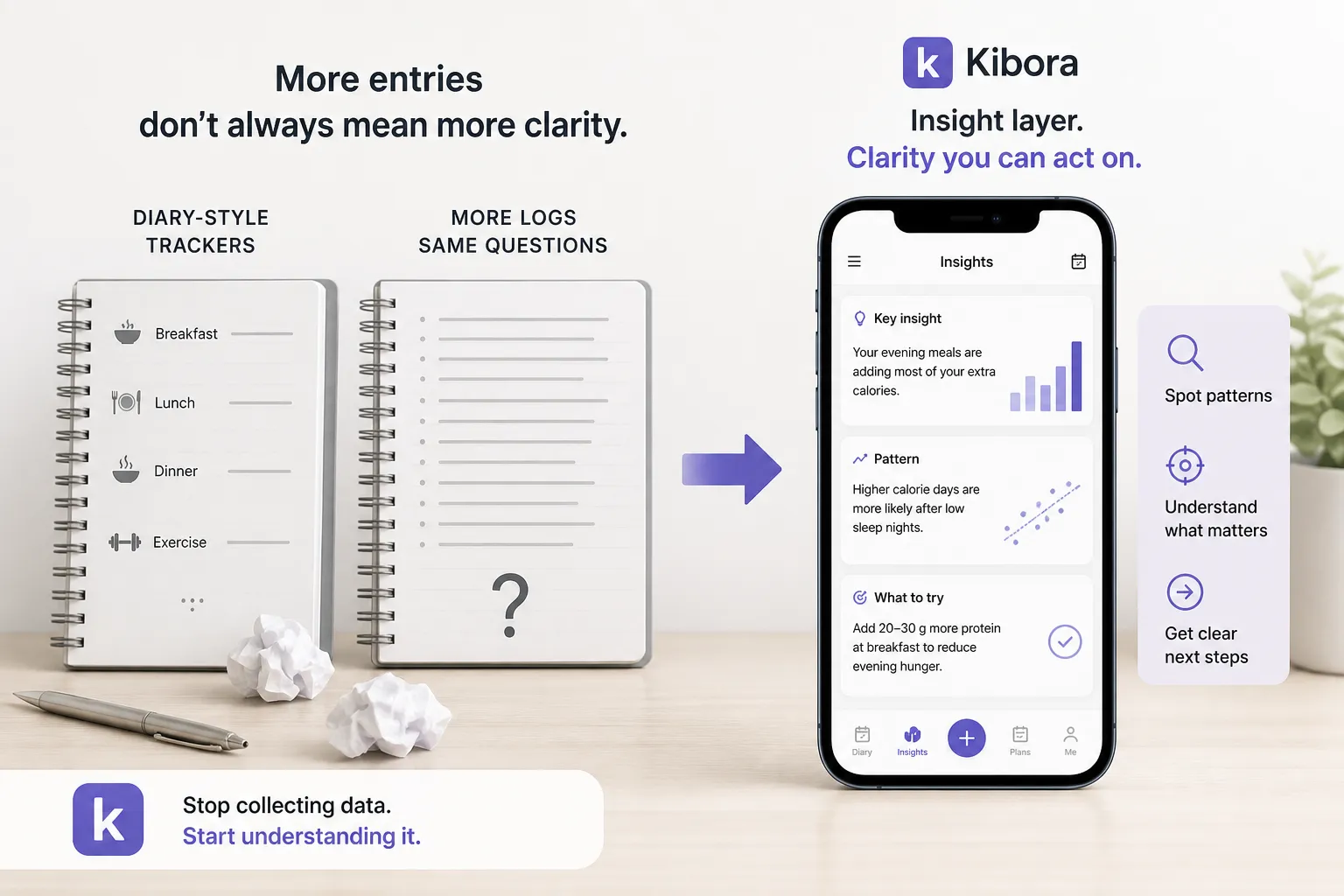
If both apps feel dated, look for an insight layer instead of another diary
FatSecret and MyFitnessPal are both, at their core, diary-style trackers. That works well if you already know how to read calorie and macro data and turn it into decisions. If you do not, more entries can create more records without creating more clarity.
A common example is the person who logs consistently, hits calorie targets most days, and still cannot tell why progress stalled. That user usually does not need another food database entry. They need help spotting patterns, tradeoffs, and what to change next.
The same applies to adherence. Research on nutrition-tracking behavior suggests that long-term results depend heavily on whether people can stick with the tracking process, not just how many features an app offers over time. If you keep abandoning calorie apps, the missing feature may not be a larger database; it may be clearer feedback on what your logs mean.
So if your main issue is free barcode access, FatSecret may still be the better fit. But if you have tried food diaries before and keep quitting after a week, or you log data without knowing what to do with it, the problem may be bigger than FatSecret versus MyFitnessPal.
In that case, evaluate modern alternatives based on three things: lower logging friction, easier interpretation, and useful next-step guidance. Kibora is one option to compare if you want a tracker built more around surfacing patterns and actions, not just storing entries.
Choose the app with the friction you can tolerate
The practical answer is simple: FatSecret is usually the stronger free pick for basic calorie counting, while MyFitnessPal is usually the better experience if you value polish and may eventually upgrade. That is the real tradeoff for most people using a free food tracker app.
A good rule is to stop comparing feature lists and test real logging friction instead. Spend five minutes in each app and log yesterday’s breakfast, one packaged snack, and a dinner you eat often. The app that makes your normal week easier to track is the one you are most likely to keep using.
If you want a fast decision, use this:
- Choose FatSecret if you want free basics with fewer limits and can accept a rougher interface.
- Choose MyFitnessPal if you want a smoother, more familiar app and do not mind paywalls or the possibility of upgrading.
- Choose neither if your real problem is not logging food, but knowing what to do with the data once it is logged.
For free calorie tracking, FatSecret is usually the better value; MyFitnessPal is usually the better experience if you are willing to live with or pay past the limits.


