- What you'll learn
- Why macro totals, target controls, and adaptive coaching are different features
- How Kibora’s hosted trial, editable AI entries, and meal reuse work without requiring an API key
- What MyNetDiary offers for free, including gram and percentage targets
- How Cronometer Basic and Gold differ in nutrient detail and logging shortcuts
- What MacroFactor’s adaptive coaching costs and requires from your ongoing food and weight logs
- Which MyFitnessPal macro controls and logging tools require Premium
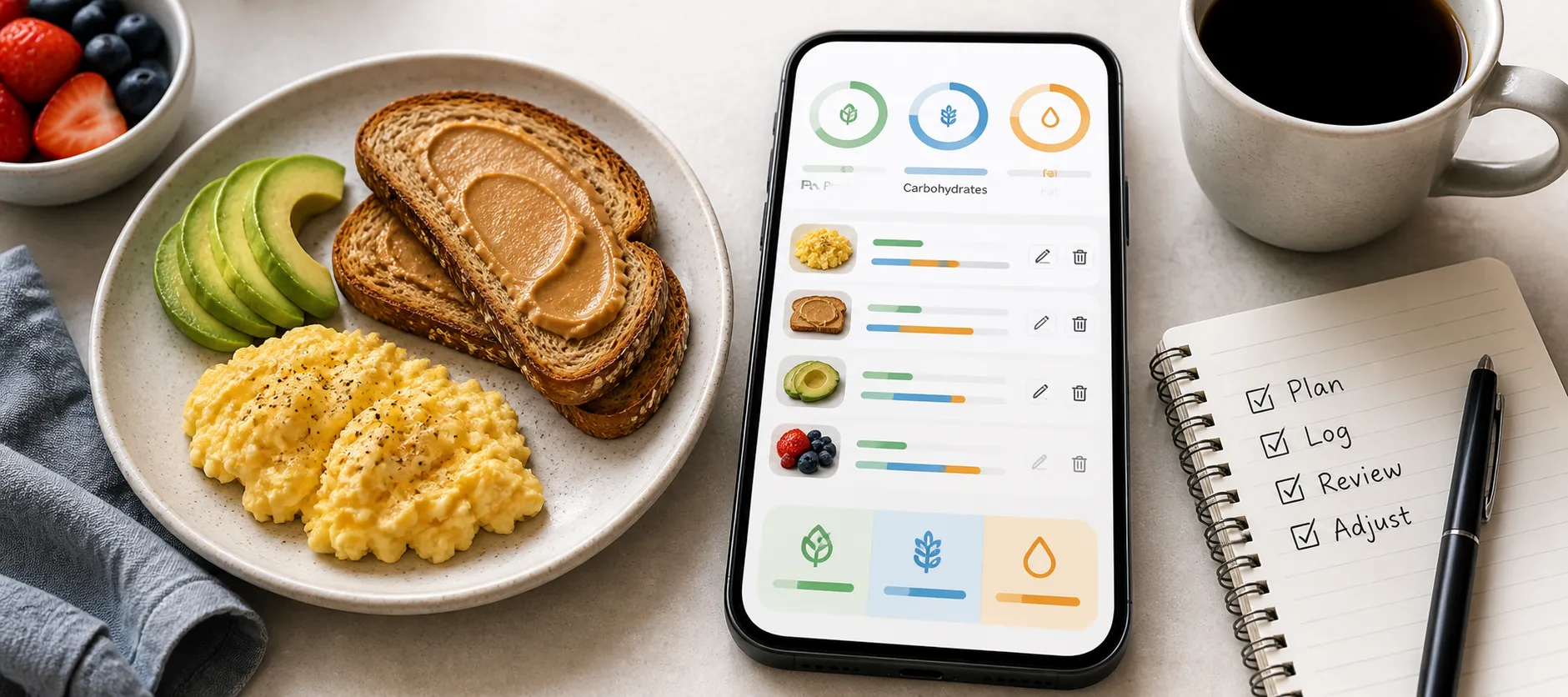
Logging breakfast is only useful if you can correct the toast portion and add missed butter. Kibora is our overall recommendation for beginners wanting quick, reviewable AI logging and understandable feedback, thanks to its editable meal entries and explanatory insights. The priority is a routine you can repeat, not the longest feature list.
MyNetDiary, Cronometer, MacroFactor, and MyFitnessPal serve different needs. We’ll compare daily effort and free versus paid access, keeping three distinct decisions separate: logging macro totals for free, customizing targets, and paying for adaptive coaching.
The best beginner macro trackers at a glance
| App |
Best fit |
Macro totals |
Target controls |
Adaptive targets |
| Kibora |
Reviewable AI logging |
Yes |
Personalized calorie/macros |
Not established |
| MyNetDiary |
Ad-free conventional start |
Free |
Free grams/percentages |
Premium: Advanced Autopilot |
| Cronometer |
Detailed nutrient tracking |
Basic: free |
Basic: custom targets |
Not established |
| MacroFactor |
Paid adaptive guidance |
Paid |
Coached, collaborative, manual |
Weekly, in adaptive modes |
| MyFitnessPal |
Established logging ecosystem |
Free: basic |
Free percentages; Premium grams |
Not established |
Macro totals tell you what you ate; macro targets tell you what you are aiming for. Adaptive coaching changes those targets using ongoing data, such as logged intake and weight trends. An app can offer one capability without offering all three.
That distinction matters because seeing protein, carbohydrate, and fat totals is not the same as controlling their goals. Gram targets express a daily amount directly, while percentage targets divide a calorie goal among the three macros; MyFitnessPal’s free percentage controls, for example, move in 5% increments.
For the entries below, a shared breakfast of eggs, toast, butter, and milky coffee provides an explanatory example, not a performed test: log it, correct two slices to one, add missed butter, review daily macros, and reuse the corrected meal.
The useful question is how easily you can inspect and fix the record, not simply whether an app accepts a photo or has a large food database. A convenient first entry loses value if correcting the portion or finding yesterday’s breakfast becomes frustrating.
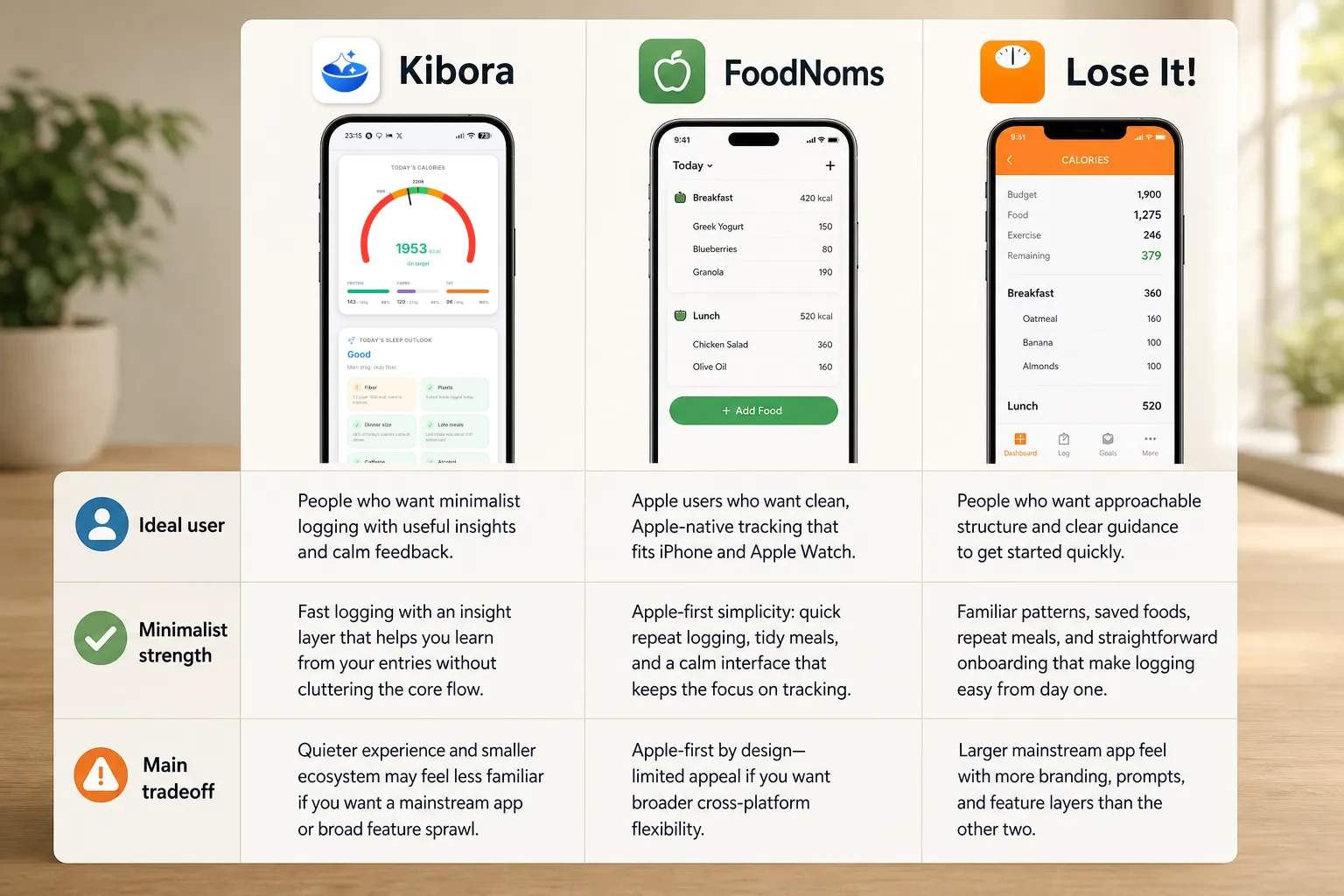
Kibora is our overall beginner recommendation for its documented combination of editable photo, voice, and text logging with macro breakdowns and explanatory insights. That is an editorial judgment about the workflow, not a claim that it has proven easier or more accurate than every alternative.
A conversational assistant is not necessarily an adaptive coach. MyFitnessPal’s Nutrition Coach can explain nutrition but cannot edit goals or access weight history; similarly, explanatory assistance alone does not establish automatic target adjustment for Kibora or Cronometer. The entries that follow unpack each app’s logging effort, access terms, and costs.
Kibora: Best overall for reviewable AI logging
Kibora is our overall pick for beginners who would rather photograph, speak, or describe a meal than search for each ingredient. Its appeal is not simply AI entry: you can review the estimate, correct it, and reuse the finished meal.
Natural-language logging and manual entry are different. Typing “two eggs, toast, butter, and coffee with milk” asks AI to interpret the food and estimate its nutrition. Manual entry means supplying the nutrition numbers yourself, rather than asking AI to work them out.
Estimate, correct, then reuse
Suppose that breakfast comes back with two slices of toast when you ate one, and the butter is missing. Correct the portion and add the butter before relying on the totals. Kibora’s documented logging and correction tools let you adjust portions, ingredients, and nutrition.
Once the breakfast reflects what you ate, use favorites or history to reuse it instead of asking AI to reinterpret the same meal tomorrow. For beginner AI logging, the useful shortcut is a meal estimate you can correct and reuse, not a photograph you have to trust blindly.
The numbers serve different purposes: macro totals show what you logged; targets show what you are aiming for. Kibora documents personalized calorie and macro targets plus explanatory insights, helping you interpret the log rather than just collect numbers. That is not the same as automatic expenditure-based target adjustment, which its public documentation does not establish.
Three access routes, without a required API key
You can try hosted AI logging first. The access choices are:
- Hosted trial: 10 AI meal analyses, with no payment card, no countdown, and no API key required.
- Optional hosted lifetime access: advertised at €49.99 once, for readers who prefer Kibora to provide the AI service.
- Optional own-key access: a supported provider key unlocks the full feature set without a Kibora payment. The external provider’s charges and limits still apply.
All routes are ad-free. After the hosted trial, manual nutrition entry, duplication, favorites, history, and analytics remain available. The trial ending therefore does not mean losing every way to maintain your food log.
Review ingredients and portions before trusting an AI estimate. A systematic review of image-based dietary assessment found substantial variation across methods, supporting that review habit rather than a product-specific accuracy claim. Kibora works on iPhone and Android through installable browser access; that should not be confused with verified native App Store or Google Play distribution.
MyNetDiary: Best for an ad-free conventional free start
MyNetDiary is a strong budget choice if you are comfortable selecting foods yourself. Its detailed feature matrix lists free macro totals and planning in grams or percentages, barcode scanning, favorites, recent meals, meal copying, custom recipes, and no ads. You can check what you ate against targets without paying for those controls.
The workflow is straightforward: search or scan breakfast ingredients, adjust the serving quantity to one slice of toast, add butter, inspect the macros, then copy the corrected meal another day. Reusing meals saves effort, but you still choose entries and check quantities.
Premium adds Meal Scan photo logging and Advanced Autopilot for adaptive target adjustments. Premium Plus adds AI Coach and AI meal-description voice logging, which is different from basic voice entry. AI conversation and automatic target adjustment are separate capabilities.
Access: Free to start without an account; synchronization requires one. Premium costs $8.99/month or $59.99/year; Premium Plus costs $14.99/month or $99.99/year. iOS, Android, and web access are documented, but do not assume every AI tool is available on every platform.
Displayed September US App Store reviews praise the free scanner and useful free functionality; some mention upgrade prompts despite the ad-free offering. These are reported experiences, not a satisfaction survey. The tradeoff is clear: strong free controls, more manual effort, with paid automation optional and no AI provider to manage.
Cronometer: Best for learning more about your nutrition
Cronometer suits beginners who want to understand more than protein, carbs, and fat. Basic includes free macro totals and custom macro/micronutrient targets, barcode scanning, and custom foods, meals, and recipes. That nutrient detail can help answer specific questions, but adds information to interpret.
For breakfast, Basic lets you log and edit eggs, toast, and butter as ingredients. Gold’s photo logging instead proposes ingredients and quantities for review, potentially including hidden additions such as butter. Check ingredients and portions before accepting the estimate.
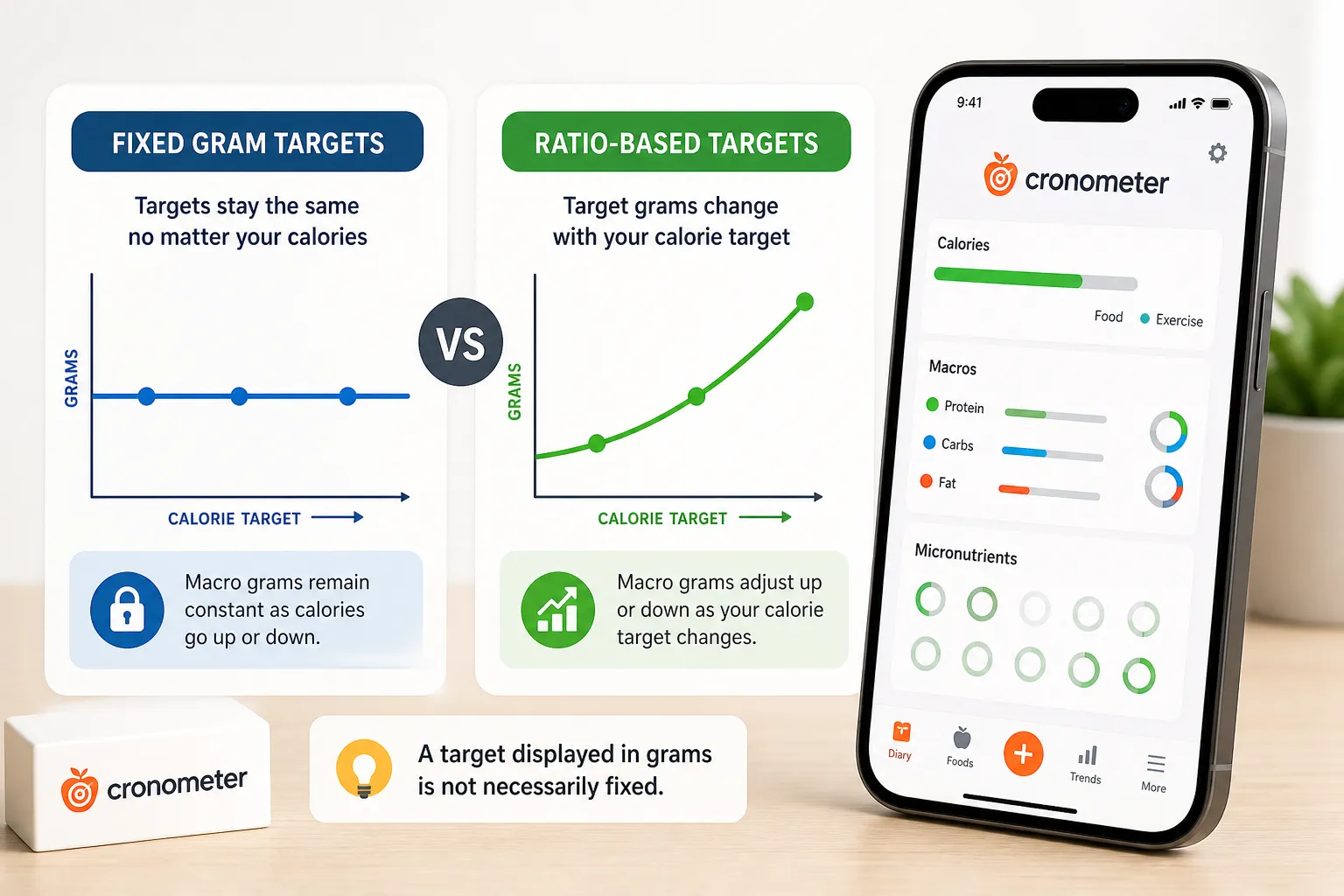
Target format matters: fixed gram targets stay fixed, while percentage-based targets produce gram amounts that change with the calorie target. A target displayed in grams is not necessarily fixed.
Basic’s custom meals and recipes let you reuse breakfast; Gold’s automatic Repeat Items handle recurring entries. Gold also adds voice logging, Macro Scheduler, and Crono Coach. The coach offers personalized guidance, not documented MacroFactor-equivalent adaptive target calculation.
Available on web, iOS, and Android, Gold costs $10.99/month or $59.99/year. Pay for logging convenience if it helps you, rather than assuming more nutrition data requires a subscription.
September App Store reviews praise nutrition visibility and photo/voice convenience, while one questions the starting protein target. Those reported experiences highlight the tradeoff: more detail can support learning, but understanding the numbers still takes work.
MacroFactor: Best for paid adaptive targets
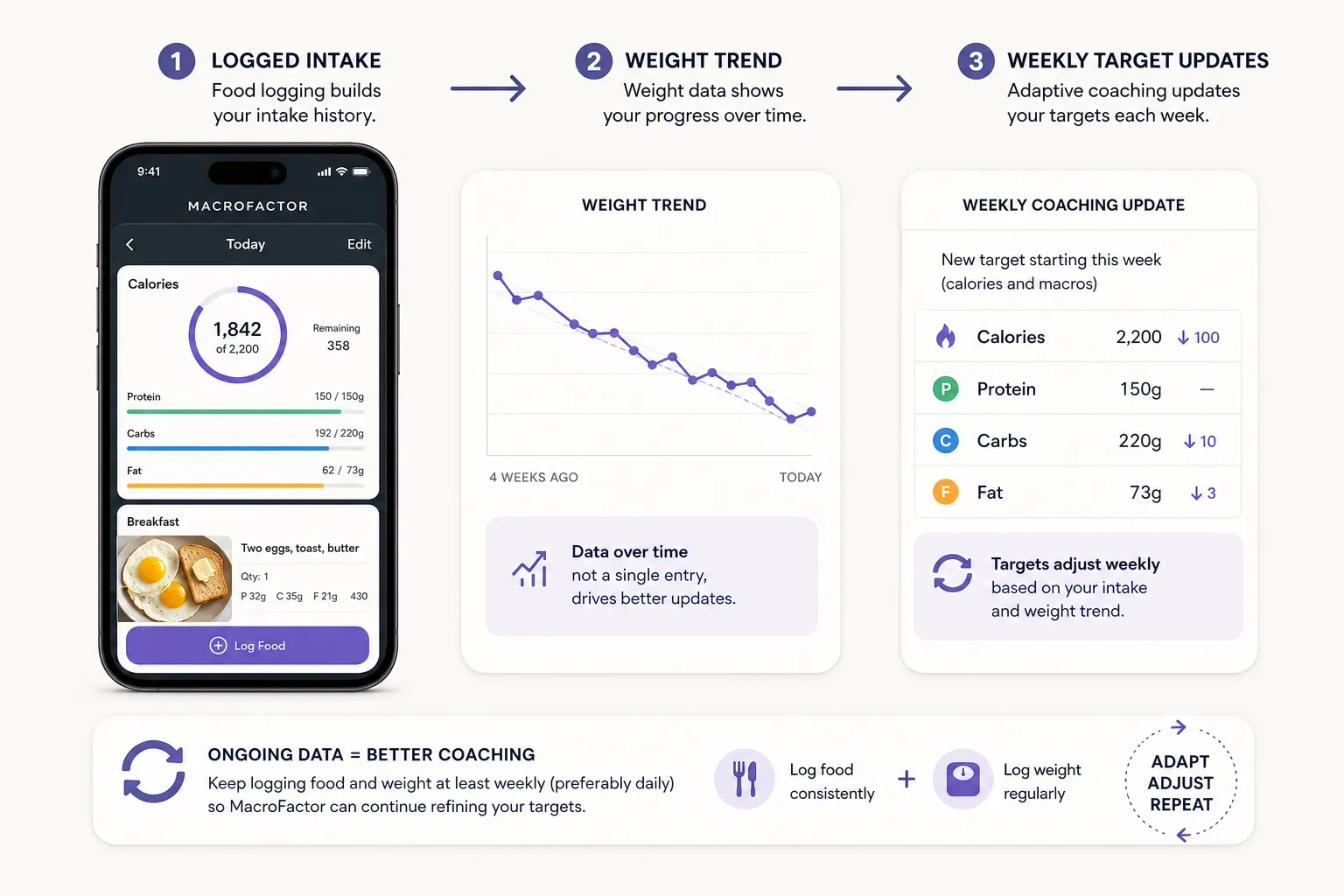
MacroFactor’s reason to pay is help deciding when your targets should change, not simply seeing protein, carbohydrate, and fat totals. Its weekly adaptive coaching uses logged intake and weight information to update recommendations, making it our pick for beginners who want ongoing target guidance rather than a static target display or nutrition chat.
Its three target modes offer different levels of control:
- Coached: the app recommends calorie and macro targets and adjusts them through weekly coaching.
- Collaborative: you have more control over macro distribution while the app adjusts calorie recommendations.
- Manual: you set and manage your own targets rather than using adaptive recommendations.
For breakfast, you could photograph your plate, add text alongside the photo, or use Describe to enter “two eggs, toast, and butter.” These options produce editable food entries: inspect the proposed foods and quantities, correct the toast and butter portions, then copy the corrected meal when you eat it again. Meal reuse can make the ongoing logging habit less repetitive.
Describe accepts typed descriptions or keyboard dictation, so you can speak through your phone’s keyboard rather than manually entering nutrition numbers. It matches common generic foods, not the entire branded catalog, making it better suited to “eggs and toast” than identifying an exact packaged product.
The bigger commitment is keeping intake and weight information coming. MacroFactor’s weight-logging guidance specifies at least once a week, preferably daily, alongside ongoing food logging. Adaptive coaching is an ongoing service built on ongoing data: a single meal photo cannot supply the intake and weight history needed to adjust targets meaningfully.
MacroFactor Nutrition is available on iOS and Android, with a seven-day trial and no ongoing free tier. Nutrition-only access costs US$11.99 per month, US$47.99 per six months, or US$71.99 per year. These are separate billing options for Nutrition, not prices for the Workouts app or a bundle.
The tradeoff is recurring cost, a continuing data habit, and occasional logging friction. Displayed September App Store reviews praise navigation, dashboard clarity, recipe reuse, and coaching, while a September 17 reviewer reports missing cup or tablespoon units for some foods. That is an individual experience, not a database-wide finding, but it highlights a practical consideration if you prefer household measures.
MyFitnessPal: Best if you value its established ecosystem
MyFitnessPal is worth considering if you value its established food-logging ecosystem and integrations. That breadth gives beginners several ways to track meals, but familiarity does not automatically mean simplicity: several useful shortcuts and target controls require payment.
The free breakfast workflow is straightforward: search for your yogurt, oats, and fruit, specify each portion, then add them to your diary. Free supports daily protein, carbohydrate, and fat totals, plus percentage-based goals in 5% increments. Seeing what you have eaten is separate from setting a target, and percentage goals offer less granular control than entering gram goals directly.
Premium adds gram targets and day-specific goals, alongside barcode scanning, Meal Scan, Voice Log, and meal-level macro displays. Subscription access spans iOS, Android, and web, but individual tools have platform and language restrictions, so check the particular shortcut you want rather than assuming every feature works everywhere.
For that same breakfast, a Premium user can speak the meal and review serving sizes before logging it. Voice Log is documented for English-language iOS and Android, not web. This is an alternative to searching for each food, not a reason to skip checking the portions.
Premium’s meal-level displays help you inspect breakfast separately from the whole day. However, a meal’s macro composition percentages describe its protein, carbohydrate, and fat balance; they are not the same as progress toward your daily targets or independently configured macro goals for each meal.
US list prices are $19.99/month or $79.99/year for Premium, and $24.99/month or $99.99/year for Premium+. The latter adds Meal Planner, but that tier is not necessary for ordinary macro logging. Choose paid access for a specific control or shortcut you need, rather than assuming the highest tier is the beginner option.
Nutrition Coach offers explanatory assistance to eligible English-language iOS Premium and Premium+ users, including in the US, subject to rollout restrictions. It cannot edit goals or access weight history, so it should not be confused with MacroFactor-style expenditure-based target adjustment.
Reported experiences underline the tradeoff. Displayed US App Store reviews praise food availability and organized tracking, while others describe redesign navigation friction and reduced at-a-glance meal visibility. A June reviewer also reports yogurt nutrition differing from its package: a reason to check the entry you select, not evidence of a database-wide accuracy problem.
Choose the help you need for your first few weeks
Start with the simplest access route that solves your friction. You do not need to pay just to see macro totals: MyNetDiary’s free workflow includes totals and gram or percentage targets.
For reviewable AI logging, our overall beginner pick is Kibora’s hosted trial: 10 AI meal analyses with no card, countdown, or API setup. Manual entry and meal reuse remain available afterward. Optional hosted lifetime access costs €49.99; optional own-key access involves external provider costs.
Pay when the extra service addresses a real need, whether that means less logging effort or MacroFactor’s weekly adaptive target adjustments. Those adjustments are a different service from simply displaying daily totals. If you need instruction first, use the separate macro-tracking guide.
Before committing, ask: Can I correct breakfast, understand my daily totals, and comfortably reuse that meal? A corrected, reusable breakfast is a better first-week milestone than exploring every dashboard. Choose the routine you can sustain, not the longest feature list.
- Key sources
- MyNetDiary free nutrition tracking
- Cronometer Gold
- MacroFactor Nutrition
- MacroFactor subscriptions and bundles
- MyFitnessPal Premium features
- MyFitnessPal membership pricing
- MyNetDiary US App Store reviews
- Cronometer US App Store reviews
- MacroFactor US App Store reviews
- MyFitnessPal US App Store reviews
- AI-based digital image dietary assessment methods compared to humans and ground truth