- What you'll learn
- How the article ranks nutrition apps by low friction, not just feature count
- Why Lose It! is the best fit for quick daily logging
- When Cronometer is worth the extra detail for micronutrients and macros
- What MyFitnessPal still does well, and where its clutter can become a problem
- How Fooducate and MacroFactor differ if you want guidance instead of more numbers
- A simple seven-day test to see whether an app actually fits your routine
Nutrition apps are supposed to make eating clearer, but plenty of them make you feel like you need to become a data analyst first. This roundup ranks apps by usefulness without overwhelm, not by who crams in the longest feature list.
The lens is simple: food logging friction, quality of nutrition insight, setup burden, pricing friction, and how much guidance an app gives without taking over your day. Research suggests self-monitoring helps most when people can actually stick with it, according to NIH-linked literature and work in Frontiers in Nutrition.
The best nutrition app is the one that turns food awareness into a repeatable habit, not the one that tracks the most things. In practice, that usually means Lose It! for simple daily logging, Cronometer for deeper detail, MyFitnessPal for database breadth, Fooducate for food quality, and MacroFactor for more advanced coaching.
The quick answer: which nutrition app should you try first?
If you want the shortest path to a useful nutrition habit, start with the app that feels easiest this week, not the one with the biggest feature list. If you get overwhelmed by tracking, choose the app with the clearest first week, not the app with the deepest settings menu.
This ranking is about low overwhelm, not raw power. No app wins every category. The right pick depends on whether you want simple meal awareness, calorie tracking, micronutrient detail, food quality cues, or more hands-on macro coaching.
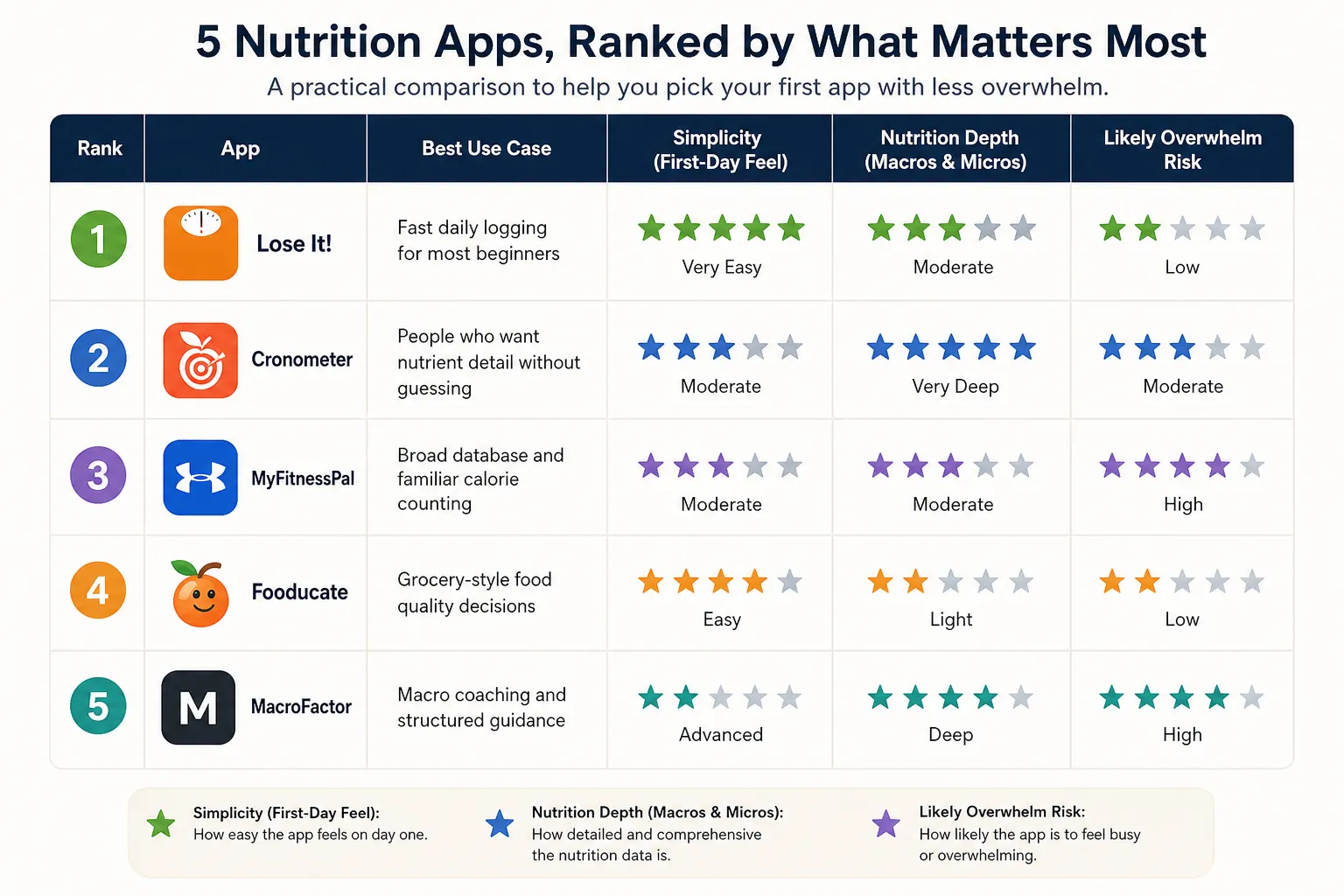
- 1. Lose It! Best for: most beginners who want fast daily logging. Verdict: the best first test for simple food tracking with less dashboard noise. Skip if: you mainly care about deep micronutrient analysis.
- 2. Cronometer Best for: people who want nutrient detail without guessing. Verdict: the strongest choice for micros and cleaner nutrition data, though it asks for a bit more attention. Skip if: you want the lightest possible logging experience.
- 3. MyFitnessPal Best for: readers who want the broadest database and a familiar calorie counting app. Verdict: still useful and convenient, but busier than the simplest options. Skip if: pop-ups, upsells, or a crowded interface drain your motivation.
- 4. Fooducate Best for: people making grocery-style food quality decisions. Verdict: more helpful for understanding food choices than chasing numbers all day. Skip if: you want detailed macro planning or precision tracking.
- 5. MacroFactor Best for: committed users who want macro coaching and structured guidance. Verdict: powerful and thoughtful, but not the simplest place to start. Skip if: you are still trying to build a basic logging habit.
Here is the same shortlist through a practical, first-day lens:
- Lose It!: Best for quick logging. Why it helps: fast search, straightforward meal entry, and a lighter feel than many larger trackers. What may feel overwhelming: some premium prompts. Free/pricing friction: worth checking in the Apple App Store or Google Play Store because review patterns often mention paywall friction. First-day setup feel: easy.
- Cronometer: Best for nutrient detail. Why it helps: strong micronutrient breakdowns and less guesswork about food data quality. What may feel overwhelming: more numbers on screen. Free/pricing friction: generally usable free, but feature expectations matter. First-day setup feel: moderate.
- MyFitnessPal: Best for database breadth. Why it helps: familiar interface and a huge food library. What may feel overwhelming: a busier layout and more feature clutter. Free/pricing friction: check current screenshots and reviews since users often flag changing feature access. First-day setup feel: moderate.
- Fooducate: Best for food quality signals. Why it helps: useful when you want guidance at the grocery level, not just calorie totals. What may feel overwhelming: less ideal for precise tracking goals. Free/pricing friction: verify based on current app store listing. First-day setup feel: fairly easy.
- MacroFactor: Best for macro coaching. Why it helps: more directed than a basic logbook. What may feel overwhelming: setup and ongoing attention are higher. Free/pricing friction: usually more of a commitment. First-day setup feel: advanced.
App store reviews are useful for spotting friction like pop-ups, paywalls, and confusing dashboards, but they are still signals, not the whole story. If you decide you actually want a broader calorie-focused comparison, see this calorie tracker roundup.
What makes a nutrition app feel simple instead of stressful
A nutrition app feels simple when it removes unnecessary decisions, not just when it hides features. The best ones answer your first question quickly: what did I eat, what pattern do I notice, and what can I adjust?
A low-overwhelm nutrition app has three jobs: make logging easy, make patterns obvious, and keep advanced data optional. That is what separates a genuinely beginner-friendly nutrition app from a cluttered calorie counting app with a dozen tabs, ads, and coaching prompts competing for attention.
Frictions in the user journey can reduce engagement.
That principle shows up across digital health usability research, including work published in the Journal of Medical Internet Research. Long questionnaires, forced goal setup, too many permissions, and constant notifications can make people quit before the app becomes useful.
For this ranking, I judged simplicity using five criteria:
- Fast onboarding: minimal setup before first use
- Low-effort logging: recent foods, saved meals, favorites, quick add, barcode scanning, or voice entry
- Useful defaults: a home screen centered on today’s meals, not every possible metric
- Clear nutrition insight: helpful patterns beyond one calorie total, including macros or food quality when relevant
- Limited interruptions: restrained prompts, upsells, and notifications
A full-featured app can still feel simple if its defaults are smart. If you can log a normal breakfast in under a minute after setup, that is a strong sign the app may work well for an overwhelmed beginner.
More detail is not bad. It just needs to stay optional. Research in Frontiers in Nutrition also reflects a practical truth: consistent tracking is often more useful than chasing perfect entries every time. And if you want a broader view of nutrition than calories alone, this idea connects with why counting calories is not enough.

Best overall for quick daily logging: Lose It!
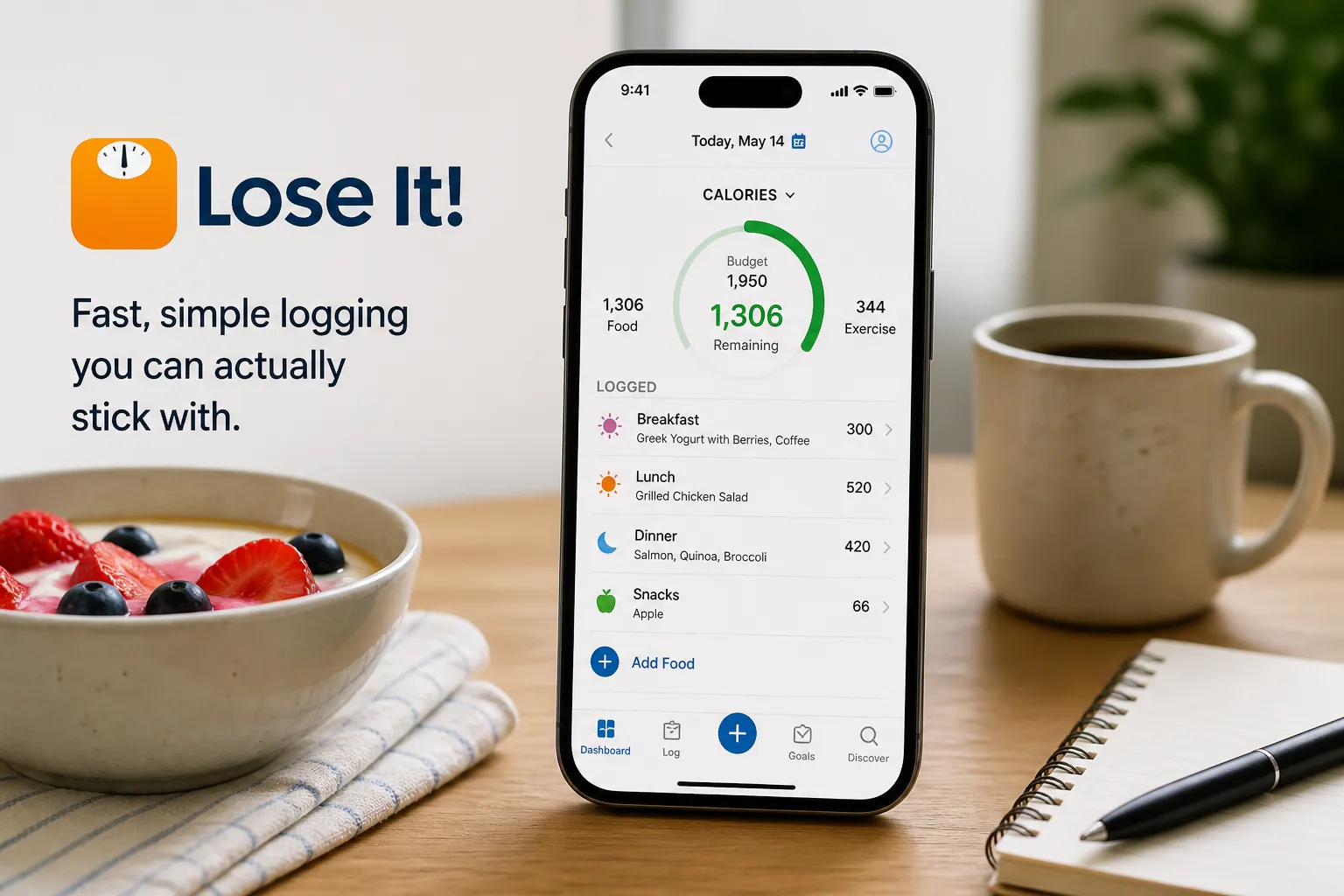
Lose It! is the best first download for readers who want a low-friction food tracker without jumping straight into advanced nutrition analysis. Its big advantage is approachability: a familiar calorie-budget structure, fast meal entry, and a less intimidating feel than apps that lead with dense charts or micronutrient dashboards.
This is the app to try if your real goal is consistency. Lose It! wins for overwhelmed users because it starts with the habit most people can actually repeat: logging normal meals quickly. For a busy weekday user who rotates through the same breakfast, lunch, and snacks, saved foods and recent meals can make tracking feel manageable instead of like homework.
It works best for people who want useful awareness of intake patterns, weight-loss support, or better day-to-day nutrition consistency. If you are deciding between the two most familiar calorie-first options, our MyFitnessPal vs. Lose It! comparison can help you sort the tradeoffs faster.
Try this app if:
- you want fast logging
- you dislike complex dashboards
- calories are useful, but not your whole identity
Skip it if:
- you want detailed micronutrients
- you need clinical nutrition tracking
- you want adaptive macro coaching
Before publication, verify current barcode scanner access, premium upgrade prompts, and pricing on the Lose It! official site and current App Store listing, since free-tier features and upgrade friction can change over time.
Best for nutrient depth without guessing: Cronometer
Cronometer is the strongest pick here if “nutrition app” means more than calories. It tracks macros, vitamins, minerals, and overall nutrient intake in one place, and the company positions the app around detailed nutrition data rather than just weight or calorie goals according to its official site.
That depth is useful when you want better answers, not more noise. If you care about protein, fiber, and iron, for example, Cronometer makes it easy to watch those three closely without reducing food logging to a single calorie number.
The catch is that detailed nutrition data can turn into overwhelm fast. Cronometer is simple only if you use it selectively: pick the nutrients that matter to your goal and let the rest stay in the background.
That matters because even strong food databases have limits. Food composition data can be robust, and much of the industry leans on sources like USDA FoodData Central, but consumer tracking still depends on database matches, label accuracy, and your portion estimates, so more numbers do not automatically mean more certainty.
Try this app if you want a best nutrition tracker app for focused tracking and better micronutrient visibility. Skip it if seeing dozens of targets will make you feel behind before lunch.
If you are deciding between nutrient depth and broader brand coverage, our MyFitnessPal vs. Cronometer comparison can help clarify the tradeoff. For the right user, Cronometer is empowering. For a beginner who just wants low-friction logging, it may be more detail than day one needs.

Best for the biggest food database: MyFitnessPal
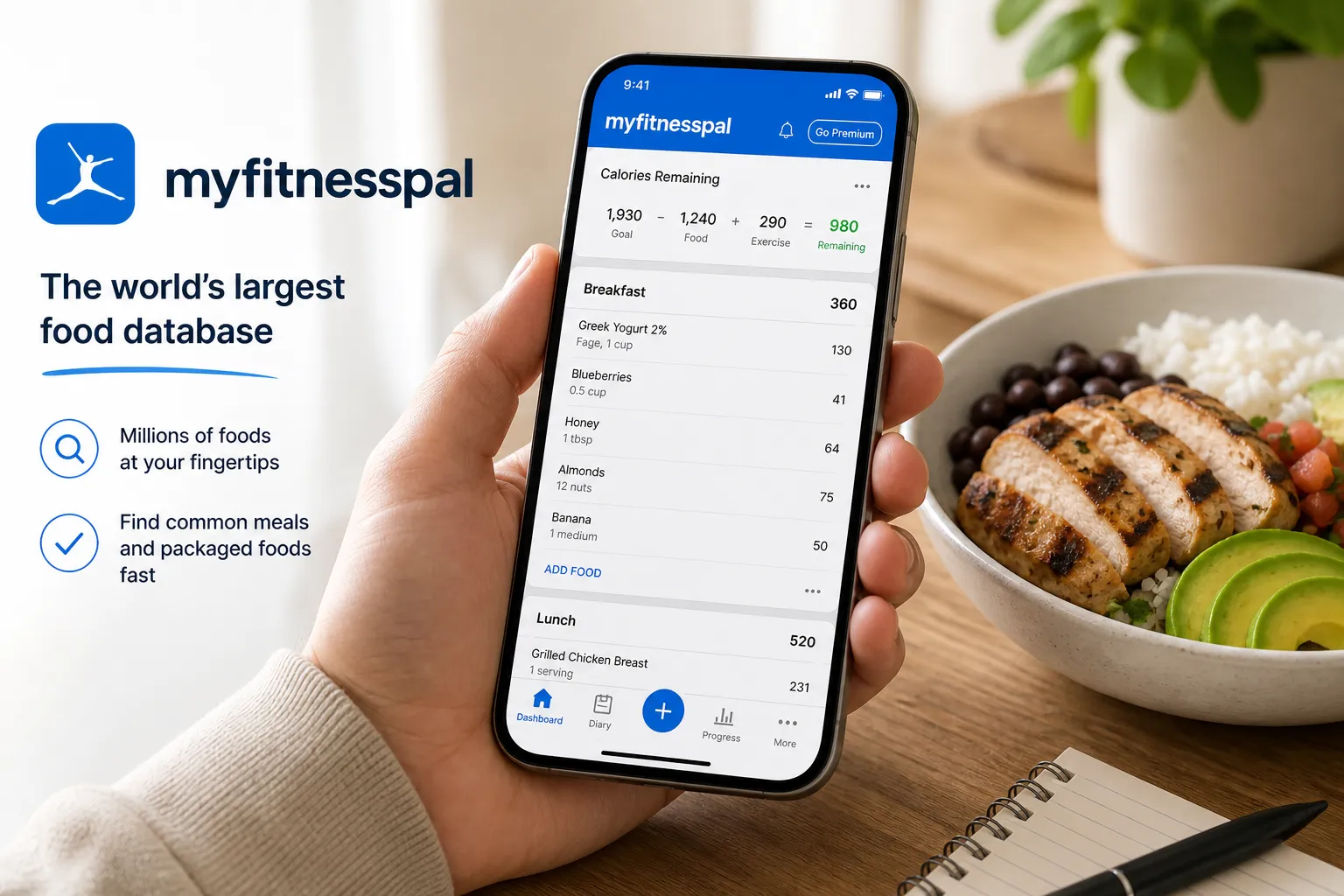
MyFitnessPal is still one of the most familiar names in nutrition tracking, and that familiarity matters. If you want a widely supported app with lots of foods, common integrations, and a workflow many people already understand, it remains a strong option.
Its biggest strength is breadth. If you are logging a chain restaurant meal or a specific packaged snack, MyFitnessPal often gives you multiple likely matches fast, which can make daily tracking easier through its large database and logging tools listed on the official site.
The tradeoff is that breadth can create clutter. More search results means more checking, more duplicate-looking entries, and sometimes imperfect database items, so the app can save time finding foods without always reducing the mental work of choosing the right one.
MyFitnessPal is strongest when breadth matters more than calm; it can be excellent at finding foods, but it may not do much to lower decision fatigue. That is especially relevant if you are the kind of user who gets drained by dense dashboards, upgrade nudges, or too many places to tap.
It is best for people who already know they like calorie tracking, want broad compatibility, or need an app that is easy to recommend because so many people use it. Skip it if pop-ups, subscription prompts, or a busier interface tend to make you quit, which is also a common theme in current Play Store feedback signals on Google Play.
If you like the MyFitnessPal idea but want less friction, this guide to easier MyFitnessPal alternatives may be a better next step.
Best if you want guidance instead of more numbers: Fooducate and MacroFactor
Some people do not need a bigger food database. They need help making sense of what they are eating. That is where Fooducate and MacroFactor stand out, though neither is the simplest default for someone who already feels buried by apps and decisions.
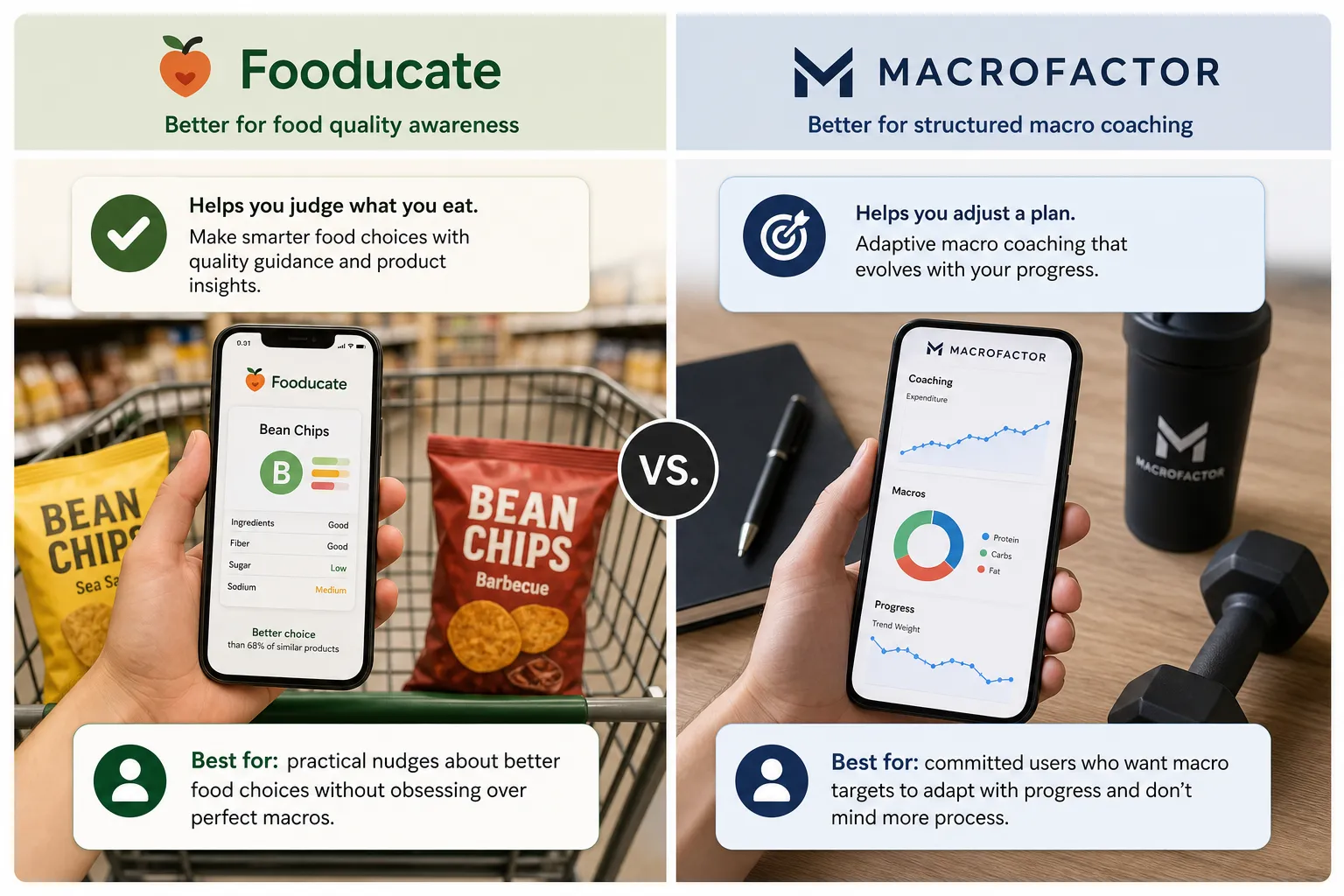
The key difference is straightforward: Fooducate helps you judge what you eat; MacroFactor helps you adjust a plan. Both offer more direction than a basic food log, but they solve different kinds of confusion.
Fooducate: better for food quality awareness
Fooducate is the better fit if calories alone do not help you choose between foods. Its positioning centers on helping users evaluate products and eating patterns with food quality guidance, not just raw totals, according to the Fooducate site.
A practical example is grocery shopping. If you are comparing two packaged snacks with similar calories, Fooducate is more useful for spotting the better everyday choice based on ingredient and quality signals, rather than asking you to do macro math in the aisle.
Best for: someone who wants practical nudges about better food choices without obsessing over perfect macro splits. Skip if: you mainly want a tight macro plan, performance-oriented targets, or the lightest possible app experience.
MacroFactor: better for structured macro coaching
MacroFactor is stronger for users who already know they want a more deliberate nutrition system. The app is built around nutrition tracking and adaptive macro coaching, which can be excellent for someone training consistently and willing to log accurately.
That structure is the appeal and the tradeoff. If you want the app to help steer intake over time, MacroFactor can be more useful than a simple calorie tracker. If you are already tired of targets, check-ins, or subscription decisions, it may feel like one more layer to manage.
Best for: a committed user who wants macro targets to adapt with progress and does not mind more process. Skip if: you want casual food awareness, fewer moving parts, or a beginner-friendly nutrition app with less setup.
The low-overwhelm takeaway is this: guidance only helps when it answers a decision you already care about. Otherwise, it is just another stream of instructions. That is why Fooducate and MacroFactor make more sense as second-step apps after you know whether you need help choosing foods or help running a nutrition plan.
If MacroFactor sounds useful but a little intense, it may help to read a simple guide on how to balance macros before committing to a more structured tracker.
How to choose without downloading five apps
Use the rankings like a filter, not a shopping spree. Do not choose a nutrition app by its maximum capability; choose it by the smallest routine you can repeat on a normal Tuesday. That matters because consistent self-monitoring is generally more useful than building an elaborate system you stop using after three days, as reflected in NIH-reviewed behavior-change research here.
Start with the kind of overwhelm you want to avoid most:
- If you want the easiest first week, start with Lose It!.
- If you care most about nutrients and micronutrients, start with Cronometer.
- If you want the biggest searchable food database, start with MyFitnessPal.
- If you want food quality guidance, start with Fooducate.
- If you want structured macro coaching, start with MacroFactor.
If logging friction is your biggest issue, skip the feature comparison spiral and look at a more minimalist shortlist. For most beginners, consistency beats precision for general food awareness, which also fits the American Heart Association’s emphasis on sustainable habits over short bursts of intensity in its healthy eating guidance.
Try one app for seven days
- Log meals only, ideally breakfast and dinner.
- Ignore advanced metrics, scores, and coaching prompts at first.
- Save two repeat meals or foods to test whether logging gets faster.
- Check one useful pattern, like protein at breakfast or veggie intake at dinner.
- Notice friction points: guilt, confusion, paywall annoyance, or too many taps.
- Cancel before trial renewal if needed.
By day seven, ask one question: did this app make eating feel clearer? If not, it is the wrong tool for your routine, even if it is powerful on paper.

The app you’ll keep using is the real winner
There is no universal best nutrition app. The right choice depends on your goal, your tolerance for detail, and whether the app lowers mental load instead of adding another daily task.
The simplest rule of thumb is practical: if you dread opening the app by day three, it is not the best app for you, no matter how impressive the feature list looks. The best nutrition app is not the most complete one; it is the one that makes your next healthy choice easier often enough to become a habit.
If you want a low-pressure starting point, pick one app and run a seven-day test before paying for a subscription or building a complex setup. Lose It! works best for simple logging, Cronometer for nutrition depth, MyFitnessPal for database breadth, Fooducate for food quality, and MacroFactor for adaptive macro coaching.
Your next step is simple: choose one, log for a week, and ask whether it made food decisions clearer. If you want to explore another lower-overwhelm option after that, you can also take a look at Kibora. The best nutrition app is the one that helps you notice patterns without turning food into homework.
- Key sources
- NIH / obesity and self-monitoring literature
- Frontiers in Nutrition
- Journal of Medical Internet Research
- American Heart Association
- USDA FoodData Central
- Apple App Store
- Google Play Store
- MyFitnessPal official site
- Cronometer official site
- Lose It! official site
- Fooducate official site
- MacroFactor official site


