


- Kaj boš izvedel/a
- Zakaj “brezplačno za prenos” pogosto še vedno pomeni pozive za nadgradnjo, plačljive zidove ali skrite ovire
- Kako članek loči resnično aplikacije brez oglasov od aplikacij za beleženje kalorij z malo prekinitvami
- Katere aplikacije so najboljše za mirno beleženje, prehranske podrobnosti, dobro brezplačno vrednost in uporabo za začetnike
- Kaj pričakovat od Kibora, Cronometer, FatSecret, Lose It!, YAZIO in MyFitnessPal
- Kako skeniranje črtnih kod, beleženje makrohranil in receptna orodja vplivajo na vsakodnevno izkušnjo
- Preprost 15-minutni test, s katerim primerjaš aplikacije na svojih obrokih, preden se naročiš
“Brezplačna aplikacija za beleženje kalorij” pogosto pomeni brezplačna za prenos, ne pa brez prekinitev. Beleženje kalorij je že samo po sebi malo tečno, in ko aplikacija doda banner oglase, pozive za nadgradnjo ali skener črtnih kod zaklenjen za plačljivim zidom, je še težje vztrajat.
Zato ta vodič aplikacije razvršča po vsakodnevni izkušnji enako kot po seznamu funkcij. Gledamo, kako mirno deluje aplikacija med beleženjem, kako uporabna je baza živil, ali je skeniranje črtnih kod praktično in kako pogosto premium pozivi prekinejo tok.
Dobiš kratek seznam najbolj čistih možnosti, ki jih je smiselno probat najprej, plus enostaven način, kako sam/a oceniš kompromise. Ker se izkušnje v aplikacijah spreminjajo, ta razvrstitev temelji na aktualnih straneh s cenami, razdelitvi funkcij in ponavljajočih se temah v ocenah, ne samo na prepoznavnosti znamke ali zvezdicah.
Kratek odgovor: najbolj čiste aplikacije za beleženje kalorij, ki jih najprej probaj
Če ti je prioriteta bolj mirna izkušnja beleženja, začni z aplikacijami, ki imajo malo prekinitev, hkrati pa še vedno naredijo beleženje hrane uporabno. To je ponavadi za vsak dan pomembnejše kot najdaljši seznam funkcij.
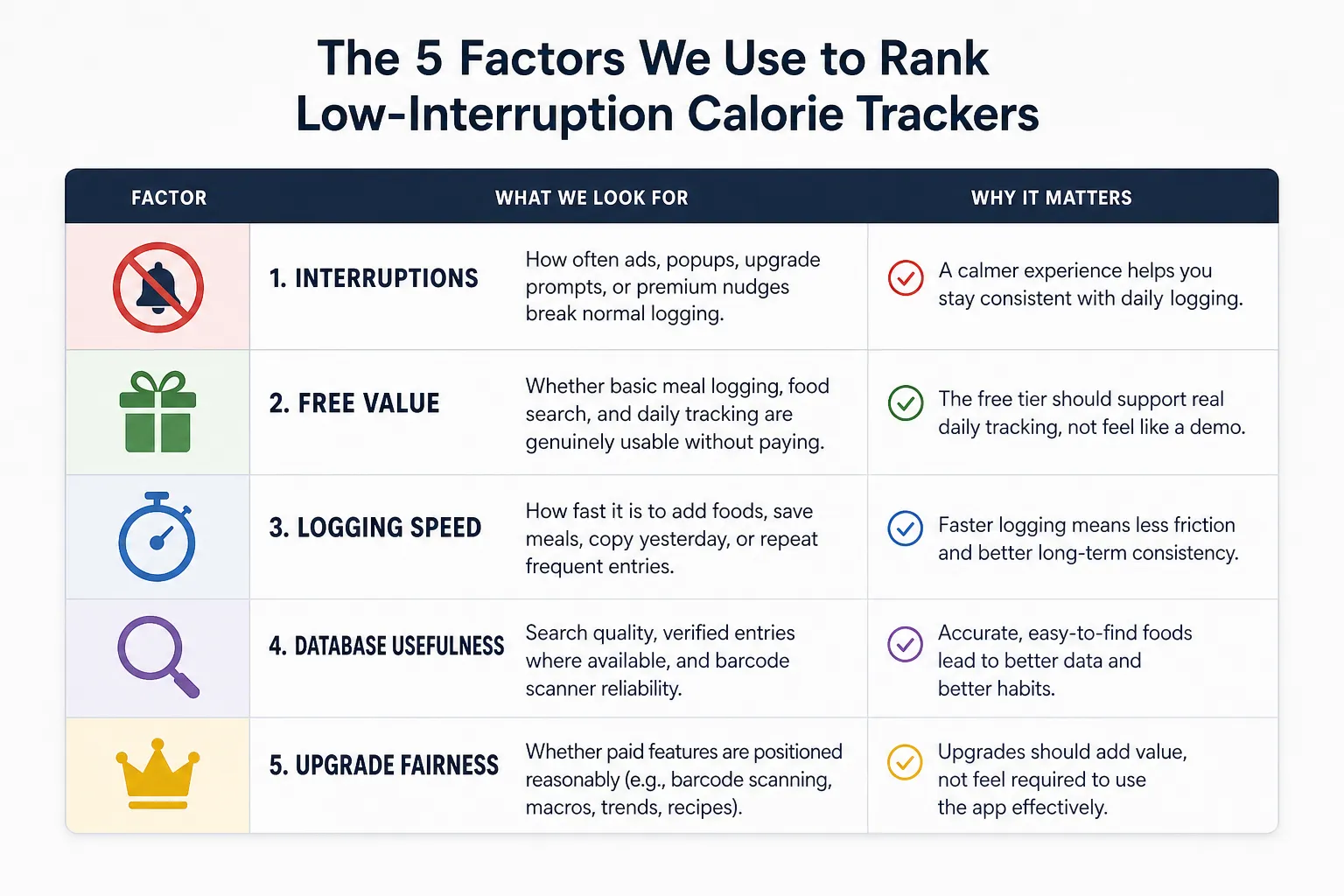
Najprej je tukaj hiter pregled razvrstitve, glede na najmanj prekinitev plus uporabno beleženje, ne glede na surovo število funkcij. Brezplačen prenos tudi ne pomeni nujno, da ni pozivov za nadgradnjo, zaklenjenih funkcij ali namigov za naročnino.
- 1. Kibora Najbolj čista plačljiva/brezplačna izkušnja
Najboljša za: mirno, zasebnosti naklonjeno beleženje z uporabnimi usmeritvami po vnosu.
Opombe glede čistosti: minimalno trenja zaradi monetizacije in manj vsiljiv občutek.
Glavni kompromis: manjši ekosistem in manj mainstream prepoznavnosti kot največji uveljavljeni igralci. - 2. Cronometer Najboljša za prehranske podrobnosti
Najboljša za: uporabnike, ki jim pomenijo mikrohranila, preverjeni vnosi in podatkovno usmerjeno beleženje.
Opombe glede čistosti: praviloma manj igrifikacije in bolj uporabniško-orodjarski pristop, čeprav so nekatera napredna orodja v Gold paketu na Cronometerjevi strani s cenami.
Glavni kompromis: lahko deluje bolj klinično kot preprosto, posebej če želiš samo hitro beleženje kalorij. - 3. FatSecret Najboljša brezplačno-najprej možnost
Najboljša za: uporabnike z omejenim budgetom, ki hočejo osnovno beleženje kalorij brez plačila vnaprej.
Opombe glede čistosti: močna vrednost brezplačno, z dnevnikom hrane, skeniranjem črtnih kod in beleženjem makrohranil izpostavljenim na FatSecret produktni strani.
Glavni kompromis: manj izpiljen dizajn in manj globine kot pri aplikacijah z bolj premium občutkom. - 4. Lose It! Najboljša za začetnike
Najboljša za: preprosto dnevno beleženje in prijazno učno krivuljo.
Opombe glede čistosti: enostavna za uporabo, ampak brezplačni uporabniki naj pričakujejo premium pozive in nekaj omejitev funkcij.
Glavni kompromis: preprostost je na začetku koristna, ampak plast prodajnih pozivov je lahko bolj opazna, če se želiš posebej izognit prekinitvam. - 5. YAZIO Najbolj izpiljena freemium aplikacija
Najboljša za: uporabnike, ki hočejo moderen vmesnik in enostavno beleženje hrane.
Opombe glede čistosti: izpiljena in dostopna, ampak se splača preverit, kako pogosto se premium omejitve pokažejo med uporabo.
Glavni kompromis: nekatere boljše funkcije za planiranje in prehrano so lahko na plačljivi strani. - 6. MyFitnessPal Najboljša, če je velikost baze pomembnejša od mirnega UX-a
Najboljša za: ljudi, ki dajejo prednost široki bazi živil in poznanim potekom dela.
Opombe glede čistosti: še vedno uporabna, ampak ni najbolj čista izbira za bralce, ki se želijo izognit naročniškim pozivom ali neredu. Njena uradna Premium stran jasno pokaže razdelitev plačljivih funkcij.
Glavni kompromis: širina in poznanost prideta z več monetizacijskega trenja kot pri najboljših možnostih tukaj.
Glavni vzorec je preprost. Aplikacije kot Kibora in Cronometer se uvrščajo dobro, ker izkušnjo držijo osredotočeno na beleženje, medtem ko aplikacije kot MyFitnessPal ostajajo relevantne, ker so njihove baze uporabne, tudi če je vmesnik bolj natrpan.
Če hočeš širšo primerjavo, ki ni omejena samo na vidik brez oglasov, poglej našo splošno lestvico aplikacij za beleženje kalorij. Naslednji del razloži, zakaj je “brez oglasov” samo del zgodbe in zakaj so lahko pozivi za nadgradnjo enako pomembni.
“Brez oglasov” ne pomeni vedno “brez prekinitev”
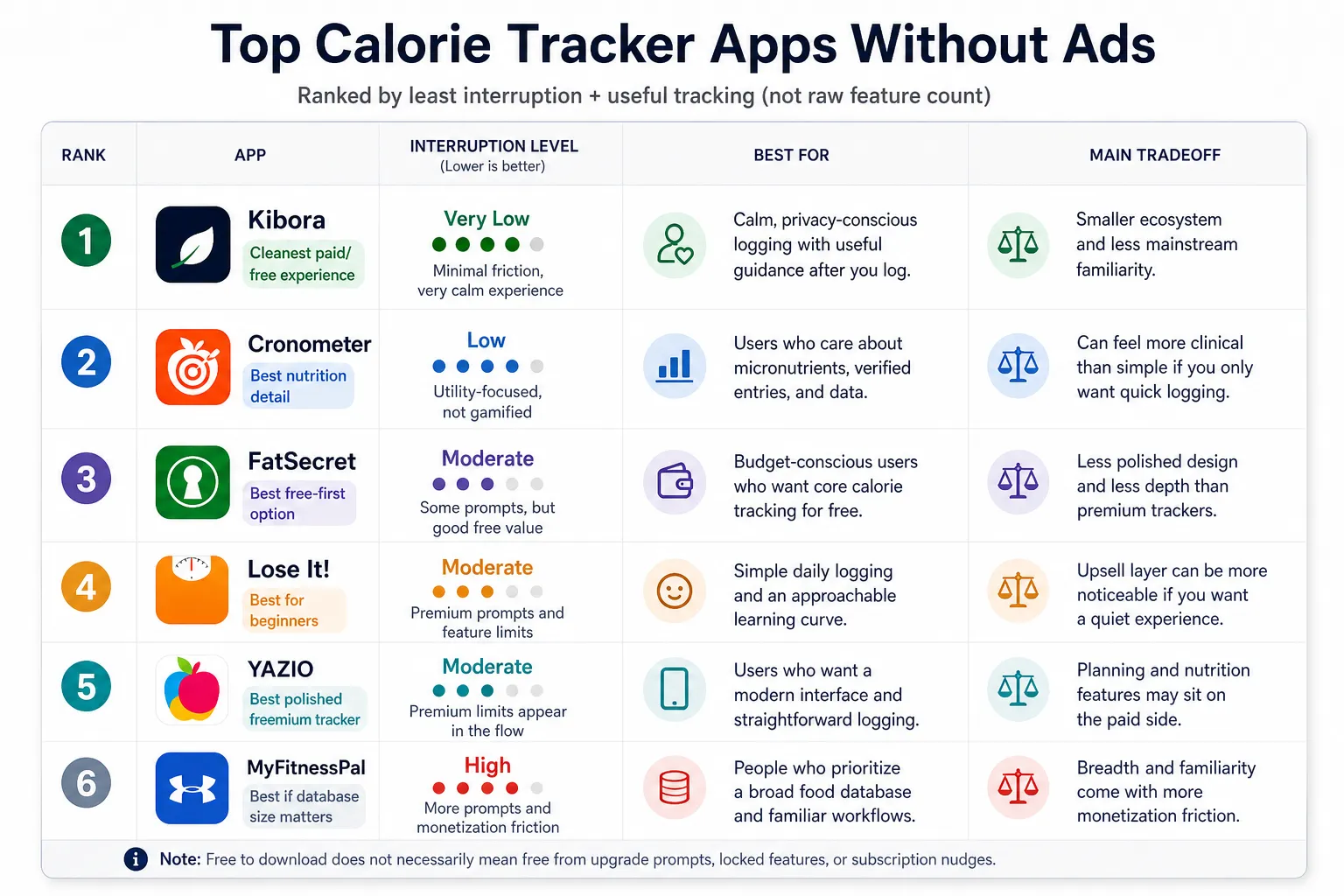
Ključna razlika v tej razvrstitvi je preprosta: brez oglasov ni isto kot malo prekinitev. Aplikacija za beleženje kalorij lahko odstrani banner oglase, pa ti še vedno prekine tok vsakič, ko vneseš obrok.
To je pomembno, ker je beleženje kalorij ponavljajoča se navada. Če aplikacija stalno vriva trenje med trenutkom, ko jo odpreš, in trenutkom, ko shraniš hrano, se izkušnja zdi natrpana, tudi če zaslon izgleda čist.
Za ta članek je koristno ločit dve ideji:
- Brez oglasov = brez prikaznih oglasov v glavni izkušnji beleženja.
- Malo prekinitev = malo pozivov, plačljivih zidov, bannerjev ali blokad funkcij med običajnim vsakodnevnim beleženjem.
To je pogled, zaradi katerega je lestvica uporabnejša od standardnega seznama popularnih aplikacij. Ne sprašujemo se samo, ali aplikacija prikazuje oglase. Sprašujemo se, katera aplikacija ti pusti vnesti hrano z najmanj trenja.
Veliko brezplačnih aplikacij za beleženje kalorij služi z naročninami namesto s prikaznimi oglasi. To samo po sebi ni slabo, ampak se pogosto pokaže kot ponavljajoči se premium pop-upi po iskanju živila, namigi za nadgradnjo na zaslonu dnevnika ali ključna orodja, zaklenjena dokler ne plačaš.
Najpogostejše prekinitve hitro prepoznaš, ko začneš pazit nanje:
- premium poziv po tem, ko poiščeš ali vneseš hrano
- skeniranje črtnih kod omejeno na plačljive pakete
- omejitve uvoza receptov ali celoten gradnik receptov za plačljivim zidom
- podrobne razčlenitve makrohranil na voljo samo z nadgradnjo
- vztrajni bannerji, ki spodbujajo naročnino, medtem ko poskušaš vnašat obroke
Nič od tega ni isto kot klasičen oglas, ampak je lahko enako moteče. V nekaterih aplikacijah je še bolj moteče, ker se pojavi točno takrat, ko poskušaš dokončat nalogo.
Zato je lahko plačljiva aplikacija za nekatere boljša vrednost. Če vnašaš večkrat na dan in ti je pomemben miren vmesnik, je plačilo lahko smiselno, ampak samo takrat, ko plačljiva verzija odstrani realno trenje, namesto da dodaja funkcije, ki jih nikoli ne boš uporabljal/a.
Tudi brezplačna aplikacija se lahko uvrsti dobro. Če njene omejitve ne motijo tvoje običajne rutine, kot so osnovno iskanje hrane, hitro dodajanje obrokov in pregled dnevnega vnosa, potem “brezplačno” ne pomeni avtomatsko frustrirajoče.
Zato bo v nadaljevanju članka “čisto” pomenilo več kot odsotnost oglasov. Pomenilo bo aplikacijo, ki spoštuje tvojo pozornost, ohranja osnovna orodja za beleženje dostopna in ne spremeni vsake uporabne akcije v trenutek za nadgradnjo.
Kako smo ocenili, da je aplikacija za beleženje kalorij dovolj čista za priporočilo
“Čisto” nismo vzeli kot marketinško oznako. Za to razvrstitev je morala aplikacija za beleženje kalorij pri normalni uporabi delovat z malo prekinitvami, hkrati pa naredit vsakodnevno beleženje dovolj praktično, da pri njem vztrajaš.
To pomeni, da smo pri oceni upoštevali aktualne uradne strani s cenami in funkcijami, zapise v trgovinah z aplikacijami, novejše teme v ocenah in praktične potrebe ljudi, ki hrano beležijo vsak dan. Več pozornosti smo dali temu, s čim se uporabnik verjetno sreča zdaj, kot dolgoročnemu povprečju zvezdic, ker novejše ocene pogosto hitreje pokažejo spremembe v naročniški politiki, pogostosti pozivov ali zaklepanju funkcij kot stare ocene.
Prav tako nismo predpostavili, da največja baza hrane avtomatsko zmaga. Čista aplikacija mora biti še vedno uporabna, to pa je ponavadi odvisno od relevantnosti iskanja, ponavljajočega vnosa, zanesljivosti skeniranja črtnih kod in tega, ali so vnosi dovolj dosledni, da skozi čas podpirajo boljše navade. Če želiš globlji razlog za to, poglej zakaj je natančno beleženje kalorij pomembno.
Pet dejavnikov za razvrstitvijo
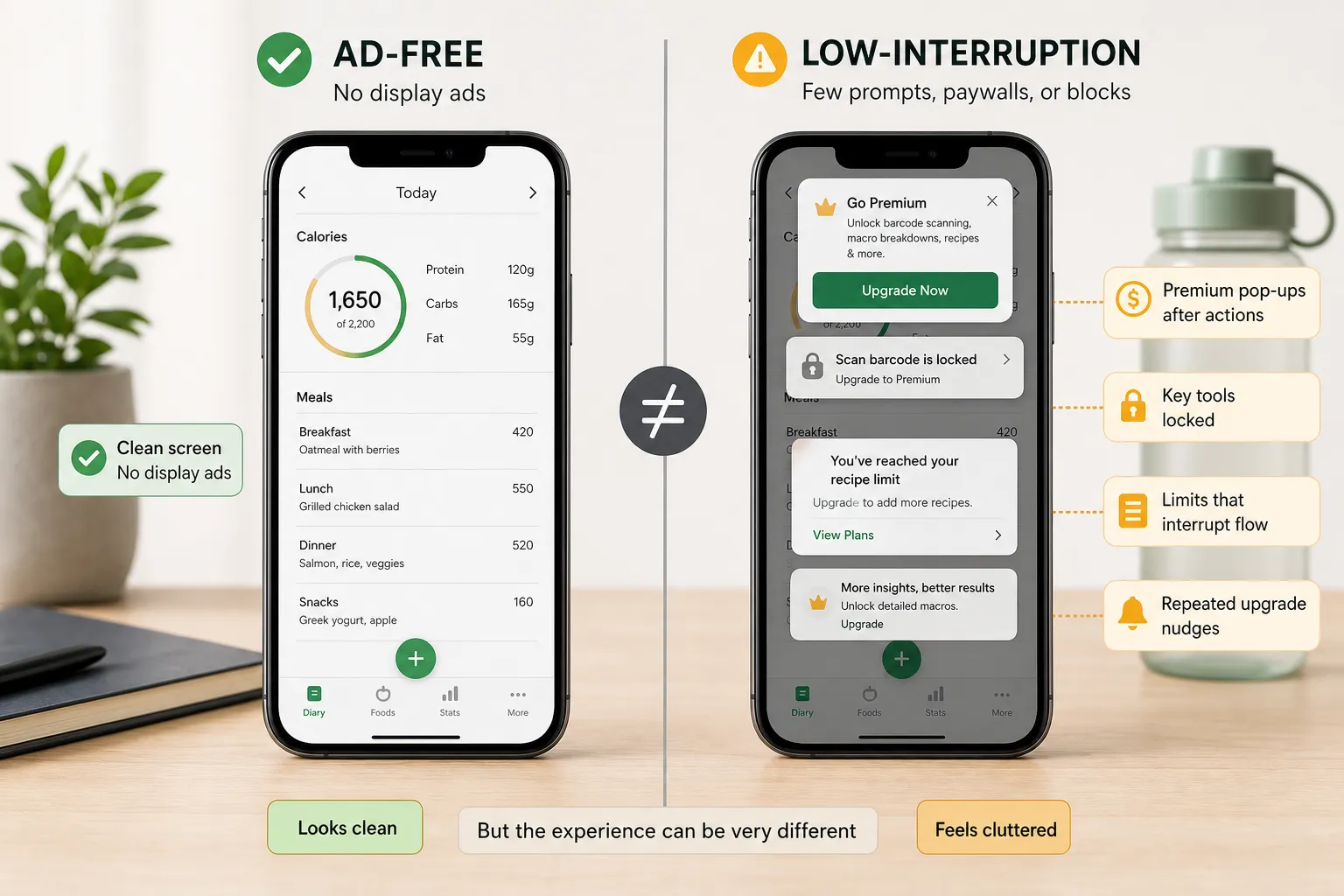
Vsako aplikacijo smo ocenili po petih praktičnih dejavnikih:
- Prekinitve: kako pogosto oglasi, pop-upi, pozivi za nadgradnjo ali premium namigi prekinejo normalno beleženje.
- Brezplačna vrednost: ali so osnovno beleženje obrokov, iskanje hrane in dnevno spremljanje res uporabni brez plačila.
- Hitrost beleženja: kako hitro dodaš pogosta živila, shraniš obroke, kopiraš včerajšnji vnos ali ponoviš pogoste vnose.
- Uporabnost baze: ne samo velikost baze, ampak kakovost iskanja, preverjeni vnosi, kjer so na voljo, in zanesljivost skenerja črtnih kod.
- Poštenost nadgradnje: ali so plačljive funkcije postavljene razumno, posebej pri skeniranju črtnih kod, makrohranilih, trendih in receptih.
V teh ocenah smo upoštevali tudi ujemanje z uporabnikom. Nekateri želijo bolj preprosto aplikacijo z manj zasloni in manj prehranskih podrobnosti, drugi pa aplikacijo za makrohranila z globljimi podatki. Višja uvrstitev tukaj ne pomeni, da je aplikacija najboljša za vsakega uporabnika. Pomeni, da je za svojo ciljno publiko posebej dobro obvladala prekinitve in vsakodnevno beleženje.
Zakaj so aktualni zapisi in novejše ocene pomembni
Strani v trgovinah z aplikacijami so uporabne, ker pokažejo, kako je aplikacija pozicionirana prav zdaj, vključno s posnetki zaslona, naročniškim jezikom in poudarkom funkcij. Na primer, aktualni Lose It! zapis v App Store in Cronometer zapis v App Store olajšata zdravorazumsko preverjanje tega, kar je javno izpostavljeno, preden to primerjamo z novejšimi povratnimi informacijami uporabnikov.
To še vedno ni laboratorijski test, niti ni mišljeno kot tak. Je transparenten, bralcu prijazen način, kako presodit, ali je aplikacija dovolj mirna za priporočilo, ali je brezplačni paket iskreno uporaben in ali se plačljive nadgradnje zdijo poštene namesto da so stalno na poti.
Kibora, Cronometer in FatSecret so najmočnejše izbire z malo prekinitvami
Če ti je prioriteta aplikacija za beleženje kalorij brez oglasov, ki je še vedno praktična iz dneva v dan, te tri izstopajo iz različnih razlogov. Niso pa enake izbire, in razlike so pomembnejše od majhnih zmag v številu funkcij.
Kibora
Kibora najbolj ustreza ljudem, ki hočejo, da je beleženje mirno, zasebno in uporabno po vnosu. Privlačnost ni samo v hitrem vnosu kalorij. Gre za to, da lahko vneseš obrok, dobiš usmeritev, ki ti pomaga razumet vnos, in greš naprej brez občutka, da te vleče v glasno nadzorno ploščo ali stalni pritisk za nadgradnjo.
Zato je posebej dobra za bralce, ki ne marajo običajnega vzorca aplikacij za kalorije, kjer se vsak zaslon spremeni v prodajni lijak. Mirnejši vmesnik lahko zmanjša trenje, ampak pravi razlog, da je Kibora tukaj visoko, je, da v središče postavi razmislek in usmeritev, ne samo surove številke. Če želiš sam/a preverit nabor funkcij, je njen pregled funkcij najboljše mesto za primerjavo, kaj je vključeno.
Čisto deluje predvsem celoten način interakcije. Bolj ustreza nekomu, ki želi razumet, kaj obrok pomeni v kontekstu, ne samo cel dan gledat, kako se števec preostalih kalorij premika gor in dol.
Točka frustracije je preprostejša: čistejši produkt ni avtomatsko pravi za vsakega uporabnika. Če potrebuješ zelo veliko bazo živil, zelo podrobne razčlenitve mikrohranil ali širok nabor naprednih orodij za beleženje, vseeno primerjaj Kibora s svojimi potrebami in cenovnimi preferencami, preden jo izbereš samo zato, ker je izkušnja mirnejša.
Za večino bralcev, ki dajejo prednost malo prekinitvam, je tukaj plačljiva možnost lahko bolj smiselna kot lovljenje aplikacije, ki je brezplačna za prenos, a ima drugje bolj agresivne pozive za nadgradnjo. Brezplačen dostop je pomemben, ampak pomembno je tudi, ali se produkt zdi pošten, ko ga dejansko uporabljaš.
Cronometer
Cronometer je izbira za bralce, ki najprej hočejo prehranske podrobnosti, preprostost pa šele potem. Je ena boljših alternativ MyFitnessPal, če tvoja verzija “čistega” pomeni manj trikov in bolj natančno beleženje makro- in mikrohranil.
Njegova največja prednost je količina uporabnih prehranskih podatkov, ki jih prikaže. Cronometer se pozicionira okrog podrobnega beleženja, njegova trenutna struktura paketov pa še vedno ločuje brezplačno verzijo od naprednejšega Gold paketa, ki dodaja globlje funkcije nad osnovno izkušnjo beleženja, glede na Cronometer stran s cenami.
Tukaj čisto deluje podatkovno usmerjen dizajn. Aplikacija se ne zanaša toliko na bleščeče motivacijske zanke kot nekateri konkurenti, kar bo všeč uporabnikom, ki želijo aplikacijo za beleženje kalorij s skenerjem črtnih kod in več substance za vnosi. Zapis v App Store jo še naprej predstavlja kot aplikacijo za prehrano, ne samo kot orodje za hujšanje, kar se ujema s tem, kako jo veliko uporabnikov uporablja v praksi: za makrohranila, mikrohranila in opažanje vzorcev, ne samo za skupne kalorije.
Kompromis je, da lahko Cronometer deluje kot veliko vsega, če želiš samo hitro beleženje kalorij. Za začetnike ali za kogarkoli, ki želi, da je beleženje lažje in ne bolj analitično, lahko dodatne podrobnosti ustvarijo trenje namesto jasnosti. Z drugimi besedami, to je izbira za prehranske podrobnosti, ne avtomatsko najbolj mirna izbira.
Brezplačna verzija Cronometer je za veliko uporabnikov še vedno izvedljiva, posebej če potrebuješ predvsem beleženje hrane in osnovni pregled prehrane. Plačljivo je bolj smiselno, če že veš, da želiš napredne Gold funkcije, ne zato, ker bi bila brezplačna verzija neuporabna.
FatSecret
FatSecret najbolj ustreza uporabnikom z omejenim budgetom, ki želijo praktičen, brezplačno-najprej števec kalorij in nočejo občutka, da je vsaka uporabna funkcija zaklenjena za naročnino. Za osnovne potrebe štetja kalorij, kot so dnevnik hrane, iskanje kalorij in vsakodnevno beleženje, ponuja močno vrednost brez občutka tako agresivne monetizacije kot pri nekaterih večjih imenih.
Zato je tukaj kot izbira za brezplačno-najprej vrednost. Njegov zapis v App Store poudarja glavna orodja, ki jih večina ljudi dejansko uporablja, vključno z dnevnikom hrane in beleženjem prehrane, in prav ta neposrednost je del privlačnosti za bralce, ki želijo čim bolj izkušnjo aplikacije za beleženje kalorij brez oglasov, brez plačila vnaprej. Brezplačno za prenos še vedno ne pomeni brez vseh pozivov, ampak ravnotežje je prijaznejše kot pri mnogih freemium tekmecih.
Uporabnike lahko zmoti izpiljenost. FatSecret lahko deluje bolj uporabniško-osnovno kot premium, in nekateri bralci bodo to opazili takoj, če ga primerjajo s čistejšimi, modernejšimi vmesniki. Prav tako ne ponuja enakega občutka osredotočenosti na interpretacijo kot Kibora ali enake prehranske globine kot Cronometer.
Tukaj je najbolj smiselna brezplačna uporaba. Plačljivo je vredno razmislit šele, če ti je osnovni pristop aplikacije že všeč in želiš gradit na njem, ne če upaš, da jo bo naročnina nenadoma spremenila v čisto drug razred produkta.
Če je tvoj glavni cilj mirno beleženje, je Kibora najbolj posebna možnost med tremi, ker naredi več kot samo odstrani nered. Poskuša naredit čas po beleženju uporaben namesto zahteven. Cronometer je boljši, ko želiš bogatejšo analizo hranil, FatSecret pa, ko je cenovna občutljivost najpomembnejša.
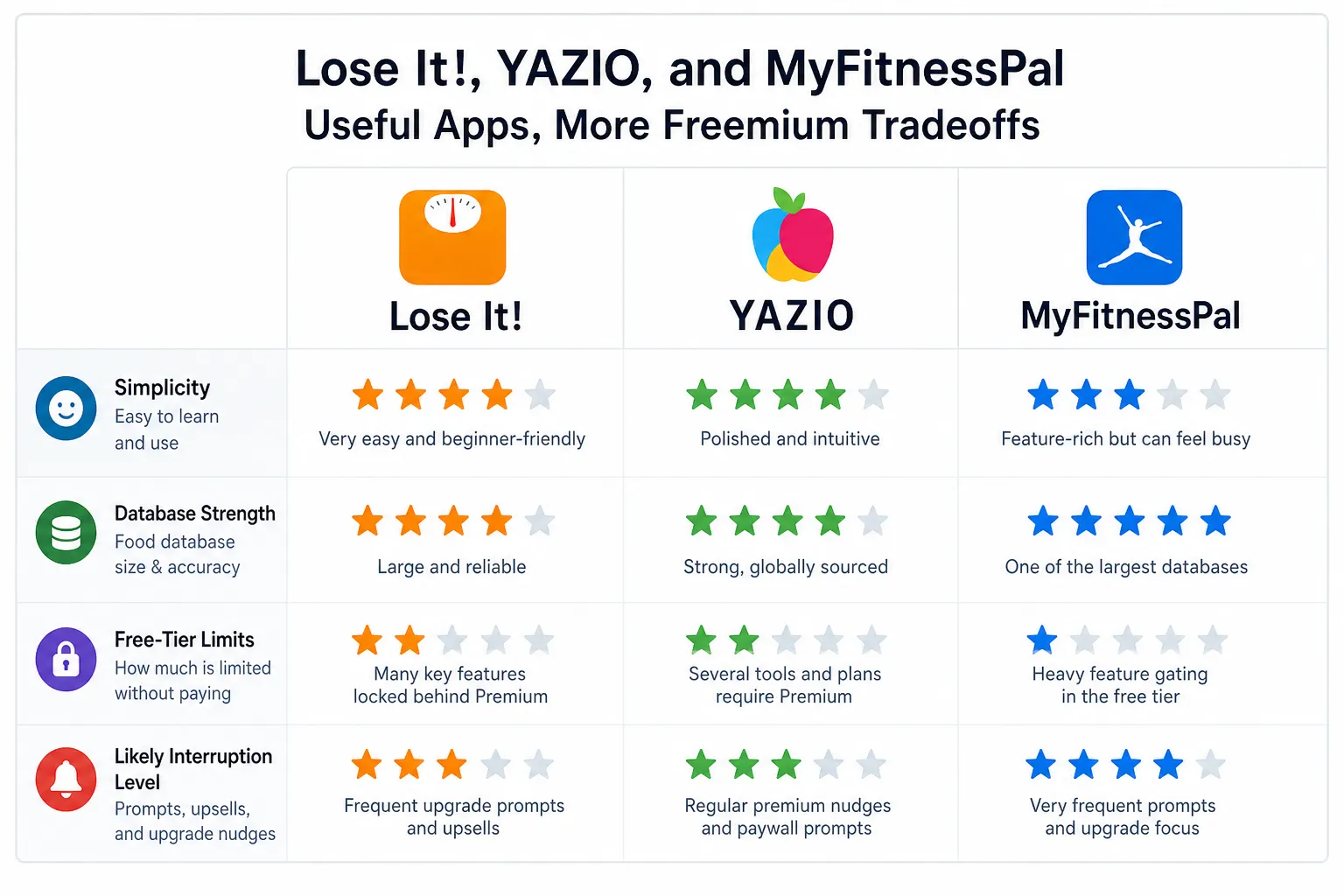
Lose It!, YAZIO in MyFitnessPal so uporabne, ampak pričakuj več freemium kompromisov
To niso slabe aplikacije. Pravzaprav so pogosto prva imena, ki jih ljudje probajo, ker naredijo beleženje hrane dostopno, poznano in bogato s funkcijami. Ampak če je tvoj glavni cilj najti najboljše aplikacije za beleženje kalorij brez oglasov ali vsaj z manj prekinitvami, jih je bolje opisat kot kredibilne freemium možnosti kot pa najbolj čiste izbire.
Ključna razlika je preprosta: brezplačno za prenos ne pomeni brez pozivov za nadgradnjo, zaklenjenih funkcij ali ponavljajočih namigov za premium. Preden se odločiš, preveri, ali so funkcije, ki so ti najbolj pomembne, kot so skeniranje črtnih kod, uvoz receptov, beleženje makrohranil in shranjeni obroki, v brezplačnem paketu res polno uporabne.
Lose It!
Lose It! ti je lahko hitro všeč. Vmesnik je prijazen začetnikom, beleženje je hitro, aplikacija pa na svoji uradni premium strani jasno razloži, kaj lahko delaš s plačljivim paketom.
- Izberi jo, če: želiš preprosto beleženje kalorij, izpiljen uvod v uporabo in aplikacijo, ki je takoj dostopna.
- Preskoči jo, če: želiš aplikacijo za beleženje kalorij brez oglasov ali z minimalnimi premium pozivi, ali če pričakuješ napredna orodja brez naleta na omejitve plačljivega paketa.
Za veliko uporabnikov Lose It! dobro deluje kot začetna aplikacija. Kompromis je, da so nekatere bolj privlačne funkcije lahko za premium, zato se lahko brezplačna izkušnja zdi malo bolj usmerjena v konverzijo, kot bi si želeli bralci, ki iščejo mirnejšo aplikacijo.
YAZIO
YAZIO ima izpiljen videz in močno identiteto beleženja prehrane. Njegova premium stran jasno pokaže, da aplikacija uporablja freemium model, kjer je plačljiv dostop vezan na širši nabor planov, orodij za beleženje in coaching funkcij.
- Izberi jo, če: ti je všeč moderen vmesnik in želiš aplikacijo, ki združi beleženje kalorij s širšo prehransko strukturo.
- Preskoči jo, če: posebej iščeš aplikacijo za beleženje kalorij brez oglasov ali brezplačno aplikacijo za štetje kalorij brez oglasov in trenja zaradi nadgradenj.
To ne pomeni, da je YAZIO slaba izbira. Pomeni samo, da je izkušnja lahko močneje oblikovana okrog premium konverzije kot pri aplikacijah z najmanj prekinitvami v tem vodiču.
MyFitnessPal si zasluži pošteno omembo, ker ostaja ena najmočnejših mainstream možnosti. Ima veliko prepoznavnost znamke, široko bazo živil in veliko poznanosti za ljudi, ki imajo leta shranjenih živil ali zgodovine obrokov. Njegov zapis v App Store tudi pokaže, kako centralno so naročnine in premium pozicioniranje zdaj del produktne izkušnje, poleg novejših tem v ocenah, ki omenjajo frustracije s pozivi in omejitvami v brezplačni verziji v Apple App Store.
- Izberi jo, če: jo že uporabljaš, ceniš njen ekosistem ali potrebuješ kontinuiteto z obstoječo zgodovino hrane in shranjenimi obroki.
- Preskoči jo, če: je tvoje glavno merilo miren UX, manj naročniških pozivov ali čistejša brezplačna izkušnja.
Zato je MyFitnessPal lahko še vedno pametna izbira, čeprav tukaj ni najčisteje uvrščena. Če posebej primerjaš možnost z manj prekinitvami z največjim mainstream imenom, ti lahko ta poglobljen pogled na Kibora vs MyFitnessPal pomaga razjasnit kompromise.
Praktičen zaključek je, da popularnost in moč beleženja nista isto kot dizajn z malo trenja. Če so ti najbolj pomembni poznanost, specifična funkcija ali stara zgodovina hrane, ti te aplikacije še vedno lahko dobro ustrezajo. Če je prioriteta najmanj nadležna dnevna izkušnja, poglej mimo imen znamk in najprej preveri omejitve brezplačnega paketa.
Uskladi aplikacijo s tem, kako dejansko beležiš hrano
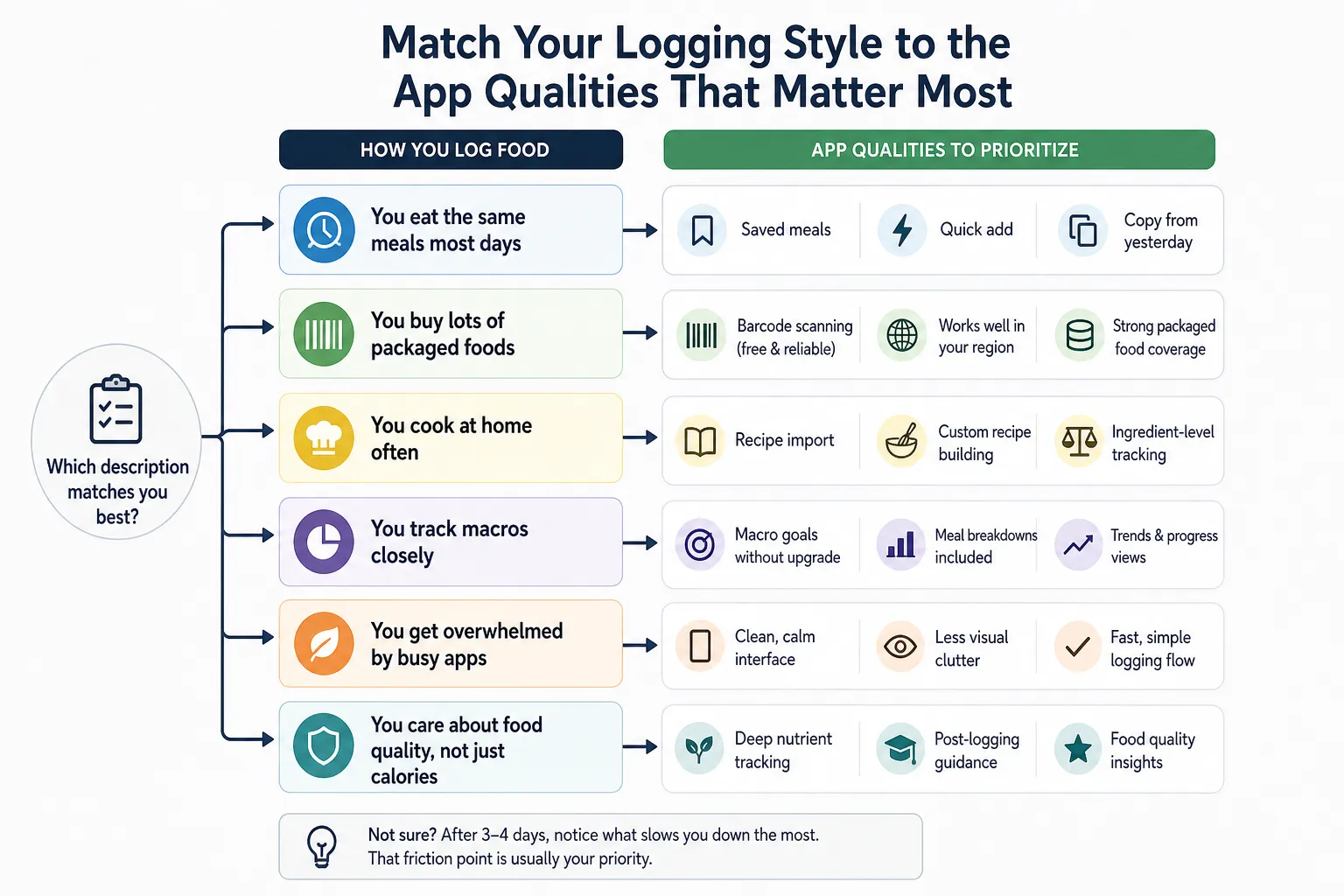
Najboljša aplikacija za beleženje kalorij brez oglasov je ponavadi tista, ki ustreza tvojim resničnim navadam beleženja, ne tista z najdaljšim seznamom funkcij. Močna aplikacija je lahko še vedno nadležna, če se njene prednosti ne ujemajo s tem, kako ješ, kupuješ in beležiš.
Tukaj naj se razvrščanje spremeni v odločanje. Brezplačno za prenos tudi ne pomeni brez pozivov za nadgradnjo, zaklenjenih orodij ali trenja, ko začneš aplikacijo uporabljat vsak dan.
Hiter način za izbiro
Uporabi ta mini vodič za odločanje, da zožiš izbor:
- Večino dni ješ iste obroke: Daj prednost shranjenim obrokom, nedavnim živilom, hitremu dodajanju in kopiranju od včeraj. Če se zajtrk in kosilo komaj spreminjata, je hitrost pomembnejša od globokih prehranskih nadzornih plošč.
- Kupuješ veliko pakirane hrane: Preveri, ali je skeniranje črtnih kod brezplačno ali plačljivo, kako zanesljivo deluje in ali dobro deluje v tvoji regiji. Aplikacija za beleženje kalorij s skenerjem črtnih kod je precej manj uporabna, če je funkcija zaklenjena ali je lokalna pokritost izdelkov šibka.
- Pogosto kuhaš doma: Uvoz receptov in ustvarjanje lastnih receptov postavi visoko na seznam. Za domačega kuharja so ta orodja ponavadi pomembnejša kot največja splošna baza hrane.
- Natančno beležiš makrohranila: Poglej, ali so cilji makrohranil, razčlenitve po obrokih in prikazi trendov na voljo brez nadgradnje. Aplikacija za makrohranila pomaga samo, če orodja za makrohranila, ki jih potrebuješ, niso stalno skrita za premium pozivi.
- Te natrpane aplikacije hitro preplavijo: Izberi najbolj miren vmesnik, tudi če druga aplikacija tehnično ponuja več. Manj vizualnega nereda lahko olajša vztrajanje pri vsakodnevnem beleženju.
- Pomembna ti je kakovost hrane, ne samo kalorije: Globina hranil in usmeritev po vnosu sta lahko pomembnejši od surovih kalorijskih seštevkov. Tu je Cronometerjev fokus na mikrohranila ali Kiborin slog usmeritev lahko uporabnejši kot osnovni števec kalorij.
Kako to izgleda v praksi
Začetnik, ki ponavlja zajtrk in kosilo, ponavadi ne potrebuje najbolj napredne platforme. Potrebuje aplikacijo, ki naredi ponavljajoče beleženje skoraj avtomatsko, da navada ostane lahka in se ne spremeni v administracijo.
Uporabnik, ki trenira moč, ima drugačno definicijo “najboljše”. Če so beljakovinski cilji, ravnotežje makrohranil in tedenski trendi osrednji del rutine, potem mora čistejša aplikacija za štetje kalorij brez oglasov te poglede podpirat na praktičen način.
Nekdo, ki kuha doma, skeniranja črtnih kod mogoče skoraj ne uporablja. Za to osebo so močna orodja za recepte lahko vrednejša kot ogromna baza pakirane hrane, posebej če so večerje domače in se spreminjajo sestavina po sestavina.
Če nisi prepričan/a, kateri slog ti ustreza, bodi pozoren/a na to, kaj te po treh ali štirih dneh upočasni. Točka trenja je pogosto funkcija, ki bi morala vodit tvojo izbiro.
Ko izbereš aplikacijo, je naslednji korak naredit navado uporabno, ne samo dosledno. Če želiš praktičen okvir za ta del, poglej kako naredit beleženje kalorij dejansko uporabno.
Preizkusi brezplačno verzijo, preden plačaš za čistejši zaslon
Najhitrejši način, da oceniš izkušnjo aplikacije za beleženje kalorij brez oglasov, je testirat svoj resnični potek dela, ne marketinške strani. Brezplačno za prenos ne pomeni brez pozivov za nadgradnjo, zaklenjenih orodij ali trenja, ki se pokaže šele, ko začneš beležit.
Preprost enodnevni test je ponavadi dovolj. Če te aplikacija med kratkim testom večkrat prekine, bo po dveh tednih vsakodnevne uporabe verjetno še bolj nadležna.
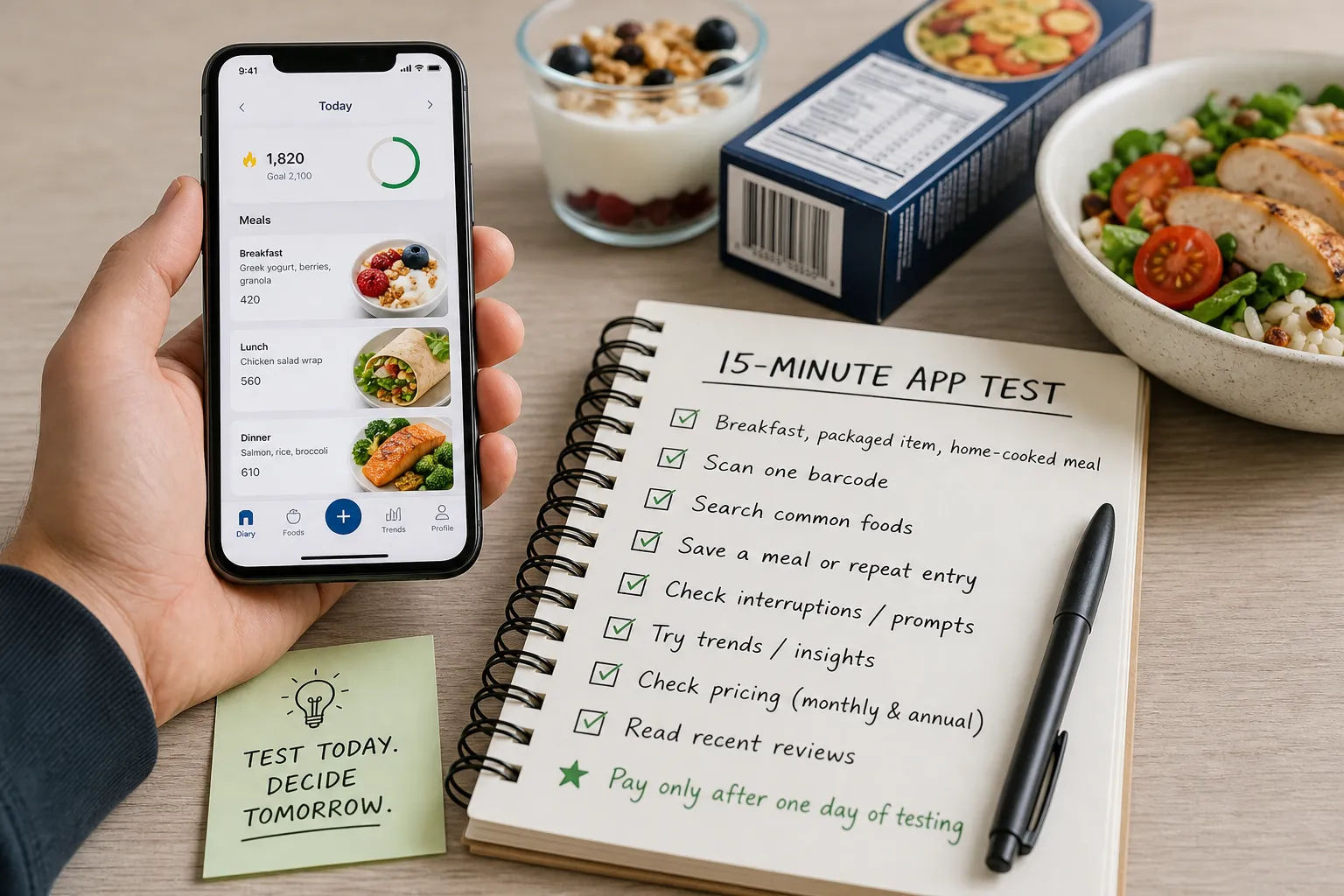
Naredi 15-minutni test, ki odraža normalno uporabo
Začni z živili, ki bi jih dejansko vnesel/a. Uporabi en običajen zajtrk, en restavracijski ali pakiran izdelek in en doma kuhan obrok, da vidiš, kako aplikacija obravnava različne vrste vnosov.
Ne predpostavljaj, da je skeniranje črtnih kod vključeno v brezplačno verzijo. Takoj poskusi skenirat en pravi izdelek, ker je ta funkcija pogosto omejena, spremenjena ali različno urejena glede na platforme in pakete.
Poišči nekaj pogostih živil in poglej kakovost rezultatov. Zanima te, ali se vnosi zdijo uporabni in razumno preverjeni, ali pa je seznam poln podvojenih vnosov, ki te upočasnijo.
Nato shrani obrok ali ustvari ponavljajoč vnos. Za veliko ljudi je to pomembnejše od napredne analitike, ker je najmanj nadležna aplikacija pogosto tista, ki naredi jutrišnje kosilo tako enostavno kot današnje.
Bodi pozoren/a, kje se zgodijo prekinitve
Vse trenje ni enako. Nekatere aplikacije premium potiskajo med nastavitvijo, druge prekinejo iskanje, nekatere dodajo pozive po vnosu, druge pa prodajni poziv prihranijo za trende ali vpoglede.
Ta razlika je pomembna, ker je zaslon za nadgradnjo po končanem vnosu lažje tolerirat kot tistega, ki prekine tok sredi vnosa. Če je miren UX prioriteta, so aplikacije kot Kibora pogosto bolj smiselne, ko ohranijo glavno pot beleženja čisto in pustijo globlje usmeritve za čas po končanem vnosu.
Pred plačilom preveri cene na napravi, ki jo dejansko uporabljaš. Aktualne podrobnosti naročnine in dostop do funkcij se lahko razlikujejo, zato preveri paket na uradni strani, kot je MyFitnessPal stran s cenami, in potrdi, ali sta na voljo mesečna in letna možnost.
Pomaga tudi, da pogledaš živi zapis aplikacije in novejši tok ocen, ne samo skupno oceno z zvezdicami. Strani v App Store za aplikacije, kot sta Lose It! in YAZIO, lahko pokažejo aktualna naročniška sporočila, novejše pritožbe in ali uporabniki omenjajo nove pozive ali spremembe funkcij.
Ker se monetizacija pogosto spreminja, vsako priporočilo, tudi to, vzemi kot izhodišče in ne kot trajno sodbo. Najboljša brezplačna aplikacija za štetje kalorij zate je tista, ki ti ne hodi na pot pri nalogah, ki jih ponavljaš vsak dan.
Uporabi ta hiter seznam, preden se naročiš na katerokoli aplikacijo za beleženje kalorij brez oglasov ali freemium aplikacijo za beleženje kalorij:
- Namesti 2 do 3 aplikacije, ki izgledajo obetavno.
- Preskoči neobvezen uvod v uporabo, če se da.
- Vnesi en zajtrk, en pakiran ali restavracijski izdelek in en doma kuhan obrok.
- Skeniraj eno črtno kodo in potrdi, ali je skeniranje dejansko na voljo.
- Poišči nekaj pogostih živil in opazuj, ali so vnosi čisti ali podvojeni.
- Shrani en obrok ali ponavljajoč vnos in poglej, kako enostavno ga je ponovno uporabit.
- Enkrat odpri trende ali vpoglede in opazuj, kdaj se pojavijo premium pozivi.
- Preveri mesečno in letno ceno na svoji platformi, ne samo v člankih.
- Preberi novejše ocene iz zadnjih nekaj tednov ali mesecev, ne samo glavne ocene.
- Plačaj šele po enem dnevu testiranja, ki pokaže, da aplikacija podpira poteke dela, ki jih dejansko uporabljaš.
Izberi aplikacijo, ki ti pusti vnest in it naprej
Razvrstitev je precej preprosta: Kibora sodi blizu vrha, če želiš miren vmesnik, pošteno monetizacijo in uporabne usmeritve po vnosu; Cronometer je najmočnejša izbira za globlje prehranske podrobnosti; FatSecret je brezplačno-najprej možnost, ki jo je vredno testirat; Lose It!, YAZIO in MyFitnessPal pa ostajajo uporabne mainstream izbire, če preneseš več freemium kompromisov. Ta vrstni red je manj pomemben kot razlog za njim: čist UX, pošten pritisk za nadgradnjo in uporabne povratne informacije naredijo za vsakodnevno doslednost več kot daljši seznam funkcij sam po sebi.
Praktičen način izbire je, da ignoriraš marketinške strani in narediš enotedenski test z resničnimi obroki. Če ti aplikacija pomaga hitro vnesti zajtrk, kosilo, prigrizke in večerjo, brez nadležnih oglasov ali stalnih pozivov za nadgradnjo, je verjetno boljša izbira kot močnejša aplikacija, ki doda trenje vsakič, ko jo odpreš. Najboljša aplikacija za beleženje kalorij brez oglasov je tista, ki odstrani trenje iz vsakodnevnega beleženja, da lahko zabeležiš, kaj si jedel/a, in greš naprej s svojim dnevom.
- Ključni viri
- Uradna stran s cenami MyFitnessPal
- Zapis aplikacije MyFitnessPal (Apple App Store)
- Uradna stran s cenami Lose It!
- Zapis aplikacije Lose It! (Apple App Store)
- Cronometer stran s cenami
- Zapis aplikacije Cronometer (Apple App Store)
- Stran aplikacije/produkta FatSecret
- Zapis aplikacije FatSecret (Apple App Store)
- Uradna stran s cenami YAZIO
- Zapis aplikacije YAZIO (Apple App Store)


