


- What you'll learn
- Which calorie tracker apps rank highest in 2026 for everyday use, not just feature count
- Why Kibora, MyFitnessPal, Cronometer, Lose It!, MacroFactor, FatSecret, and Noom land where they do
- How to judge logging speed, database trust, and insight quality before choosing an app
- What free plans usually include, and which useful tools are often hidden behind paywalls
- Why barcode scanning, AI meal logging, and photo logging help with speed but not always with accuracy
- Which app fits different goals better, from weight loss and macro tracking to nutrient detail and behavior change
Downloading a calorie tracker app is easy. Sticking with one is harder once logging a homemade dinner takes five minutes, barcode scanning is locked behind a subscription, recipe import is clumsy, or the app gives you a pile of numbers with no help spotting patterns in your week.
This ranking focuses on real-life usefulness, not feature count. That means we weigh the things that actually decide whether a food diary app survives past week two: logging speed, accuracy safeguards, free-plan value, insight quality, and how well the app fits a specific goal like weight loss, macro tracking, nutrient detail, or behavior change.
Accuracy also needs a careful lens. Food databases vary, portion estimates are messy, homemade meals are hard to standardize, and AI calorie tracker or photo calorie tracker features can be convenient without being consistently precise.
Early verdict: Kibora, MyFitnessPal, Cronometer, Lose It!, MacroFactor, FatSecret, and Noom all earn a place here, but for different reasons. Some win on database depth, some on coaching, some on nutrient analysis, and some on making daily logging calm and fast enough to keep doing.
That distinction matters because free-plan limits, ads, paywalls, and pricing changes can quickly reshape the value of a calorie counting app. The next section ranks the best calorie tracker apps of 2026 by how useful they are in everyday life, not how long their feature list looks.
The 2026 ranking: the best calorie trackers by real-life use
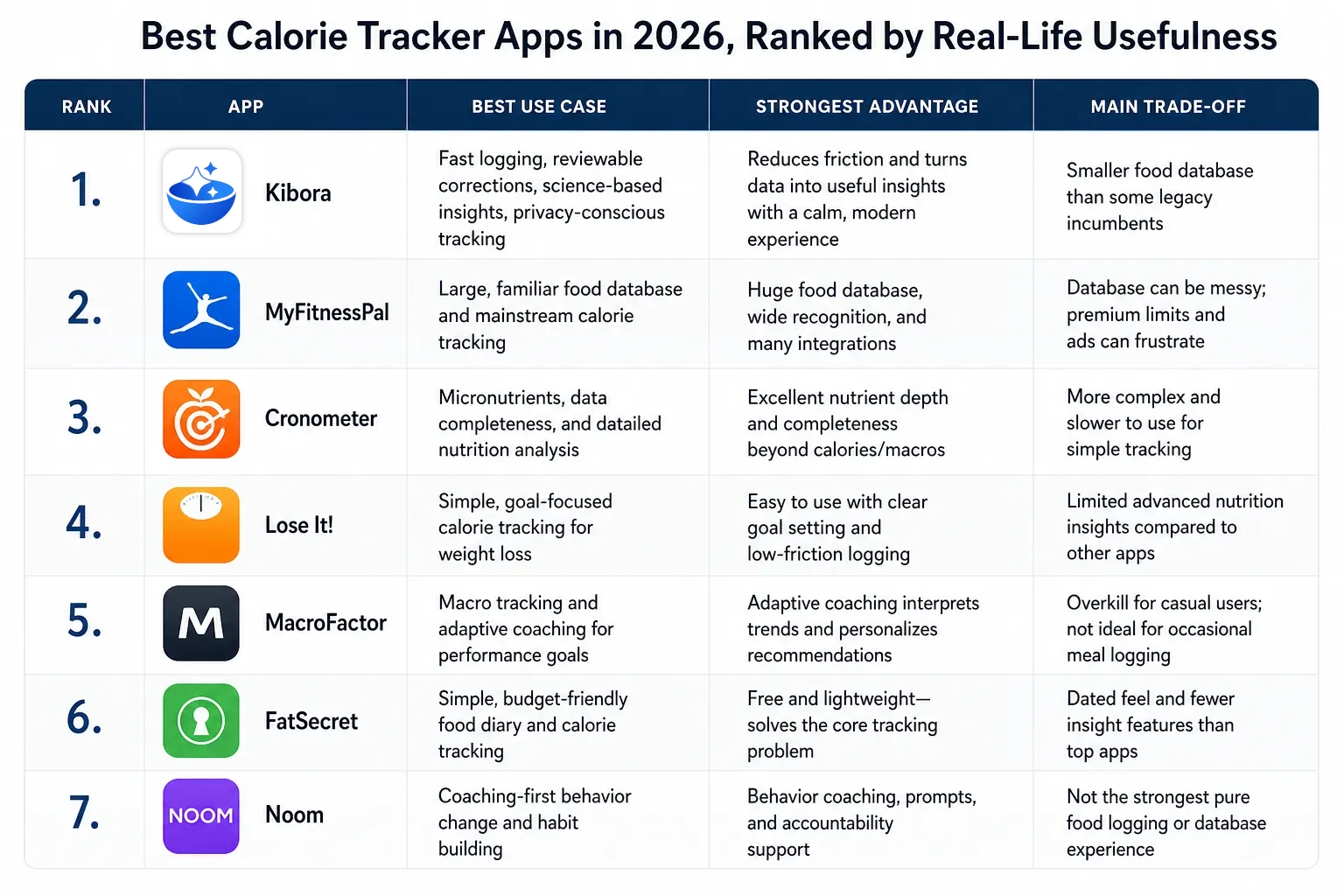
If you want the short answer, start here: the best calorie tracker apps in 2026 are Kibora, MyFitnessPal, Cronometer, Lose It!, MacroFactor, FatSecret, and Noom, in that order for most people. This ranking prioritizes fast daily logging, trustworthy-enough food data, useful insight after logging, and how usable the app remains without pushing every key action behind a subscription.
Best overall for most people: Kibora. Best for database familiarity: MyFitnessPal. Best for nutrient detail: Cronometer. Best for simple weight-loss tracking: Lose It!. Best for macro coaching: MacroFactor. Best budget-friendly basic diary: FatSecret. Best for coaching-first behavior change: Noom.
1. Kibora
Best for: people who want fast logging, reviewable corrections, science-based insights, a calm interface, and privacy-conscious tracking. It ranks first because it focuses on the part that actually determines long-term use: reducing friction without turning the log into a black box.
Why it ranks here: Kibora’s strongest case is not “biggest database.” It is the more useful tracker model: get food in quickly, review or correct entries, and receive interpretation that helps you act on patterns instead of just collecting numbers. If you want to explore it further, see Best Calorie Tracker Apps in 2026.
What free users should check: verify which core logging and insight features are available without a subscription before committing. Also check whether the foods you log most often are easy to enter repeatedly.
Biggest caveat: if you rely on an enormous legacy database of obscure packaged foods, an incumbent may still feel broader. Kibora wins more on speed, reviewability, and post-log usefulness than on sheer database age.
2. MyFitnessPal
Best for: users who want a large, familiar food database and mainstream calorie tracking with broad ecosystem recognition. It ranks second because its coverage and familiarity are still genuinely useful for many people.
Why it ranks here: MyFitnessPal remains one of the default answers when someone wants a calorie counting app with lots of searchable foods, common restaurant items, and integrations, as reflected in its major app store presence on Apple App Store and Google Play. For users who care most about “can I probably find this item fast,” that matters.
What free users should check: look closely at current barcode scanner access, ad load, and which analytics are reserved for premium. Free to download does not always mean fully useful without compromise.
Biggest caveat: database size is not the same as database cleanliness. Familiarity helps, but community-heavy entries can create duplication or inconsistent nutrition data, and some users find premium limits frustrating.
3. Cronometer
Best for: people who care about micronutrients, data completeness, and seeing more than calories and macros. It ranks third because it is one of the clearest upgrades when your question is “what nutrients am I actually getting?”
Why it ranks here: Cronometer is especially strong when nutrient depth matters more than mainstream convenience. If you track vitamins, minerals, fiber, and other detailed nutrition targets, it often gives a more informative picture than a typical food diary app.
What free users should check: confirm whether the charts, custom targets, and deeper analysis tools you want are available at your plan level. Also test whether the interface feels efficient enough for daily use, because depth can come with more complexity.
Biggest caveat: it is not the fastest or most approachable app for everyone. If all you need is quick calorie logging, Cronometer can feel more technical than necessary.
4. Lose It!
Best for: people who want an approachable, goal-focused calorie tracker without needing deep nutrient analysis. It ranks fourth because it keeps the mainstream weight-loss use case simple and understandable.
Why it ranks here: Lose It! has long been strong at helping users set calorie goals, log food with relatively low friction, and stay focused on the basic weight-management loop. For many users, that straightforwardness is more valuable than advanced analysis.
What free users should check: review current limits around barcode scanning, meal planning tools, and trend analysis. Also pay attention to whether the free experience gives you enough without repeated upgrade prompts.
Biggest caveat: it is better at mainstream calorie tracking than at advanced nutrition interpretation. If you want rich micronutrient detail or adaptive coaching logic, other apps rank higher.
5. MacroFactor
Best for: serious macro tracking and adaptive coaching, especially for physique, performance, or body-composition goals. It ranks fifth because it becomes much more valuable when you want coaching logic, not just a diary.
Why it ranks here: MacroFactor stands out for users who want the app to interpret intake and body-weight trends in a structured way. This is a different promise from a generic nutrition tracker app, and for the right user, it can be a major advantage.
What free users should check: confirm whether there is a meaningful free trial or free tier that lets you assess the coaching system properly. This is not the app to choose casually if you only want occasional meal logging.
Biggest caveat: it is overkill for many people. If you are not actively using macro targets or adaptive coaching, the extra structure may feel unnecessary compared with a simpler calorie tracker app.
6. FatSecret
Best for: users who want a simple, low-cost or free-style food diary app and can tolerate a more basic product feel. It ranks sixth because it still solves the core problem for many users without demanding much.
Why it ranks here: FatSecret often appeals to people who just want to log food, monitor calories, and move on. It is less polished than top-tier competitors, but its practicality keeps it relevant.
What free users should check: test the search experience, barcode workflow, and whether the interface feels dated in ways that slow you down. A basic app is fine if it is still fast enough to use consistently.
Biggest caveat: the product can feel less refined, and insight features may be less compelling than higher-ranked apps. It works best when your standards are “simple and serviceable,” not “best-in-class UX.”
7. Noom
Best for: people who want behavior-change coaching more than a traditional calorie database. It ranks seventh because its value is often less about logging quality and more about the surrounding coaching model.
Why it ranks here: Noom can be useful for readers who need accountability, prompts, and psychology-oriented support. If the main barrier is habit change rather than finding a good barcode scanner calorie app, that can matter more than pure tracking power.
What free users should check: inspect exactly how much of the coaching and tracking experience is available before paying. The usefulness of Noom depends heavily on what level of access you actually get.
Biggest caveat: it is not the strongest pure food logging app in this ranking. If you mainly want a fast, high-utility nutrition tracker app, other options are easier to justify.
Where AI and photo calorie trackers fit
Use AI calorie tracker and photo calorie tracker apps for convenience, not blind precision. They can reduce effort, especially for mixed meals, but meal recognition and portion estimates are still variable. That makes them useful as helpers inside a broader tracking workflow, not automatic top-ranked replacements for stronger manual logging systems.
Before choosing one, check two things: whether corrections are easy, and whether the free version is genuinely usable. A photo-first app is only helpful if you can quickly fix mistakes and still trust the log enough to learn from it.
What made an app rank higher than another
The ranking favored apps people can actually keep using. A calorie tracker app ranked higher if logging felt fast on an ordinary Tuesday, not just if it had an impressive feature list. That means we rewarded low-friction basics first: quick search, reliable barcode scanning, saved meals, recipe import, and custom foods that do not make repeat logging a chore.
Database size helped, but database trust mattered more. A huge food library is useful only if entries are reasonably clean, not flooded with duplicates, missing nutrition fields, or hard-to-verify user submissions. That is why some incumbents score well for breadth, while apps with smaller but more reviewable food data can still rank higher for real-life usefulness. For a broader comparison of that tradeoff, see Best Calorie Tracker Apps in 2026.
We also ranked what happens after you log. An app earned extra credit if it turned entries into something practical, such as trend charts, nutrient summaries, goal feedback, or useful prompts that help you notice patterns. A calmer app with clearer insight can beat a flashier AI calorie tracker if the latter saves a few seconds up front but gives vague or inconsistent takeaways later.
How we judged usefulness in plain language
- Daily logging speed: because even a very detailed calorie counting app fails if you stop using it.
- Food data quality: bigger is not always better if the database is messy or hard to verify.
- Repeat-work reduction: barcode scanner tools, custom foods, saved meals, and recipe import all matter.
- Post-log value: insights, summaries, and trends should help you do something with the data.
- Real cost: free plans, paywalls, and subscription friction affect whether an app is genuinely useful.
- Secondary extras: wearable sync and exports matter, but they did not outrank core logging quality.
Different eating styles change what “best” looks like. Someone who eats mostly packaged foods may care most about a fast barcode scanner calorie app. Someone who cooks from scratch may get more value from strong recipe tools, custom ingredients, and clearer macro and nutrient breakdowns.
We also looked for current complaint patterns, not just marketing claims. Recent App Store and Google Play reviews were useful for spotting recurring issues like logging friction, bugs, aggressive ads, or subscription frustration, while keeping in mind that reviews are signals, not definitive proof of quality (App Store, Google Play). That approach helps explain why an app with fewer flashy features can still rank above a more famous nutrition tracker app if it is simply easier to trust and easier to use every day.
Free calorie trackers are rarely free in the way people expect
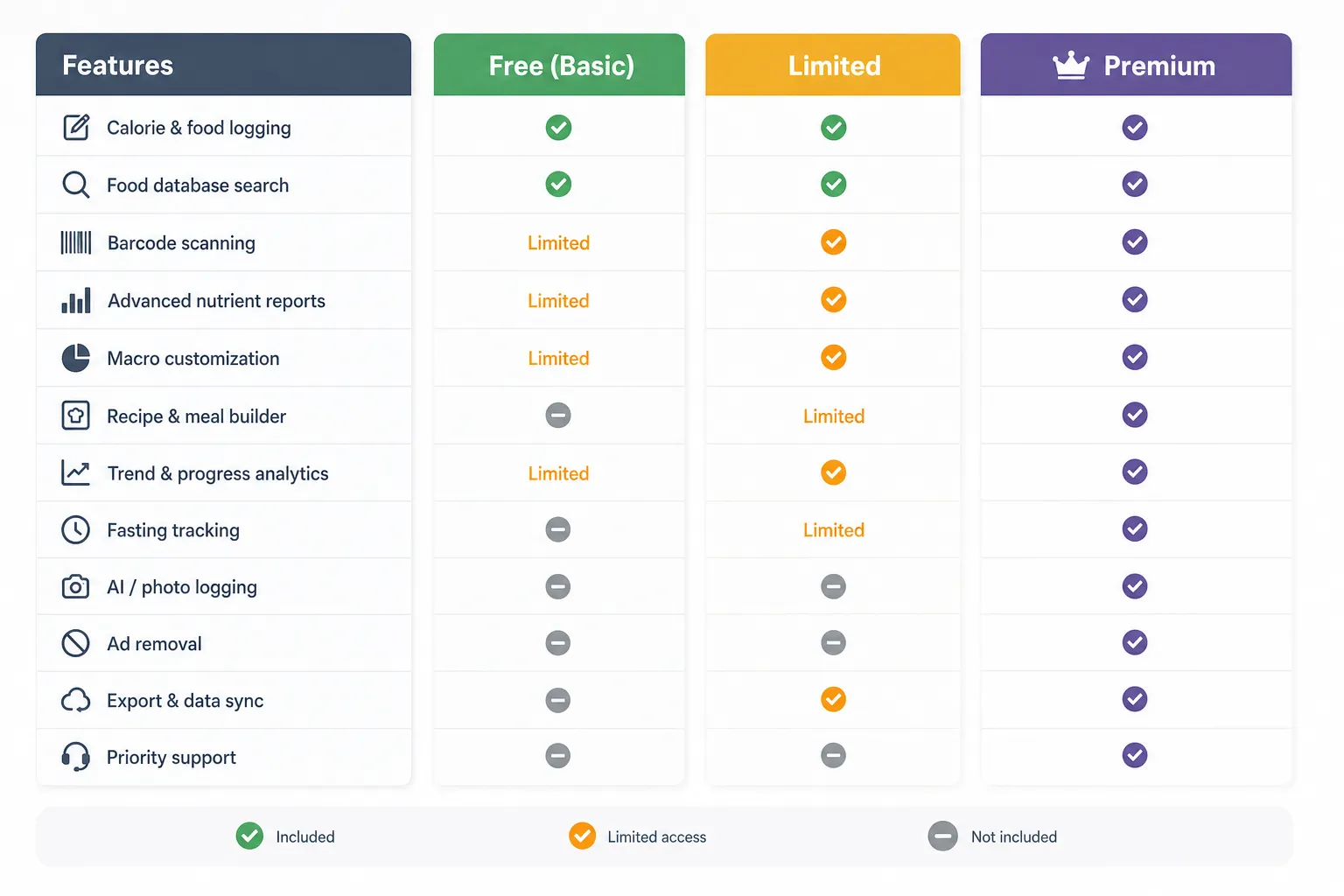
Check the free tier before you commit, because “free” usually means you can start logging, not that you get the features that make logging easy. In most calorie tracker apps, the real dividing line is whether the free plan is usable day after day without too much friction.
Free plans often cover basic calorie entry, weight logging, and a simple food diary. The features most likely to move an app from tolerable to genuinely helpful are often reserved for premium, including barcode scanning, advanced nutrient reports, recipe tools, macro customization, trend analytics, fasting support, AI or photo logging, and ad removal.
That does not automatically make paid apps bad value. Premium is worth considering if it saves you time every day or unlocks coaching, reports, or targets you will actually use. If all you need is a basic food diary and you do not mind ads or manual search, a free tier may be enough.
What “free” usually means in practice
- Free to download: you can install the app, but key features may be locked.
- Usable free tier: you can log consistently without constant upgrade pressure.
- Good paid value: the subscription unlocks tools that materially improve speed, clarity, or adherence.
Plan details also change more often than many roundup articles admit. MyFitnessPal, Lose It!, Cronometer, and MacroFactor all frame free and paid access differently on their official pricing pages, so it is smarter to verify current details directly at MyFitnessPal, Lose It!, Cronometer, and MacroFactor than to trust old screenshots or reviews.
For this ranking, subscriptions are judged by what they unlock, not by the mere fact that they exist. That keeps the comparison fair to simpler apps that stay useful for free, and to premium apps that genuinely earn their cost.
Accuracy is not one thing
Judge accuracy in layers, not as a single score. A calorie tracker can be excellent at finding foods quickly and still be weak on serving sizes, recipe math, or micronutrient completeness. That is why broad claims about the “most accurate” app are usually too vague to help.
Start by separating database accuracy from portion-size accuracy. A food entry might correctly reflect a nutrition label, but your logged amount can still be off. The reverse is also true: you may estimate the portion well, but the database entry itself could be outdated, duplicated, or missing nutrients, which is a common risk in crowd-sourced databases.
Where tracking errors usually happen
The biggest misses often come from foods that are hard to standardize. Restaurant meals, homemade recipes, sauces, cooking oils, and mixed dishes create more uncertainty than a packaged yogurt or protein bar. A salad that looks simple in a photo can swing a lot depending on dressing, oil, nuts, cheese, and the amount of protein added.
Generic entries are useful for awareness, but not always for precision. A homemade pasta dish may be close enough if your goal is rough consistency, but it is less reliable if you care about tighter macro targets. In those cases, recipe-level logging is usually more trustworthy than choosing the first generic result.
Barcode and photo logging help speed, not certainty
Barcode scanning reduces search friction, but it does not guarantee the entry is current. A barcode match can still be wrong if a product changed packaging, ingredients, or serving size. App Store and Google Play listings for major calorie tracker apps highlight barcode and AI logging as convenience features, which is useful context, but those features still need user review (Apple App Store; Google Play Store).
AI and photo logging are best treated as a first draft. They are getting better and can save time, especially for frequent meals, but portion size, hidden ingredients, sauces, lighting, and overlapping foods still create obvious failure points. Mixed meals are especially tricky because the app has to infer both what is present and how much of each component was eaten.
The most trustworthy apps make corrections easy to review. Transparent entries, editable serving sizes, and clear nutrition breakdowns matter because users need to spot and fix mistakes quickly. That is one reason the best tools in our Best Calorie Tracker Apps in 2026 comparison favor fast logging with reviewable corrections over flashy automation alone.
- Use packaged foods with barcode scan when possible, but compare the entry against the current label.
- Log recipes for meals you repeat instead of relying on a generic restaurant-style entry.
- Count oils, dressings, and sauces separately when they materially change calories.
- Treat photo logging as an estimate and correct obvious misses before moving on.
- Check macro and micronutrient completeness if nutrition detail matters for your goal.
Which calorie tracker should you choose?
Choose based on the job you need the app to do every day. For weight loss, the best calorie tracker app is usually the one that keeps logging easy enough to maintain. For macro tracking or nutrient analysis, a more detailed nutrition tracker app can be worth the extra complexity.
Pick Kibora if you want fast logging without a chaotic interface. It fits people who want a calm food diary app, reviewable corrections, privacy-conscious design, and insights that help explain patterns after logging instead of just storing entries.
Pick MyFitnessPal if you want the most familiar mainstream option. It is still a practical choice when broad database coverage matters most, especially if you already know the workflow. Just go in knowing that some useful features may sit behind premium tiers.
Pick Cronometer if detail matters more than speed. It is the strongest fit for micronutrient awareness, nutrient completeness, and a deeper nutrition view. If you care about vitamins, minerals, and more precise food data structure, this is the better match.
Pick Lose It! if you want approachable calorie tracking for weight loss. It is a strong middle ground for people who mainly need easy logging, basic goal feedback, and enough structure to stay adherent.
Pick MacroFactor if your priority is macros and body-composition planning. It makes more sense for users who want macro targets, trend adjustments, and coaching logic, and who are less concerned about having a meaningful free tier.
Pick FatSecret if you want a simple, low-cost starting point. Its official positioning centers on food diary logging, nutrition tracking, and community tools, which makes it a reasonable choice for basic awareness without paying for advanced reports you may never use FatSecret.
Pick Noom if you want behavior-change support more than a conventional calorie counting app. Noom positions itself around psychology-based coaching and habit change, so it suits readers who want guidance and accountability rather than the best food tracking app purely for nutrient detail Noom.
Be careful with AI calorie tracker and photo calorie tracker apps if precision matters. They can reduce friction, but estimates still need review. If you need reliable macro targets or nutrient reporting, convenience alone is not enough.
- For weight loss: prioritize easy logging, useful goal feedback, and adherence.
- For macro tracking: prioritize macro targets, trend adjustments, and strong custom-food or recipe tools.
- For nutrient awareness: prioritize micronutrient reporting and database quality.
- For simple awareness: prioritize a low-friction diary and skip premium reports you will not use.
Pick the tracker you will still want to open next week
Do not choose by feature count alone. Pick the app that removes your biggest daily friction, gives you reasonable trust in what you logged, and helps you see something useful afterward. A huge database, AI meal tools, or premium charts only matter if they make logging faster or decisions clearer for you.
The best test is one week of normal eating. Log a packaged food, a restaurant meal, a homemade recipe, and a snack you eat more than once. That mix will show you much more than app-store ratings about whether the app fits real life.
Pay attention to two things during that week: how easy it is to get entries in, and whether the app helps explain patterns after those entries. A good calorie tracker app should not just store food. It should help you notice what is pushing calories up, where protein is falling short, or which meals are easiest to repeat.
- If speed and low-friction logging matter most, start with the app that feels fastest to capture real meals.
- If you care most about nutrient depth and tighter food-data review, start with the one built for detailed analysis.
- If motivation comes from a familiar interface and a very large database, start there, but check whether the useful parts stay outside the paywall.
For many readers, the right tracker is the one that turns food logging from a chore into a feedback loop. Start with the app whose strengths match your main use case, use it for a week of real meals, and then reassess based on what actually helped you keep going.
- Key sources
- Apple App Store listings for major calorie tracker apps
- Google Play Store listings for major calorie tracker apps
- MyFitnessPal official pricing page
- Lose It! official pricing page
- Cronometer official pricing page
- MacroFactor official pricing page
- FatSecret official site
- Noom official product/pricing pages


