- What you'll learn
- Which AI trackers suit everyday logging, detailed nutrition tracking or coaching.
- How to correct food matches, portions and ingredients before relying on an estimate.
- When a barcode or saved recipe is more useful than another food photo.
- Which AI features require payment, and what to check about device support and privacy.
- How to test both meal entry and useful daily feedback with your own food.
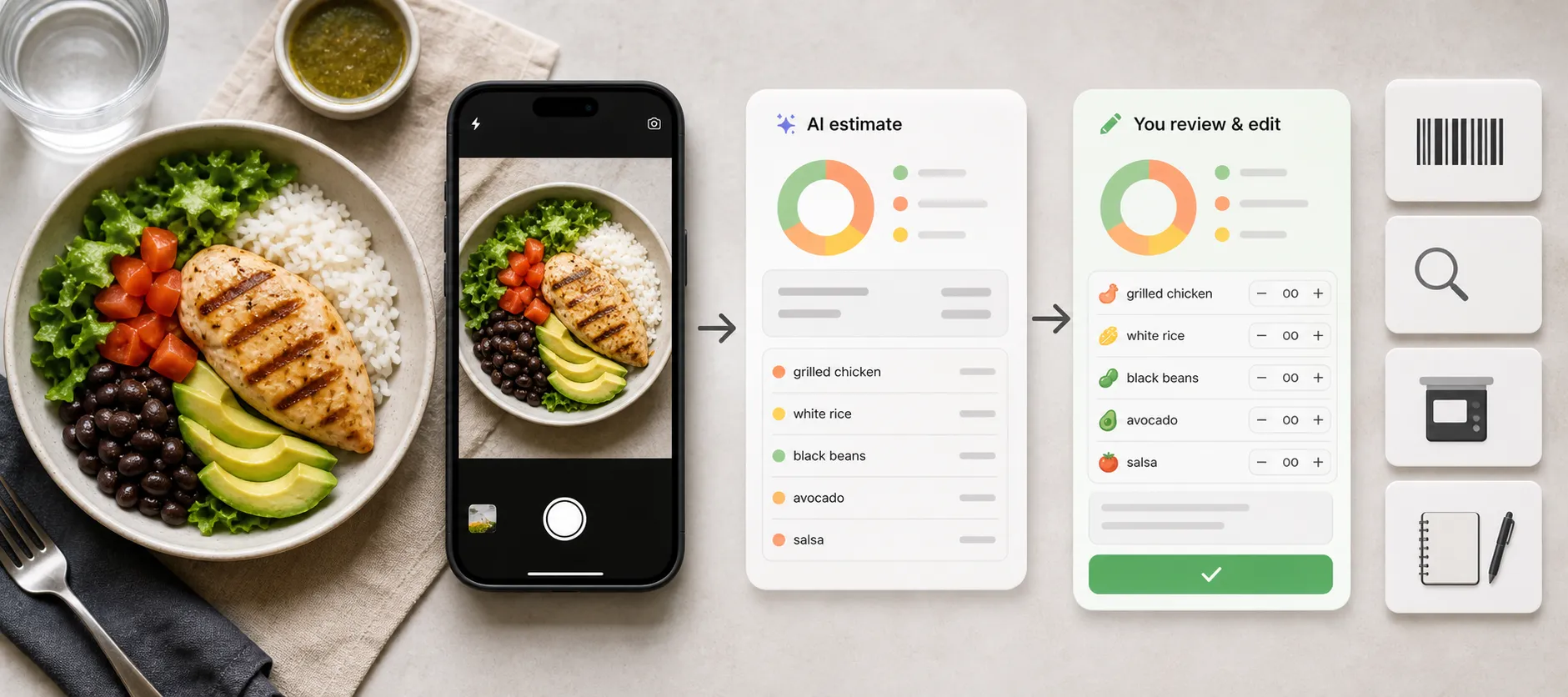
Taking a photo of lunch is easy. Getting a useful food record from it involves more: identifying the right foods, checking portions and adding anything the camera could not see.
For everyday use, Kibora is our first pick for flexible logging and useful nutrition feedback without another subscription. You can capture a meal in the way that suits the moment, check the details and get help understanding what your food diary means.
Other apps suit more specific priorities: Cronometer combines AI with detailed nutrient tracking, Cal AI centers its offer on meal capture, and MyFitnessPal and Lose It add AI tools to familiar diaries. Lifesum offers conversational tracking, while Noom places logging within a broader behavior-change program.
You do not necessarily need to leave an app you already use to get AI logging. Start by comparing what happens after the first estimate, and whether the feature works on your device and plan.
The quick picks: which AI calorie tracker fits which person
| Your priority | App to consider | Important access detail |
|---|
| Flexible everyday logging, practical nutrition insights and no recurring subscription | Kibora | 10 free analyses without a card; €49.99 once for lifetime hosted-AI access |
| A meal-photo-centered calorie and macro tracker | Cal AI | Food-scan analysis requires a subscription |
| Photo logging alongside detailed nutrient tracking | Cronometer | Photo logging requires Gold |
| Adding photo and voice entry to an existing diary | MyFitnessPal | Premium; mobile and English-language requirements apply |
| Photo matches that can draw on previously logged foods | Lose It | Snap It requires Premium and an English device language |
| Describing meals and making changes through chat | Lifesum | AI Tracking requires Premium |
| Meal capture within a broader behavior-change program | Noom | Features depend on region, app version and plan |
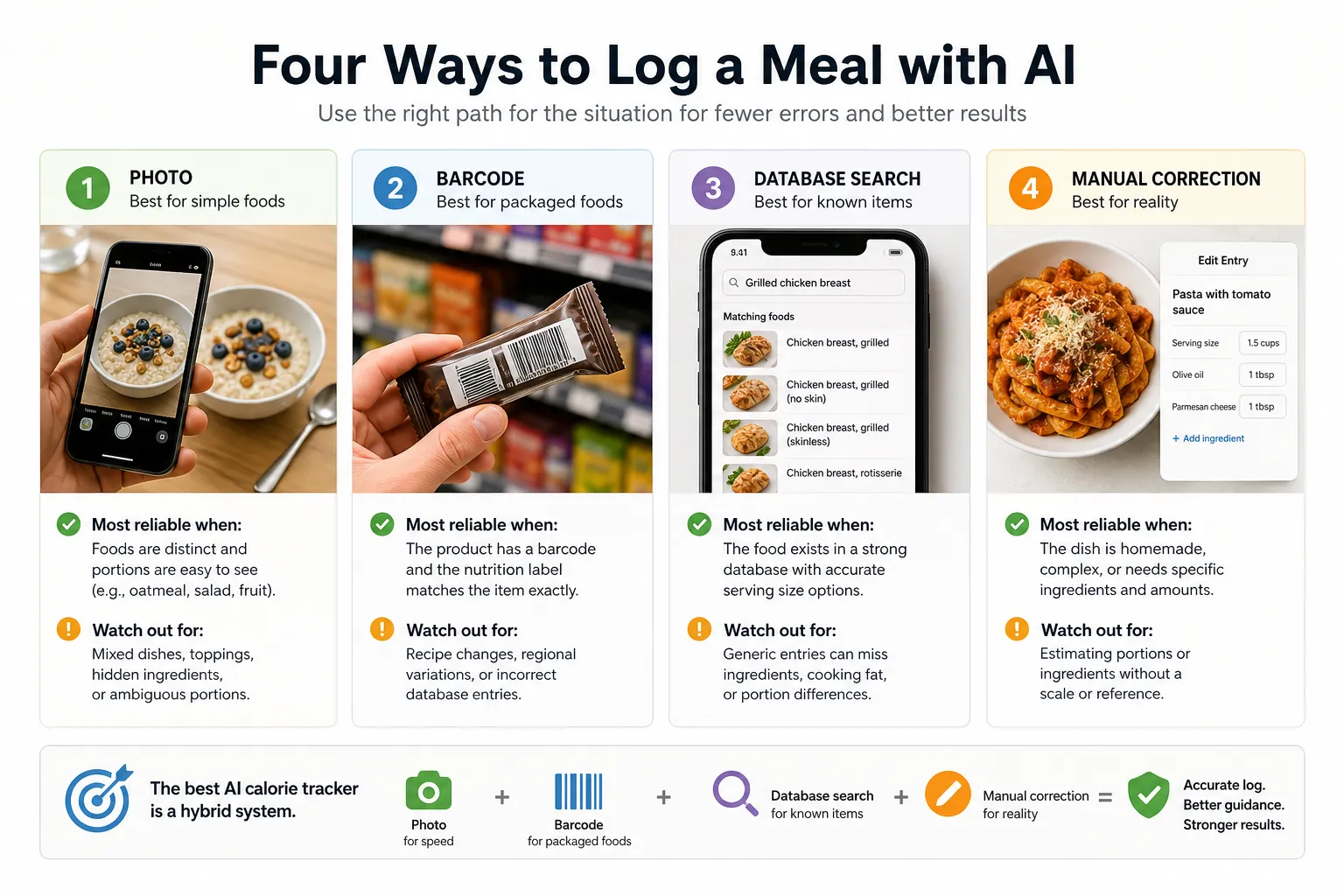
These choices reflect different uses for AI. A nutrient-focused diary, a conversational logger and a coaching program can all recognize a meal without serving the same purpose. For options beyond AI features, see our broader calorie tracker comparison.
The best AI calorie tracker apps compared
Kibora: our pick for everyday logging and useful nutrition feedback
Kibora is a strong starting point if you want food tracking to fit around your day and give you something useful back. Its logging tools combine photo, text, voice and barcode entry with reusable meals and favorites. Photograph a varied lunch, dictate breakfast or bring back a meal you have already checked.
You can review and adjust the entry before saving, including portions, ingredients, timing and nutrition. Mixed dishes may still need corrections, so the value lies in having a convenient starting point and control over the final log.
The bigger reason to choose Kibora is help deciding what to do next. Alongside calories and macros, it looks at protein, fiber, meal timing and food variety. It can suggest dinner ideas from meals you already eat, based on what your day still needs, and explain patterns across the week. Source links and deeper explanations let you explore the reasoning behind an insight.
That makes it particularly appealing if you want more guidance from your diary without committing to a full coaching program. Its pricing is straightforward too: 10 free meal analyses without a card, then optional €49.99 lifetime hosted-AI access. Manual entry, duplication, favorites, history and analytics remain free.
Cal AI: for people who want to start with a meal photo
Cal AI offers photos, barcodes and meal descriptions, with calorie and macro breakdowns. It also supports custom foods and recipes, so you are not limited to photographing every meal.
Its appeal is a meal-centered starting point: capture what is in front of you, then review the result. That can suit varied lunches or restaurant meals where searching for every component feels cumbersome. Whether it saves time depends on how well it handles the foods you actually eat.
The free download does not include free scan results. Its App Store listing explicitly requires a subscription for food-scanning analysis. Check the billing period and renewal price shown in your purchase screen rather than treating an undated promotional price as the standard offer.
There are also switching limits: Cal AI's FAQ says it cannot directly import MyFitnessPal food history, and subscriptions do not transfer between iPhone and Android. Our Cal AI vs MyFitnessPal comparison examines that choice more closely.
Cronometer: for photo logging with detailed review controls
Cronometer is relevant to AI logging in its own right. Its Gold photo feature returns matched foods for review, with controls to change serving amounts, swap matches, add missing foods and delete incorrect ones.
One useful detail is its suggested additional ingredients. It can ask whether the dish contains foods commonly associated with it but not visible in the photo. That is a prompt to check the recipe, not evidence that an ingredient was detected.
You can also turn reviewed matches into a custom meal or recipe. For a lunch you make repeatedly, that lets the first photo become a reusable entry instead of a new estimate every day.
Gold also includes voice logging and nutrition analysis tools. This makes Cronometer worth considering when you want AI entry within a more detailed diary. The extra information is useful only if you want to inspect it; someone seeking a minimal calorie total may prefer fewer controls.
MyFitnessPal: for adding AI to a diary you already use
MyFitnessPal's Meal Scan suggests food matches from a photo. You choose the relevant foods, adjust servings and search for anything it missed without leaving the scan workflow.
Its Voice Log provides another route: describe the food and quantity, then review the matched items before saving. This can be more useful than a photo when you know an ingredient that is hidden inside the dish.
Both are Premium mobile features with English-language requirements. Meal Scan currently requires iOS 18 or Android 13 and the supported app version; neither tool is available on the website.
If you already have reliable recipes and food history in MyFitnessPal, testing these tools may involve less setup than moving everything elsewhere. Its plan comparison also clarifies that Premium+ adds meal planning; you do not need that higher tier just to access Meal Scan.
Lose It: for connecting photo logging with familiar foods
Lose It's Snap It analyzes a new or uploaded meal photo and proposes foods with estimated servings. You can edit the amount before saving.
A useful distinction is its Swap option: when several possible matches exist among previously logged foods in My Foods, you can review those alternatives. For someone who repeatedly eats variations of the same breakfast or lunch, choosing a familiar match can be more helpful than accepting a generic result.
Snap It requires Premium and an English device language. Lose It's membership guide lists barcode, photo and voice logging within Premium, with a standard US annual price of $79.99. Offers and local prices can differ.
That makes it a candidate for people who like its calorie-budget diary and want more entry methods. It is not a free-scanning alternative simply because its basic app is free.
Lifesum: for people who prefer describing and revising meals in chat
Lifesum's AI Tracking accepts photos, typed descriptions and voice input. The chat also provides access to recent entries, favorites, manual quick tracking and food search.
Its distinctive interaction is editing through a description. You can reopen a meal and ask to add an ingredient or replace one food with another. For a bowl that was logged with rice when you actually used quinoa, that may feel more natural than navigating several item screens.
AI Tracking requires Premium, and you can switch back to the classic diary. Consider Lifesum if conversational entry appeals to you, but test how clearly the final meal reflects your changes. A chat response is useful only when the saved foods and quantities say what you intended. If you are also considering YAZIO, compare Lifesum vs YAZIO.
Noom: for meal logging alongside behavior-change support
Noom's photo, voice and text logging includes a review step where you can edit, add or swap ingredients. Its support page lists availability for most users on current iOS and Android versions in the US, Canada, Australia and Great Britain.
The reason to consider Noom is the surrounding program. If you want help with routines and consistency as well as meal entry, that broader support may matter more than small differences in the scanner.
Be specific about which Noom experience you are buying. Its free-feature guidance says available tools vary by location and app version, while paid programs add deeper guidance and support. Do not assume a free logging feature includes the coaching package you saw advertised.
Why photo calorie estimates still need a reality check
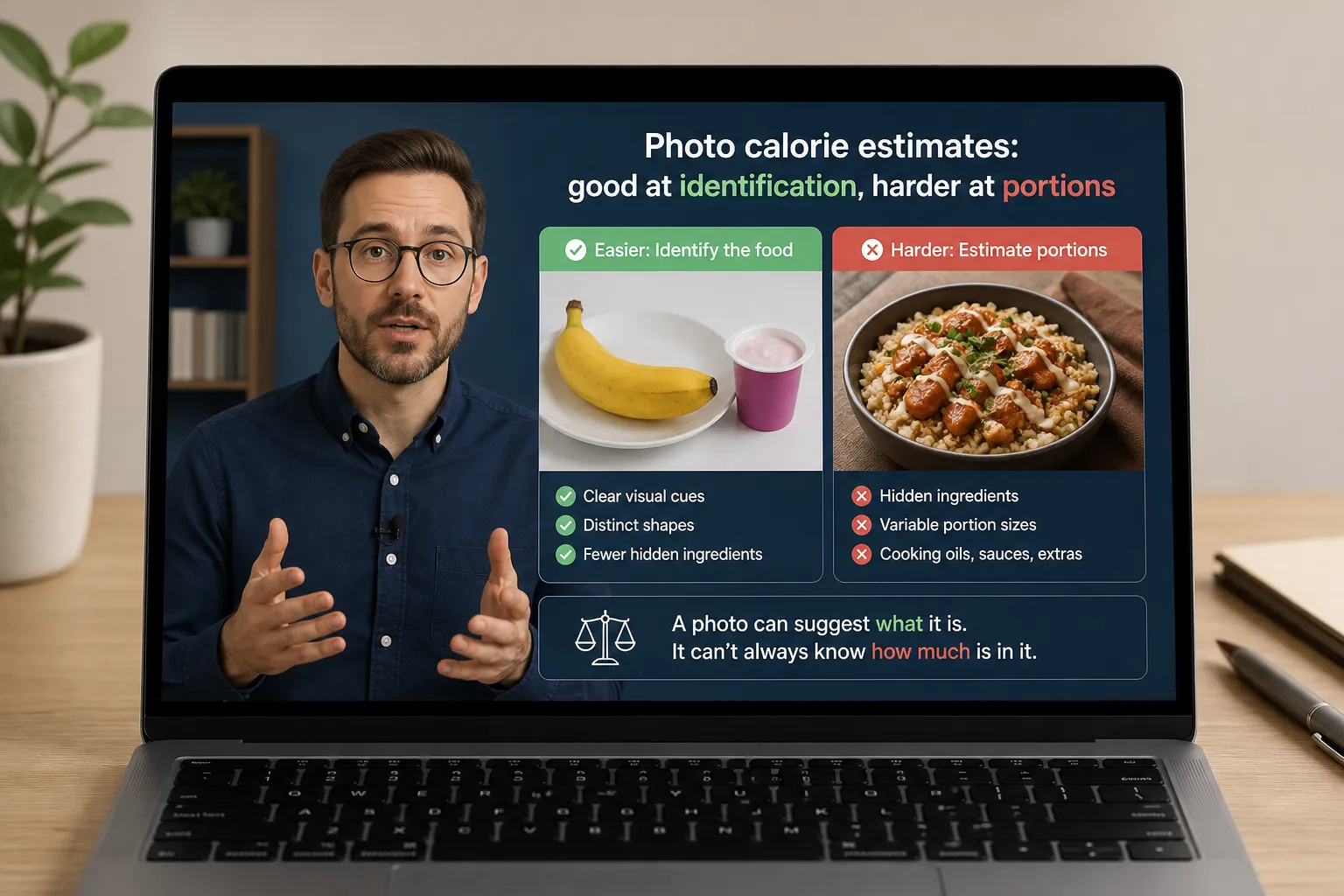
A photo can show chicken and rice without revealing how much oil was used, what is inside a sauce or how much food sits below the visible surface. Recognizing the dish and measuring the meal are different jobs.
A systematic review of 52 studies found substantial variation in AI image-based dietary assessment methods and results, preventing a single pooled accuracy estimate. It does not establish an accuracy winner among these current commercial apps.
Choose the input that captures what you know. For a packaged yogurt, use the barcode and check the serving against the label. For homemade pasta, a saved recipe with ingredient amounts may be more useful than another photograph. For an unfamiliar restaurant plate, a photo can provide a starting estimate, but unknown preparation details remain unknown.
Editing helps when you can supply better information. Replacing one guess with another does not make the result measured. If your logs and progress keep disagreeing, our guide to why calorie tracking can stop being useful looks beyond the entry method.
What user reviews reveal about everyday usefulness
For everyday use, getting food into the diary is only half the benefit. The other half is understanding what to do with it. In her Trustpilot review of Kibora, Ana Obreza described easy photo and text entry, clear macros and useful feedback:
“And at the end of the day you get real feedback, not just a bunch of numbers staring back at you.”
— Ana Obreza, Trustpilot, 4 August 2026
Her experience captures the combination that makes Kibora worth trying: less effort recording meals and more help making sense of the day. It is an individual account, rather than a guarantee of the same experience for everyone.
When testing a tracker, look for both benefits. Can you record a normal lunch without getting bogged down, and does the feedback help you make a practical choice for dinner? That is a more useful test of everyday value than the novelty of the first scan.
Check the paid features and privacy terms before committing
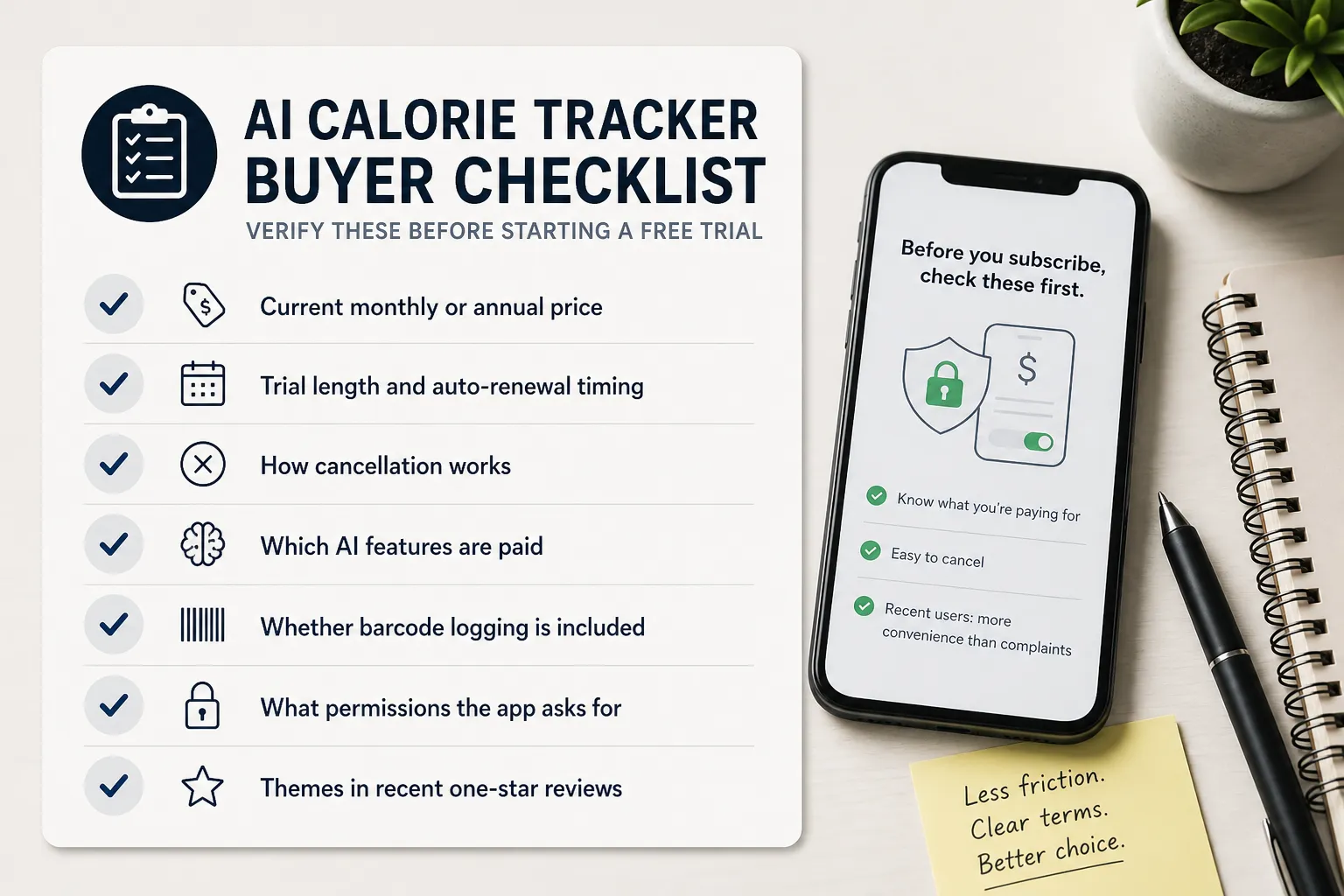
Start with the feature you actually want. A free diary, a free download and a free AI trial are three different offers. Check the renewal amount and billing period, and whether photo, voice and barcode access are included in the same tier.
Keep the receipt or confirmation so you know who manages the purchase. For example, Cal AI's cancellation instructions direct Apple and Google subscribers to their store subscription settings; deleting the app does not cancel the subscription.
For privacy, read the relevant app's current disclosures about photos, nutrition data, processing providers, retention and deletion. The App Store listing and Google Play data-safety section provide starting points, alongside the developer's policy. A paid plan alone is not evidence that information stays on your phone.
If advertisements are another deciding factor, our guide to calorie trackers without ads covers that separately.
Choose using a few normal meals
If you want a starting point, try Kibora’s 10 free analyses with meals you normally eat. Compare it with the app most relevant to your main priority using the same everyday tasks:
- A packaged snack: does the match agree with the label and the amount you ate?
- A homemade meal: can you add a missed ingredient and correct a portion without starting again?
- A repeated breakfast: can you reuse the checked entry and change one item?
- A day of logs: does the summary help you answer the question you downloaded the app for?
Notice the total effort through saving the entry, not just how quickly the camera returns a number. Also check whether the useful workflow remains available after the trial.
If you need an initial calorie estimate, our calorie calculator can provide a starting point. Then choose the app whose controls and feedback help you maintain a usable diary, with room to correct it when real meals differ from its assumptions.
- Key sources
- Cal AI: logging features and billing, platform and import limitations.
- Trustpilot: Ana Obreza’s Kibora review.
- Apple App Store and Google Play: Cal AI's subscription disclosure and privacy information, plus Android data-safety information.
- Cronometer: photo review and correction controls and Gold features.
- MyFitnessPal: Meal Scan, Voice Log and plan comparison.
- Lose It: Snap It controls and membership features and pricing.
- Lifesum: AI Tracking and meal editing.
- Noom: photo, voice and text logging and free-feature availability.
- Kibora: features and review controls and pricing.
- Research: AI-based digital image dietary assessment methods compared to humans and ground truth: a systematic review.