


- Kaj boš izvedel/a
- Kako oceniti aplikacije za beleženje kalorij po realni hitrosti vnašanja, ne po številu funkcij
- Zakaj so enostavni popravki v AI aplikaciji za beleženje kalorij enako pomembni kot hiter vnos hrane
- Kdaj skeniranje črtne kode, shranjeni obroki in nedavna živila prihranijo največ časa
- Katere aplikacije pašejo različnim potrebam, od širokih baz hrane do podrobnejšega beleženja makrov
- Zakaj je Noom in WeightWatchers bolje razumeti kot programa, ne kot čisti aplikaciji za beleženje kalorij
- Kako lahko brezplačni in plačljivi paketi spremenijo izkušnjo z oglasi, vpogledi in skeniranjem
Večina aplikacij za beleženje kalorij zna šteti kalorije. Problem je, da se jih veliko v resničnem življenju hitro sesuje: vnos traja predolgo, popravki so tečni ali pa aplikacija postane glasna ravno takrat, ko skušaš med sestanki na hitro vpisati kosilo.
Za ljudi, ki so skoz v gužvi, je najboljša aplikacija tista, ki jo lahko uporabljaš tudi na razštelan torek, ne tista z najdaljšim seznamom funkcij. Če je ponovni vnos istega zajtrka muka, če popravljanje AI ocene iz fotke zahteva preveč klikov ali če oglasi upočasnijo vnos večerje, najprej ponavadi izgine doslednost.
Ta vodič primerja vsako aplikacijo za beleženje kalorij po stvareh, ki so vsak dan dejansko pomembne: hitrost beleženja, enostavnost popravkov, trenje v aplikaciji in kako uporabne so smernice po tem, ko je hrana že vpisana. Kibora je najboljša splošna izbira za hitro, mirno beleženje z uporabnimi vpogledi, druge aplikacije pa lahko zmagajo, če hočeš ogromno bazo hrane, več nadzora nad makri ali bolj osebno vodenje.
Hiter odgovor: izberi glede na vnos, ki ga ponavljaš največkrat
Če hočeš kratko verzijo, izberi aplikacijo, pri kateri je tvoj najpogostejši vnos hrane enostaven. Za ljudi v gužvi ta lestvica temelji na vsakodnevni uporabnosti, ne na skupnem številu funkcij ali najdaljšem meniju nastavitev.
To pomeni, da so hitrost, popravki brez kompliciranja, miren vmesnik in podatki, ki jih lahko dejansko uporabiš, pomembnejši od tega, da ima aplikacija čisto vsako možno orodje. Cilj je ponovljivo, dovolj natančno beleženje, ki pomaga pri zavedanju in spremembi navad, ne popolnost, kar se sklada tudi s smernicami NIDDK.
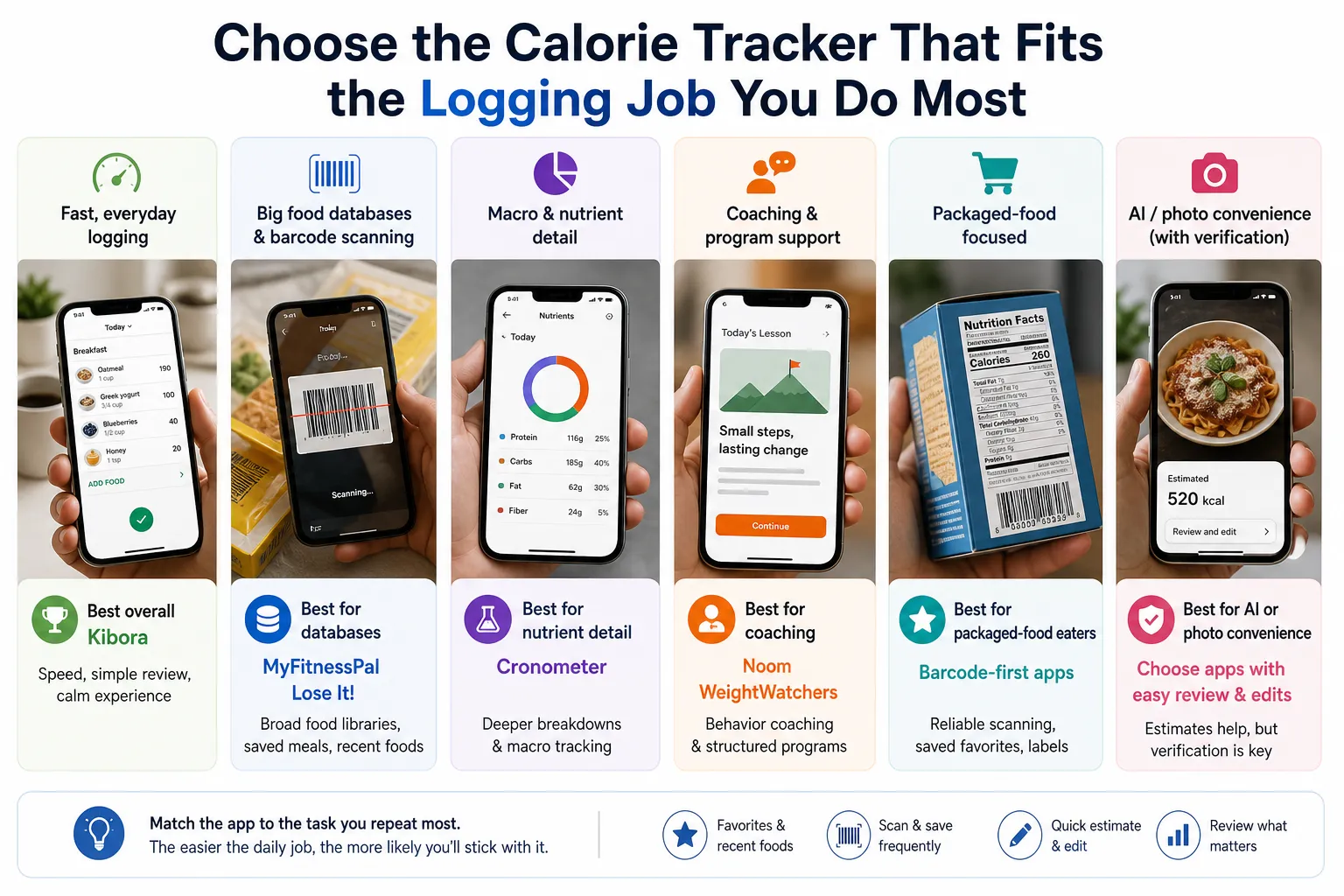
- Najboljša splošna izbira za hitro beleženje: Kibora. Najbolj paše, če hočeš hiter vnos hrane, enostaven pregled, mirnejšo izkušnjo in znanstveno podprte vpoglede brez težke programske navlake.
- Najboljša izbira za velike baze hrane: MyFitnessPal in Lose It! Močni izbiri, če se zanašaš na široke knjižnice hrane, skeniranje črtnih kod, shranjene obroke in nedavna živila.
- Najboljša izbira za podrobnosti o makrih in hranilih: Cronometer. Najboljša, če ti veliko pomenijo globlje razčlembe hranil. MyNetDiary in YAZIO sta tudi vredna ogleda, odvisno od poteka dela in premium funkcij, ki ti bolj ustrezajo.
- Najboljša izbira za coaching in podporo programa: Noom in WeightWatchers. Dobra, če hočeš vedenjski coaching ali strukturiran program, nista pa čisti aplikaciji za beleženje kalorij.
- Najboljša izbira za ljudi, ki jedo veliko pakirane hrane: Aplikacije z močnim skeniranjem črtnih kod in shranjenimi priljubljenimi živili. Če tvoje kosilo prihaja iz škatel, ovitkov ali nalepk na meal prepu, je to navadno pomembnejše od beleženja s fotko.
- Najboljša izbira za AI ali foto priročnost s preverjanjem: AI aplikacijo za beleženje kalorij ali aplikacijo za kalorije iz fotk izberi samo, če omogoča tudi enostaven pregled in popravljanje. Hitre ocene pomagajo, slepo zaupanje pa ne.
Par hitrih primerov to še olajša. Če vsak delovni dan ješ isti zajtrk, ti bodo priljubljena in nedavna živila prihranila več časa kot zapleten prehranski dashboard.
Če kupuješ pakirana kosila, bo zanesljiva aplikacija za beleženje kalorij s črtno kodo verjetno premagala aplikacijo, ki najprej stavi na kamero. Če veliko potuješ ali pogosto ješ zunaj, je boljša izbira tista, ki ti omogoča hitro oceno in potem urejanje porcij ali sestavin brez borbe.
Zato so tudi brezplačni in plačljivi paketi pomembnejši, kot priznajo številne primerjalne strani. Skeniranje črtnih kod, globlji vpogledi, količina oglasov in shranjene priročne funkcije lahko izkušnjo spremenijo toliko, da je “najboljša alternativa za MyFitnessPal” za eno osebo čisto nekaj drugega kot za drugo.
Če hočeš več konteksta o tem, ali se ti beleženje sploh splača glede na tvojo situacijo, poglej kdaj je beleženje kalorij dejansko uporabno. V nadaljevanju vodiča uporabi zgornji seznam kot filter: izberi aplikacijo, ki ustreza vnosu, ki ga ponavljaš najpogosteje, potem pa vse ostalo ocenjuj po tem, kako enostavno jo je še naprej uporabljati.
Najboljša splošna izbira za ljudi v gužvi: Kibora
Kibora je tukaj najmočnejša izbira, če tvoj glavni problem ni znanje o prehrani, ampak da vnos opraviš dovolj hitro, da pri tem vztrajaš. Zasnovana je bolj kot praktična aplikacija za vnos hrane kot pa cel dietni program, kar je pomembno za zaposlene ljudi, ki hočejo obroke hitro zabeležiti, ne da jih aplikacija potegne v težji sistem.
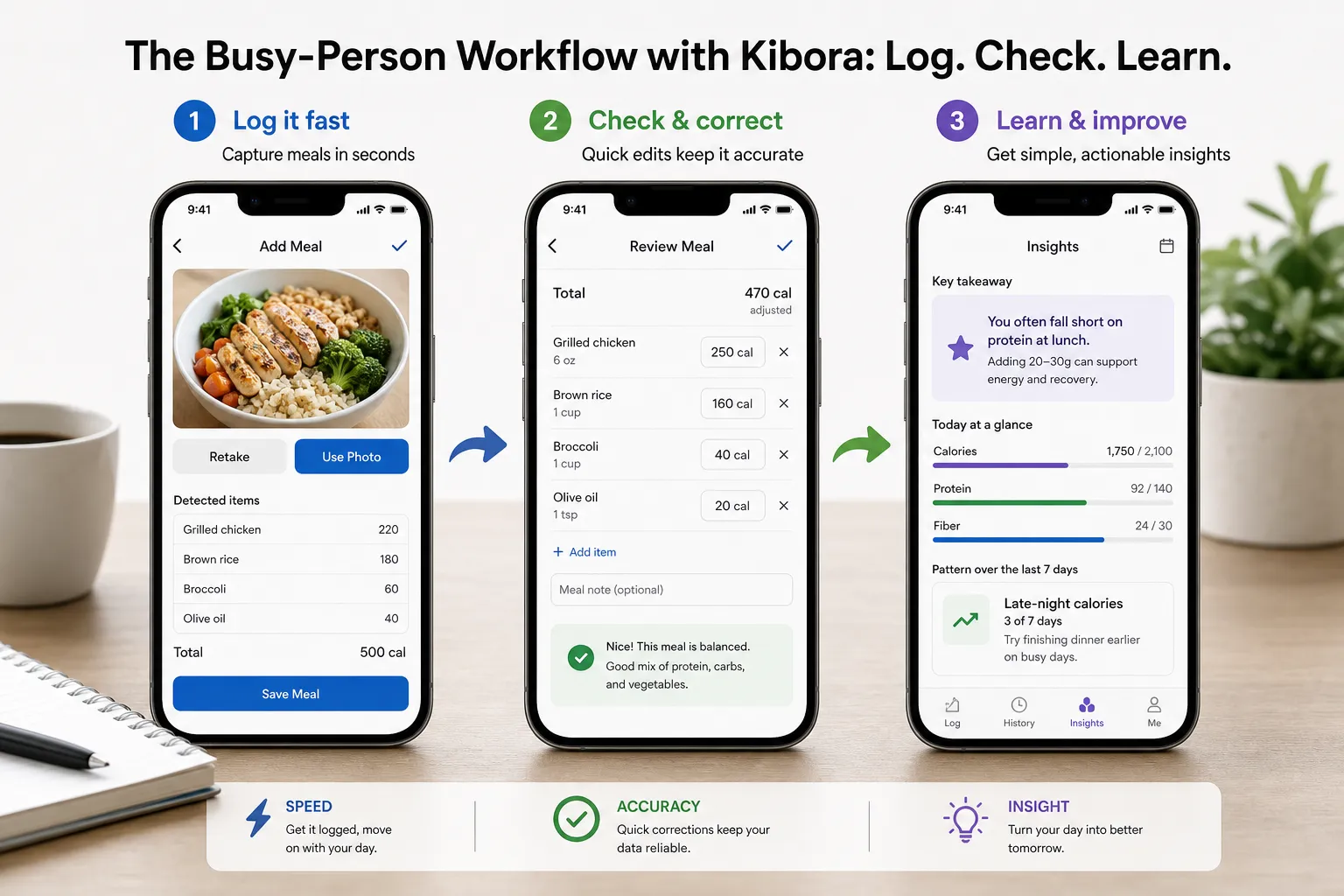
Prav ta kombinacija jo naredi drugačno. Hitrost ustvari vnos, hitro popravljanje ga ohrani zanesljivega, vpogled pa poskrbi, da je podatke sploh vredno zbirati. Hiter vnos, ki ga ne moreš popraviti, ni zanesljiv, čist vnos brez uporabnih povratnih informacij pa je samo administracija.
Kibora deluje tudi mirnejše kot veliko tradicionalnih aplikacij. Namesto da te potiska v obsesivno mikro-upravljanje makrov, natrpane dashboarde ali občutek coaching programa, fokus ohrani na beleženju obrokov in učenju iz vzorcev. Za veliko uporabnikov je to razlika med aplikacijo za beleženje kalorij, ki jo preizkusijo en teden, in tako, ki jo uporabljajo še mesec kasneje.
Preprost primer delovnega dne pokaže, zakaj je to pomembno. Zajtrk lahko potegneš iz zgodovine v par klikih, kosilo hitro dodaš, potem pa popraviš večerjo, ne da bi moral/a cel vnos sestaviti znova, če je bila ocena mimo. Nato lahko aplikacija dan spremeni v uporaben zaključek, na primer ponavljajoč se vzorec glede preskočenih beljakovin, poznih večernih kalorij ali neenakomerne strukture obrokov.
Tak potek je pogosto lažji kot pri alternativah, natrpanih s funkcijami, kjer se moraš pred koncem vnosa enega obroka prebijati čez podvojene vnose v bazi, premium pozive, oglase ali razvejane panele s hranili. Te funkcije niso neuporabne, ampak pri zaposlenih ljudeh lahko ustvarijo trenje ravno v trenutku, ko je doslednost najbolj pomembna.
Popravljanje je posebej pomembno pri vsakem hitrem ali z AI podprtem poteku beleženja. Raziskave o prehranski oceni na podlagi slik dosledno kažejo, da lahko hitro prepoznavanje zmanjša trud, a vnosi še vedno potrebujejo uporabnikov pregled, ker se napake pri oceni in prepoznavi dogajajo v literaturi o prehranski oceni. Zato vrednost Kibore ni samo v hitrosti, ampak v tem, da so popravki dovolj enostavni, da jih uporabniki dejansko naredijo.
Zato Kibora dobro deluje tudi kot najboljša alternativa MyFitnessPal za določen tip človeka, ne za vse. Ustreza zaposlenim profesionalcem, ljudem, ki pogosto beležijo iste obroke, tistim, ki hočejo praktičen prehranski vpogled, in uporabnikom, ki so naveličani funkcijsko pretežkih aplikacij, ki delujejo glasno ali zahtevno.
Ni pa očitna izbira za vsak primer uporabe. Če hočeš ogromno staro bazo hrane, globoke dashboarde z mikrohranili ali coaching program s srečanji, izzivi in skupnostjo, ti bo morda bolj ustrezala druga aplikacija. Zaposleni uporabniki, ki hočejo bolj osredotočeno izkušnjo, lahko preizkusijo Kiboro tukaj in vidijo, ali se hitrejše beleženje plus znanstveno podprti vpogledi ujemajo s tem, kako dejansko jedo in beležijo.
Najboljša izbira za ogromne baze hrane: MyFitnessPal in Lose It!
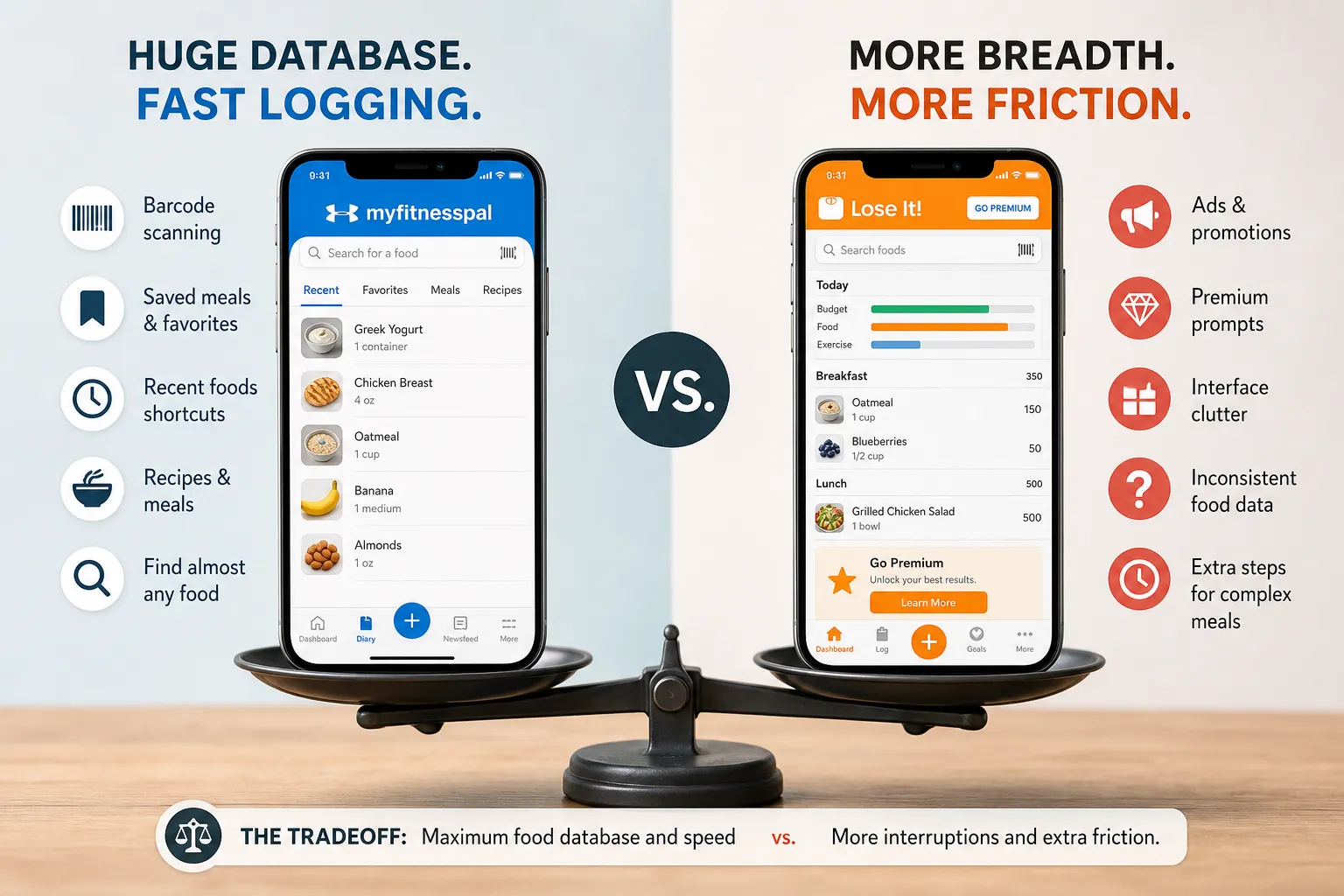
Če je tvoja prioriteta hitro najti živila, sta MyFitnessPal in Lose It! še vedno dve najmočnejši mainstream izbiri. Obe sta zgrajeni okoli priročnosti, ki jo zaposleni ljudje dejansko uporabljajo: velike knjižnice hrane, skeniranje črtnih kod, shranjeni obroki, priljubljena živila, recepti in bližnjice do nedavnih živil, ki lahko ponavljajoče vnose spremenijo v par klikov namesto v vsakodnevno opravilo.
MyFitnessPal je znana možnost s širokim pokritjem. Njegov uradni nabor funkcij vključuje beleženje hrane, skeniranje črtnih kod, orodja za recepte in premium dodatke za globlje vpoglede in načrtovanje, zato ostaja pogosta privzeta izbira za ljudi, ki hočejo uveljavljeno aplikacijo za beleženje kalorij z zelo veliko bazo.
Lose It! pokriva veliko istega in pogosto deluje posebej praktično za vsakodnevno štetje kalorij. Njegova uradna stran poudarja beleženje s skeniranjem, beleženje obrokov in druge bližnjice za ponavljajočo uporabo, kar pomaga razložiti, zakaj veliko uporabnikov pri njem ostane zaradi rutinskih obrokov in pakirane hrane, ne zaradi enkratnih globokih prehranskih analiz.
V najboljšem primeru sta ti aplikaciji res hitri. Kosilo iz pakirane hrane lahko zabeležiš v nekaj sekundah s skenom črtne kode, ponavljajoč zajtrk pa enkrat shraniš in ga uporabljaš cel teden, namesto da ga vsako jutro sestavljaš znova.
Kompromis je, da je hitrost odvisna od tega, ali bližnjica deluje gladko. Restavracijski obrok ali domača mešana jed te lahko še vedno vrne v iskanje, ocenjevanje, primerjanje podobnih vnosov in preverjanje, ali sta velikost porcije in hranilna vrednost videti prav.
To je pravi minus za ljudi v gužvi. Ponavadi ne gre za pomanjkanje funkcij. Gre za dodatno trenje zaradi oglasov, premium pozivov, natrpanega vmesnika in občasnih neskladnosti v bazi, ki prekinejo nekaj, kar bi moralo biti hitro opravilo.
Ocene uporabnikov v Apple App Store in Google Play Store redno kažejo v to smer, s pritožbami glede pritiska plačljivih zidov, bugov, sprememb izdelka in glasnih zaslonov. To ne pomeni, da bo imel vsak uporabnik slabo izkušnjo, kaže pa, da so te starejše aplikacije lahko en trenutek močne in učinkovite, naslednji pa malo preveč zasedene.
Za veliko ljudi je ta kompromis še vedno vreden. Če hočeš širino, poznan občutek in dobro možnost, da je hrana, ki jo potrebuješ, že v sistemu, sta obe aplikaciji še vedno solidni izbiri, posebej za beleženje s črtno kodo in ponavljajoče obroke.
Če ta pristop primerjaš z mirnejšo, bolj vodeno alternativo, poglej ta podrobnejši pregled Kibora vs. MyFitnessPal. Ključna razlika je manj v surovi zmogljivosti in bolj v tem, ali imaš raje največjo širino baze ali tišji potek dela z manj prekinitvami.
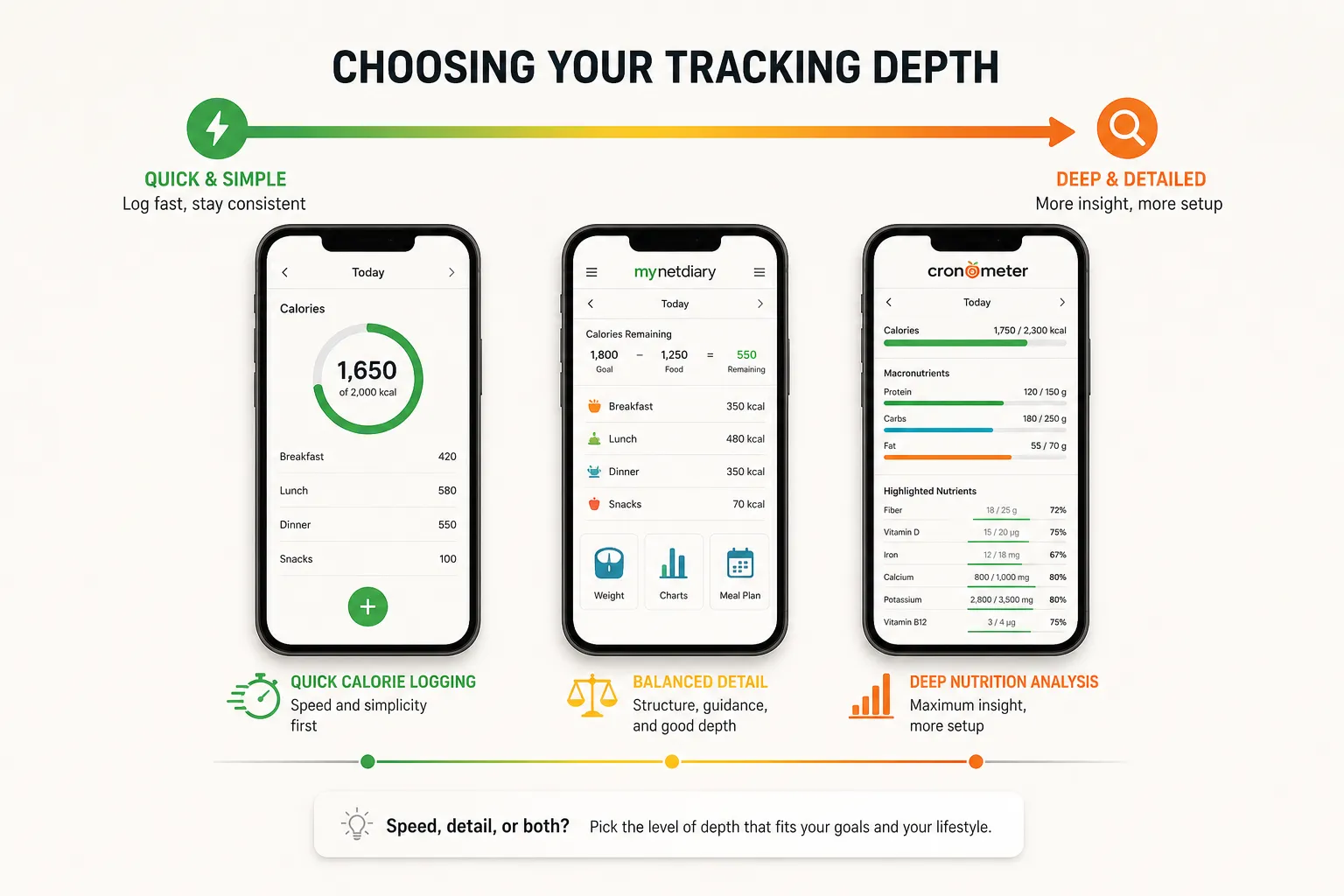
Najboljša izbira za ljudi, ki hočejo več prehranskih podrobnosti: Cronometer, MyNetDiary in YAZIO
Nekateri potrebujejo več kot hiter seštevek kalorij. Če hočeš po obrokih beležiti beljakovine, ogljikove hidrate, maščobe, vlaknine ali celo vitamine in minerale, so te aplikacije lahko boljša izbira kot preprostejša aplikacija za vnos hrane.
Cronometer je najbolj jasna izbira za podrobno usmerjeno beleženje prehrane. Njegova glavna prednost je natančnost: zgrajen je okoli beleženja makrov, vidnosti mikrohranil, skeniranja črtnih kod in globljih prehranskih razčlemb, kot prikazuje uradna stran Cronometer.
Zato je Cronometer posebej uporaben za športnike, ljudi, ki beležijo makre, in tiste, ki upravljajo specifične prehranske cilje. Če hočeš videti, ali je kosilo zadelo tvoj cilj za beljakovine, a ti je zmanjkalo vlaknin, kalija ali železa, je to tip dashboarda, ki lahko dejansko pomaga.
MyNetDiary je nekje bolj vmes. Združuje beleženje kalorij z veliko bazo hrane, skeniranjem črtnih kod, načrtovanjem obrokov in vodenimi funkcijami, glede na uradno stran MyNetDiary, zato lahko dobro deluje za uporabnike, ki hočejo strukturo, ne da bi šli čisto v spreadsheet način.
YAZIO je bolj lifestyle usmerjen, saj združuje beleženje hrane z jedilniki, skeniranjem črtnih kod in premium orodji za načrtovanje, glede na uradno stran YAZIO. To je lahko privlačno, če hočeš, da se beleženje prehrane počuti bolj kot vsakodnevna wellness aplikacija in manj kot laboratorijsko poročilo.
Kompromis je preprost: več podrobnosti običajno pomeni več nastavitev. Več časa lahko porabiš za izbiro točnih vnosov, preverjanje zaslonov s hranili in premikanje čez dodatne zavihke, preden prideš do podatkov, ki jih želiš.
Za podatkovno usmerjenega uporabnika se ta trud splača. Za zaposleno osebo, ki večinoma hoče hitro vnesti hrano in iti naprej, pa se lahko vsi ti grafi in prehranski paneli zdijo bolj trenje kot vrednost.
Zato so to močne možnosti, ampak za specifičen primer uporabe. Če so ti pomembni podrobna prehranska kakovost, cilji za makre ali načrtovanje obrokov, si Cronometer, MyNetDiary in YAZIO zaslužijo ogled. Če je tvoja prioriteta hitro, ponovljivo beleženje z ravno dovolj smernicami, da ostaneš dosleden/na, so mogoče več aplikacije, kot jih potrebuješ.
Najboljša izbira, če hočeš odgovornost bolj kot hitro računanje kalorij: Noom in WeightWatchers
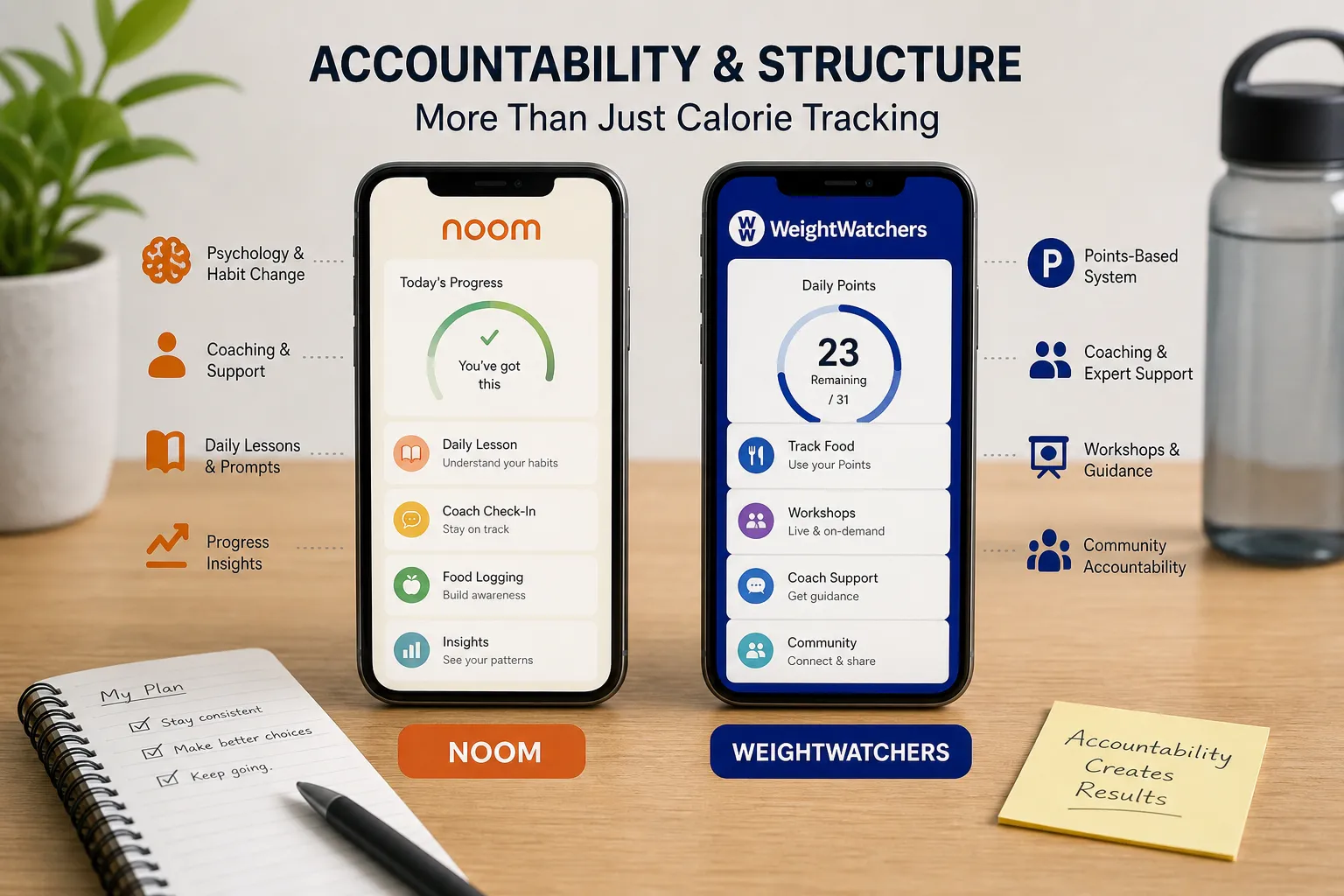
Noom in WeightWatchers imata več smisla kot programa z vgrajenim beleženjem kot pa kot čista števca kalorij. Če ju primerjaš samo po tem, kako hitro je vnesti hrano, boš zgrešil/a, kaj dejansko prodajata: strukturo, opomnike, coaching in sistem, zasnovan za to, da ostaneš vključen/a.
Noom se postavlja okoli psihologije, spremembe navad in coachinga, ne samo računanja kalorij, z naročniškim modelom, ki poleg funkcij beleženja vključuje lekcije in podporo. Ta okvir prihaja neposredno z uradne strani Noom, in je pomemben, ker dodatne plasti nekaterim pomagajo ostati dosledni, tudi če samo beleženje ni najhitrejši del izkušnje.
WeightWatchers deluje podobno, samo v drugačni obliki. WW v ospredje postavlja svoj sistem točk, plus coaching in funkcije skupnosti, namesto da bi od uporabnikov zahteval, da ga obravnavajo kot osnovno aplikacijo za beleženje kalorij, glede na stran WW.
Ta kompromis je lahko koristen, če se zatakneš pri odločitvah glede hrane. Program, ki ti pove, čemu dati prednost vsak dan, lahko zmanjša utrujenost od odločanja, posebej če hočeš opomnike, check-ine in občutek, da te nekdo ali nekaj drži na pravi poti.
Za pravega uporabnika je ta dodatna struktura ravno izdelek. Nekdo, ki hoče dnevne pozive, lekcije ali odgovornost, se lahko z Noom ali WW znajde bolje kot s hitrejšo, lažjo aplikacijo za beleženje.
Ampak če je tvoj cilj vnesti kosilo v 20 sekundah in iti naprej, to navadno ni najboljša izbira. Ista struktura, ki eni osebi daje podporo, se lahko nekomu, ki hoče samo hitro aplikacijo za beleženje kalorij brez naročniške obveze, coaching plasti ali programskih pravil, zdi preveč težka.
Strošek in ujemanje s programom sta tukaj pomembnejša kot pri preprostejših aplikacijah. Običajno plačuješ širšo izkušnjo, ne samo vnosa hrane, zato sta Noom in WW najbolj smiselna takrat, ko si dejansko želiš odgovornosti, lekcij ali vodenega sistema za hujšanje, ne najhitrejšega možnega poteka beleženja.
To je najčistejši način za pošteno primerjavo: izberi Noom ali WW, če hočeš strukturiran program okoli svojih prehranskih navad, in izberi čisto aplikacijo za beleženje, če so tvoja glavna prioriteta hitrost, malo trenja in fleksibilen vnos hrane.
AI in beleženje s fotko sta uporabni bližnjici, ne avtopilot
Za zaposlene ljudi sta AI in beleženje s fotko lahko res uporabni bližnjici. Poslikati obrok ali ga povedati na glas je pogosto veliko hitreje kot iskati po bazi, izbrati najbližje ujemanje in v aplikacijo za beleženje kalorij vtipkati vsako sestavino.
Ta hitrost je najbolj pomembna na kaotične dni. Če je alternativa to, da vnos čisto preskočiš, lahko AI aplikacija za beleženje kalorij ali aplikacija za kalorije iz fotk precej olajša doslednost.
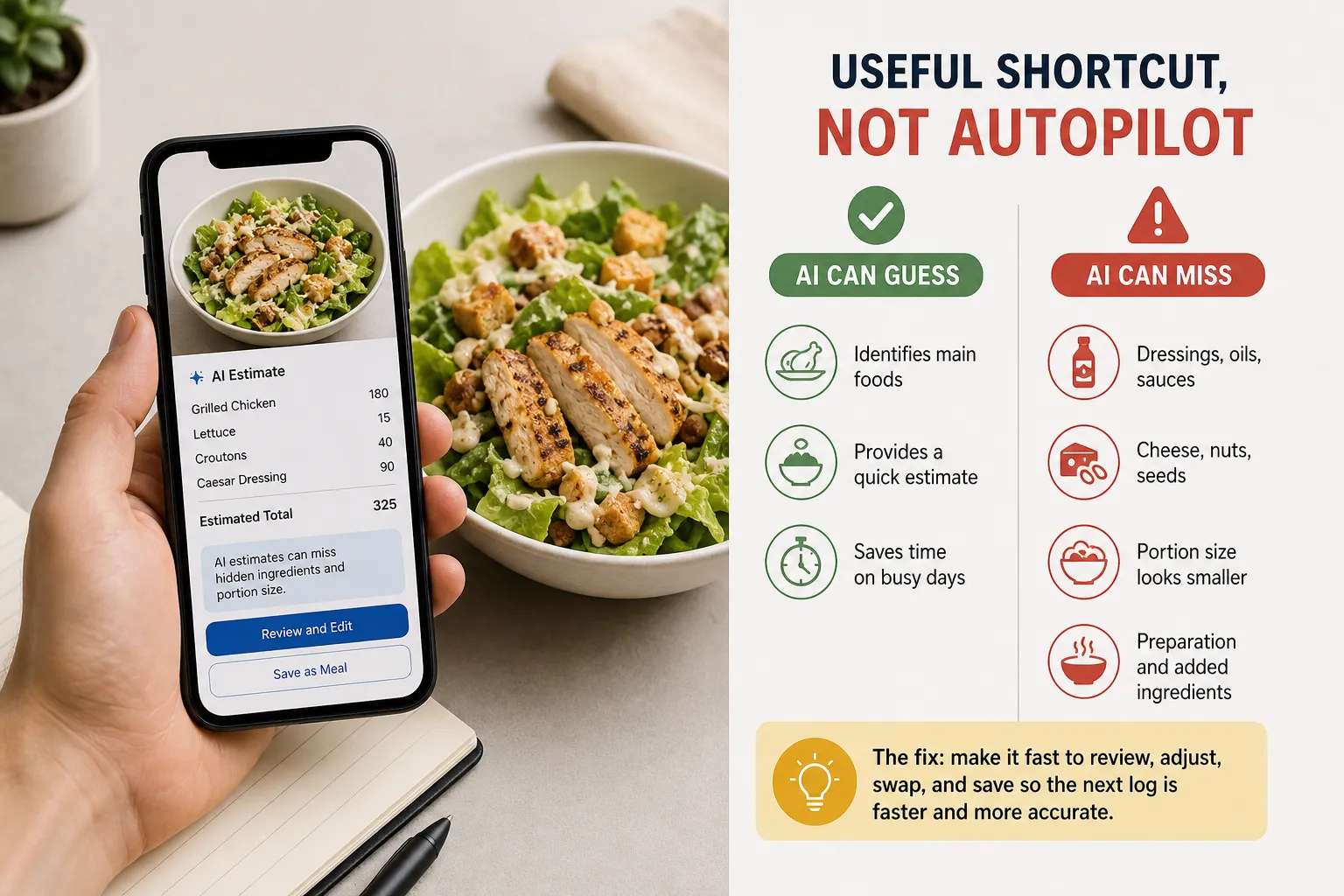
Finta je, da prepoznavanje hrane ni isto kot razumevanje hrane. Pregledi AI-podprte prehranske ocene so našli ponavljajoče se omejitve pri oceni porcij, mešanih jedeh, podrobnostih priprave in živilih, ki so si podobna na videz, a se prehransko razlikujejo, zato beleženje na podlagi slik še vedno potrebuje človeški pregled glede na raziskovalno literaturo o prepoznavanju prehranskih slik.
Solata je očiten primer. Fotka lahko ujame solato in piščanca, zgreši pa preliv, sir, oreščke, semena ali dejstvo, da je skleda dvakrat večja, kot izgleda.
Restavracijski obroki so še ena pogosta točka napak. Bowl z žiti iz takeout lokala je lahko videti podobno kot domača različica z manj kalorijami, ampak restavracijska porcija je lahko večja in pripravljena z več olja, omakami ali zamenjanimi sestavinami.
Zato pravo vprašanje ni, ali ima aplikacija AI. Vprašanje je, ali aplikacija omogoča, da hitro preveriš in popraviš, kar je AI ugibal.
Najboljša hitra aplikacija za beleženje kalorij za tak potek ti omogoča, da hitro narediš nekaj stvari: prilagodiš porcije, zamenjaš eno živilo z drugim, urediš količine in odstraniš sestavine, ki jih je aplikacija napačno uganila. Tudi glasovno beleženje lahko pomaga, posebej pri preprostih obrokih, ampak velja isto pravilo kot pri beleženju s fotko: hitrost je uporabna samo, če je pregled enostaven.
Če hočeš globlji pogled v to, zakaj lahko ocene odplavajo, ta razlaga zakaj so AI ocene kalorij pogosto napačne razčleni pogoste napake v preprostem jeziku.
Druga pomembna funkcija je spomin. Če obrok enkrat popraviš in ga lahko shraniš kot svoj obrok, nedavni vnos ali ponavljajočega favorita, je drugi vnos veliko hitrejši in navadno tudi natančnejši.
To je napetost, ki bi morala zanimati zaposlene uporabnike. AI prihrani čas samo takrat, ko je popravljanje skoraj brez trenja. Če ti aplikacija da pametno oceno, popravke pa naredi počasne, bližnjica izgine ravno takrat, ko jo najbolj potrebuješ.
Izberi aplikacijo, ki preživi tvoj najbolj zaseden obrok
Če hočeš najboljše ravnotežje za zaseden tempo, začni s Kiboro. Najbolje paše, če so tvoje prioritete hitro beleženje, mirnejša izkušnja in uporaben vpogled, po katerem lahko dejansko ukrepaš, ne da te potegne v programsko navlako, nered ali preveč zgrajeno beleženje.
Če je tvoja glavna potreba čista širina baze, ti bosta morda bolj ustrezala MyFitnessPal ali Lose It!. To sta močni izbiri za ljudi, ki cenijo več vnosov in bolj znano pokritost restavracij ali pakirane hrane ter jih ne moti bolj zaseden vmesnik ali razpršenost funkcij.
Če ti največ pomenijo podrobnosti hranil, poglej Cronometer, MyNetDiary ali YAZIO. Ta orodja imajo več smisla, ko hočeš globljo analizo in si pripravljen/a nameniti malo več pozornosti podatkom.
Če bolje deluješ s strukturiranim sistemom, coachingom ali znamčenim programom za hujšanje, izberi Noom ali WeightWatchers. Nista samo aplikaciji za beleženje kalorij, in ravno zato za nekatere delujeta bolje kot čista aplikacija za vnos.
Praktično pravilo za odločitev je preprosto: izberi aplikacijo, ki jo lahko še vedno uporabiš ob 20:15, ko je bila večerja na hitro, porcije približne in imaš še dve minuti za vnos. Sistem, ki je 90 % natančen in ga uporabljaš dosledno, ti bo navadno dal boljše podatke kot teoretično popolna postavitev, ki jo po enem tednu nehaš uporabljati.
To je glavna poanta. Najboljša aplikacija za beleženje kalorij za ljudi v gužvi ni tista z najdaljšim seznamom funkcij. Je tista, ki se dovolj dobro prilega resničnemu življenju, da še naprej beležiš, popravljaš in dobivaš podatke, ki jih lahko uporabiš.
- Ključni viri
- Viri NIH / NIDDK za prehrano in uravnavanje telesne teže
- Uradna stran MyFitnessPal / funkcije / Premium
- Uradna stran Lose It!
- Uradna stran Cronometer
- Uradna stran MyNetDiary
- Uradna stran YAZIO
- Uradna stran Noom
- Uradna stran WeightWatchers (WW)
- Zapisi v Apple App Store za MyFitnessPal, Lose It!, Cronometer, YAZIO, MyNetDiary, Noom, WW
- Zapisi v Google Play za MyFitnessPal, Lose It!, Cronometer, YAZIO, MyNetDiary, Noom, WW
- Recenzirani pregledi o prepoznavanju slik hrane / prehranski oceni


