- What you'll learn
- How Lifesum and YAZIO differ in daily food logging and overall workflow
- Why Lifesum is usually the better fit for meal plans, recipes, and guided eating
- Why YAZIO stands out for calorie tracking, fasting, and structured progress tracking
- What to look for when testing barcode scanning, repeat meals, and macro visibility
- How water tracking, AI/photo logging, ads, and subscriptions affect real-world usability
- Which recurring app store complaints to watch for before you pay for either app
Lifesum and YAZIO can look almost interchangeable at first glance. Both position themselves as broader nutrition platforms, not just simple calorie counters, with food logging, plans, recipes, water tracking, and premium upgrades on offer via Lifesum and YAZIO.
The real difference shows up in daily use. Lifesum feels more like a guided healthy-eating app, while YAZIO is usually the stronger fit for structured tracking and fasting.
This comparison focuses on that practical choice: Lifesum or YAZIO for the way you actually track food, plan meals, stay consistent, and avoid annoying paywall or subscription surprises.
The quick verdict: Lifesum for guided eating, YAZIO for fasting-focused tracking
If you want the short answer, Lifesum is the better pick for guided healthy eating, while YAZIO is the better pick for calorie tracking plus intermittent fasting. That lines up with how each app presents itself: Lifesum leans into nutrition plans, recipes, and healthier habits on its official site, while YAZIO puts more emphasis on calorie counting, fasting, and weight-focused progress tracking on its official site.
There is no universal winner here. The practical question is which app you will still tolerate opening every day, because feature depth only helps if the daily workflow fits how you actually want to eat and log.
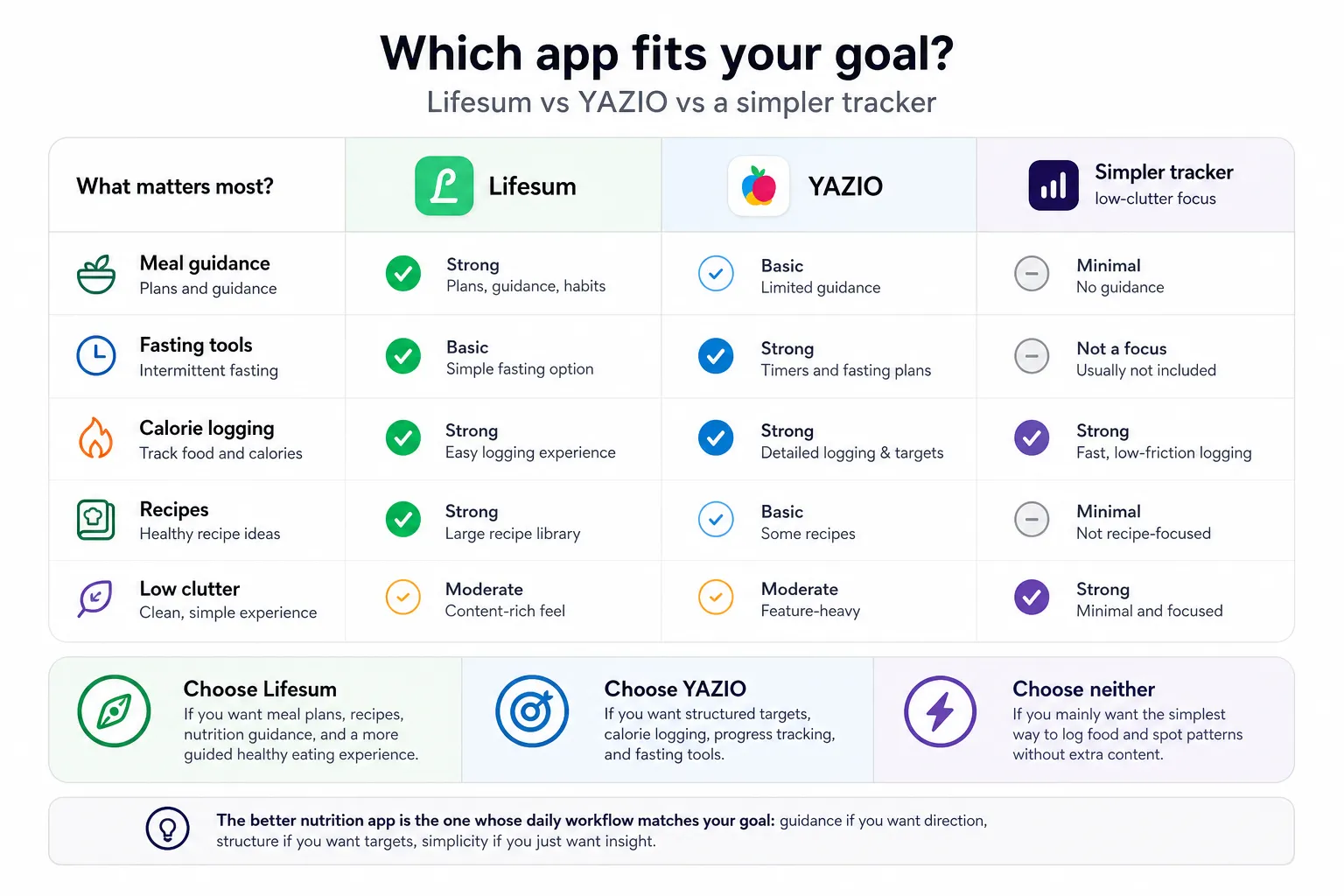
- Choose Lifesum if you want meal plans, recipes, nutrition guidance, and a more polished wellness feel.
- Choose YAZIO if you want structured targets, calorie logging, progress tracking, and fasting tools.
- Choose neither if you mainly want the lowest-friction way to log food and spot simple eating patterns without much lifestyle content.
The better nutrition app is the one whose daily workflow matches your goal: guidance if you want direction, structure if you want targets, simplicity if you just want insight.
That tradeoff also explains a common review pattern: what feels motivating to one user can feel cluttered or upsell-heavy to another. If neither approach sounds right, it may help to compare a broader shortlist of options in this nutrition app guide before you commit.
Food logging is where the comparison gets real
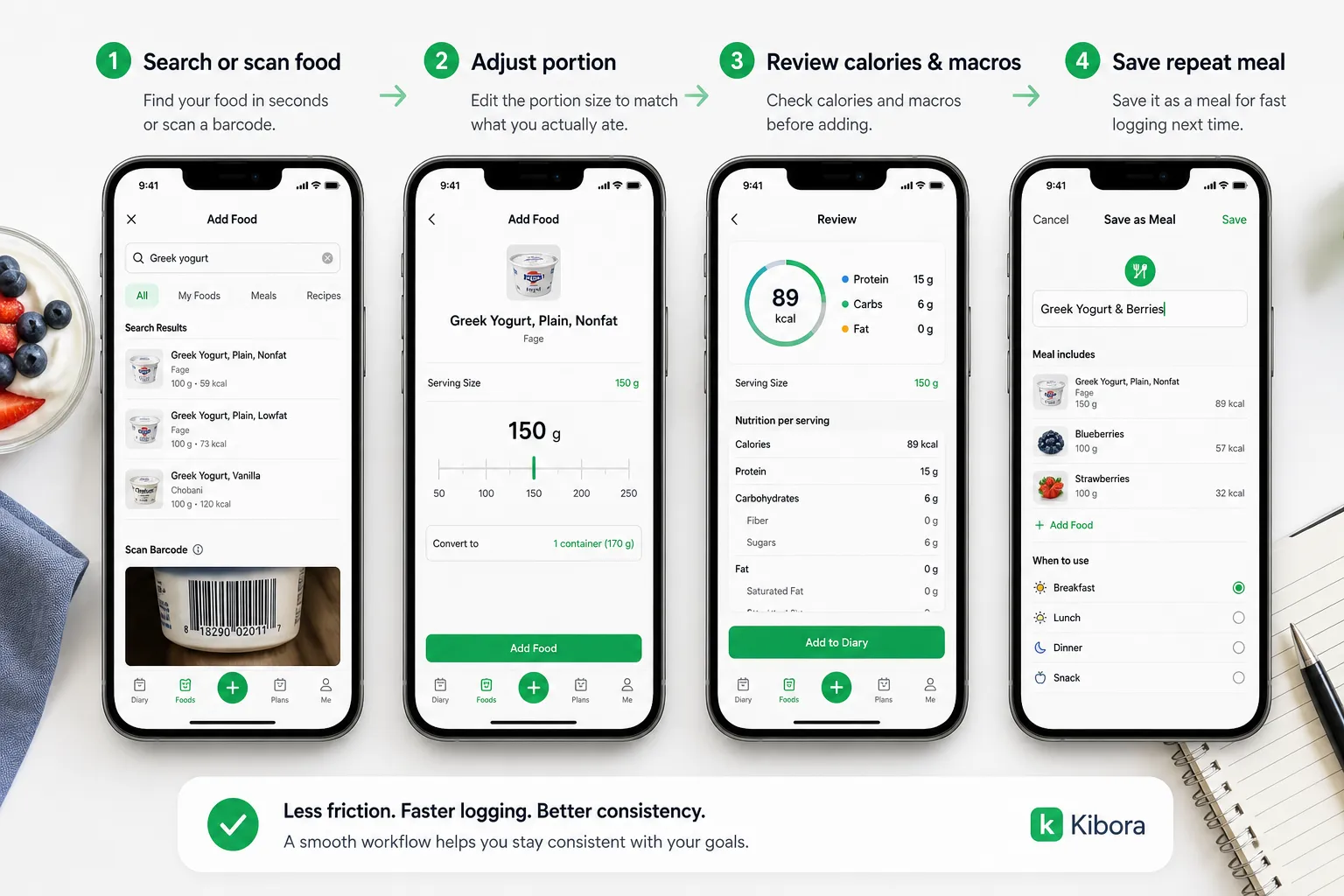
Both Lifesum and YAZIO can log meals, calories, and macros. The real difference is daily friction: how fast you can search a food, scan a barcode, adjust the portion, fix a bad entry, and move on with your day.
That matters more than feature count because food logging is repetitive. If an app makes repeat meals easy and keeps macro totals visible without too many taps, it will usually feel better to use than an app with a longer wellness feature list.
What to compare in a real logging workflow
A practical test is to log the same breakfast, lunch, snack, and packaged item in both apps. Pay attention to how quickly each app lets you find common foods, save meals you eat often, and review calories, protein, carbs, and fat before confirming the entry.
Barcode scanning is part of that test, but it is not the whole story. A scanner only helps if the product matches correctly, portion sizes are easy to edit, and fixing mistakes does not turn into a chore.
The same goes for the food database. The best food database is not the one with the biggest marketing claim. It is the one that accurately covers the foods you actually eat and lets you correct entries quickly when something looks off.
That is also why it is better to avoid declaring either app's database more accurate without live side by side testing. Across calorie apps, user generated entries and inconsistent product data are common friction points, and barcode coverage can vary a lot by country, brand, and packaging version.
Onboarding can help or get in the way
Setup shapes first impressions more than many readers expect. An app can feel helpful if onboarding turns your goal into a realistic calorie and macro target, but it can feel pushy if the flow is long, confusing, or heavily focused on upgrade prompts before you even log your first meal.
That theme shows up often in app store feedback for both products, alongside complaints about inaccurate entries and logging friction. Those reviews are not controlled evidence, but they are still useful as recurring signals to watch for when checking the current Lifesum App Store listing, YAZIO App Store listing, Lifesum Google Play listing, and YAZIO Google Play listing.
If food logging is your main reason to download either app, test your own staples before paying. Log your usual coffee order, a home cooked meal, a packaged snack, and a repeat lunch. If one app makes that process noticeably faster and clearer, that is probably the better choice for you. If your priority is simply usable tracking with less commitment upfront, it may also help to compare other options in this guide to the best free calorie counter apps.
Meal plans and recipes are Lifesum’s stronger lane
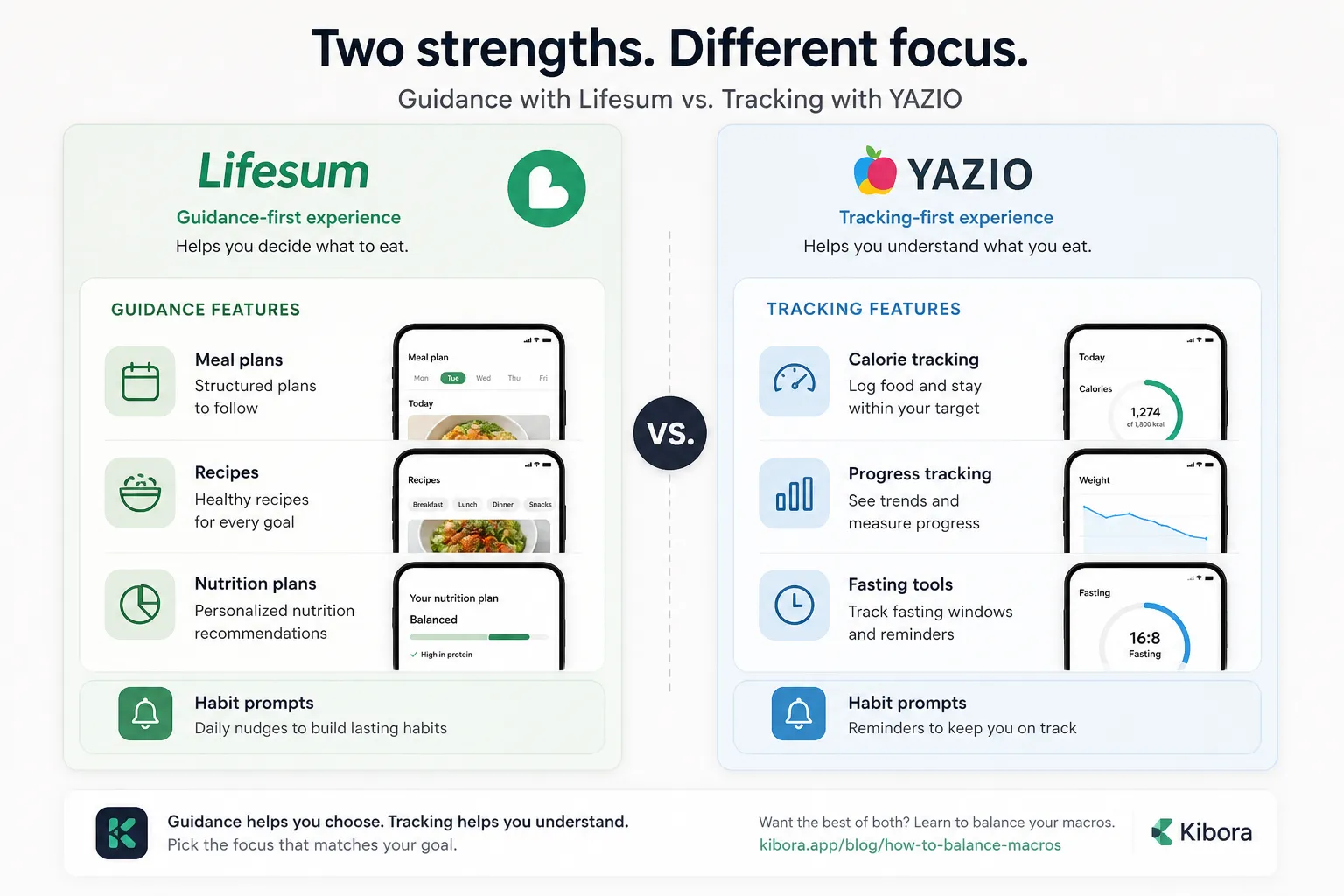
Lifesum feels more natural if you want the app to do more than record food. Its core experience leans into guidance, with official positioning centered on recipes, meal plans, and nutrition support rather than tracking alone Lifesum official website.
That matters because some people do not just want data. They want help deciding breakfast, finding balanced lunches, and building a repeatable eating routine without making every choice from scratch.
YAZIO is not missing these features. It also offers recipes and structured nutrition support, but its official messaging puts more emphasis on calorie tracking, weight loss, and fasting tools, which gives the app a different center of gravity YAZIO official website.
The practical question is simple: do you want the app to guide what you eat, or mostly help you understand what you already eat? Lifesum is usually the better fit for the first group. YAZIO often feels cleaner for the second.
A useful rule of thumb is this: meal plans help when you want direction, but they turn into clutter when your real goal is accurate logging and pattern awareness. The same feature can feel supportive or heavy depending on how hands-on you want the app to be.
If you want more structure without fully handing meal decisions to an app, it can also help to learn a simple framework for balancing your macros. That middle ground often suits people who want guidance, but not a full wellness-coaching layer.
Fasting, water tracking, and AI tools are useful only if they match your routine
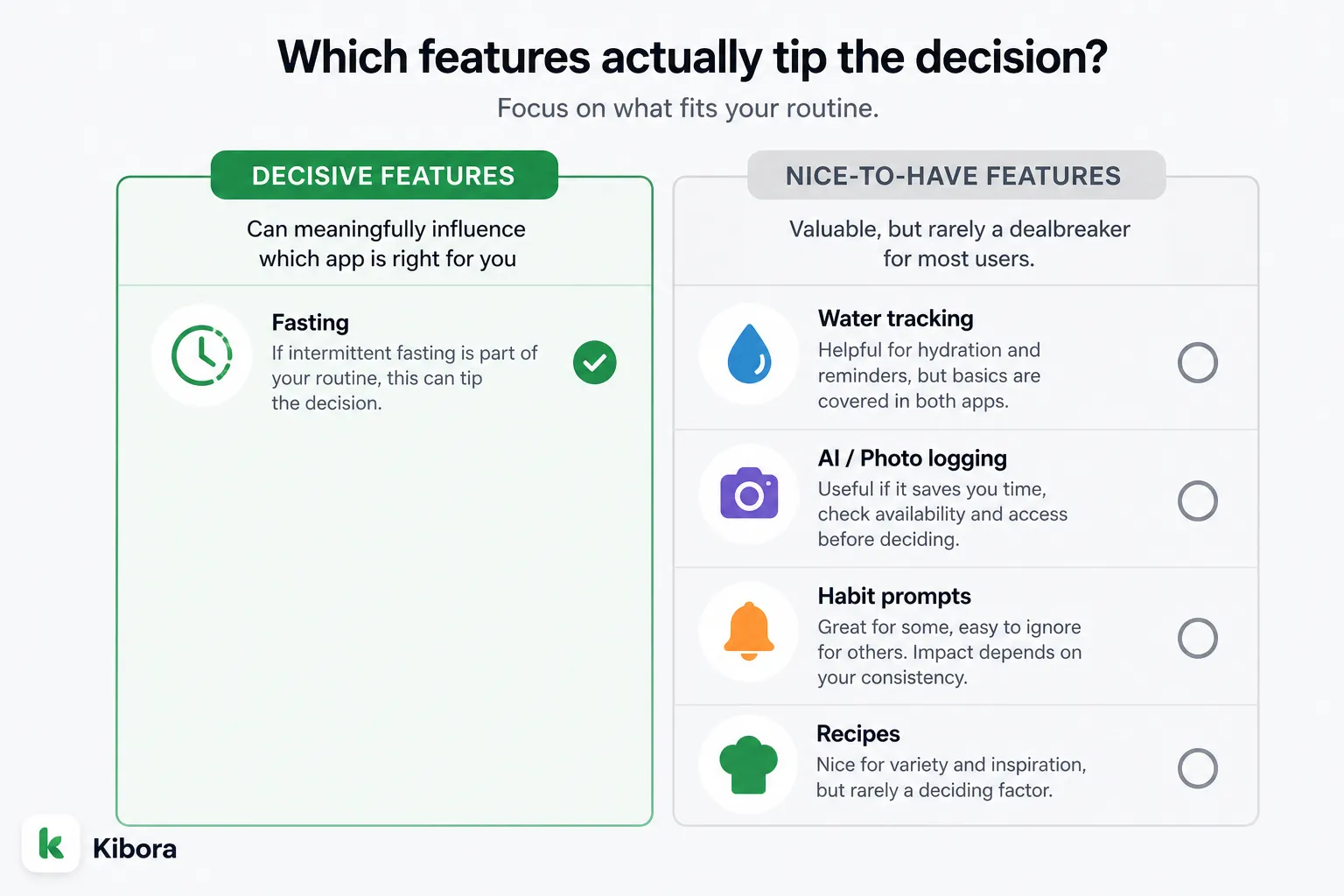
If intermittent fasting matters to you, YAZIO is usually the more compelling option. Its official site and app positioning put fasting much closer to the center of the experience than Lifesum does, which makes YAZIO easier to recommend for readers who already know fasting is part of how they want to eat. YAZIO’s website reflects that emphasis, while Lifesum’s positioning leans broader and more wellness-oriented.
That makes fasting one of the few extra features that can genuinely tip a Lifesum vs YAZIO decision. Fasting support is a real differentiator; water tracking and AI/photo logging are only decisive if they reduce effort in your actual routine.
Water tracking is less meaningful as a tiebreaker because both apps present it as part of the package. If you just want to log hydration or get reminders, either app may cover the basics, so this feature should matter only if hydration prompts are something you rely on every day.
AI and photo logging deserve more caution than app store screenshots usually suggest. Feature names, device support, regional rollout, and subscription access can change quickly, so it is worth checking the current YAZIO Google Play listing and Lifesum Google Play listing before treating those tools as a reason to choose one app.
Habit prompts sit in the middle. Some people stay consistent because of reminders and coaching cues, while others ignore them after a week. The best extra feature is not the flashiest one, but the one that quietly removes friction from your normal routine.
Free vs paid is where both apps deserve scrutiny
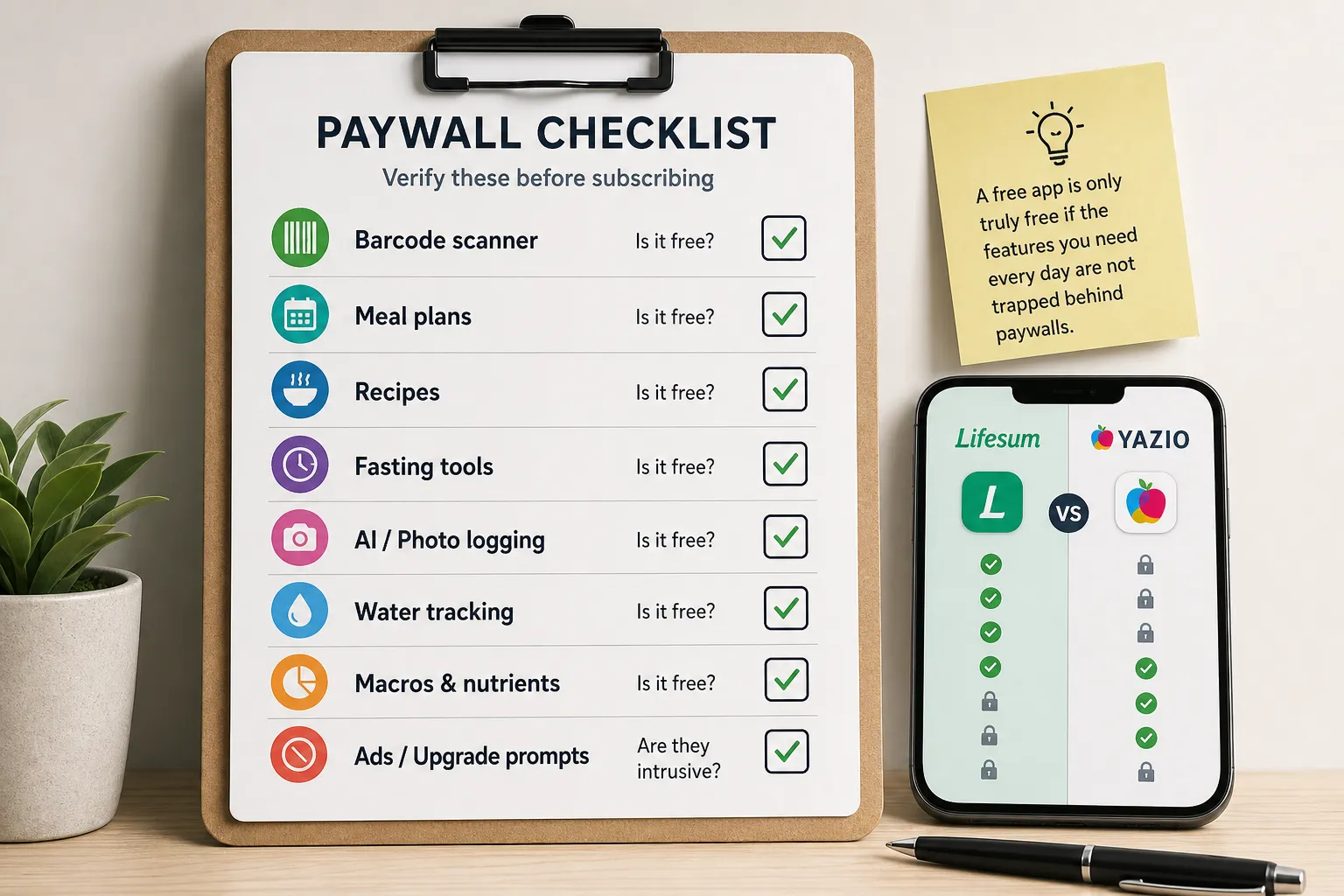
Lifesum and YAZIO both use premium subscriptions, and that matters more than a simple feature checklist. A tool can look impressive during onboarding, then feel much less generous once you discover that the parts you actually wanted, like meal plans, barcode scanning, fasting tools, deeper macro insights, recipes, or AI-style logging, are limited or reserved for paid tiers.
That is why the smartest comparison is not “Which app has more features?” but “Which features do I need every day, and are they free?” Before paying for Lifesum or YAZIO, check whether your daily essentials are free: food logging, barcode scanning, macro visibility, fasting, meal plans, and recipe access.
A free nutrition app is only truly free if the features you need every day are not trapped behind upgrade prompts.
This is also where daily usability comes into focus. Even a good app can become annoying if the free tier constantly pushes upgrades, locks useful taps behind premium screens, or interrupts routine logging with repeated reminders to subscribe. For some people, that friction matters just as much as the subscription cost itself.
Because plans, offers, and feature gates can change by market and over time, it is worth checking the current Lifesum App Store listing and YAZIO App Store listing before you commit. Do not assume a feature mentioned in marketing is fully available in the free version, and be especially careful with newer AI or photo-based tools since availability and paywalls can shift quickly.
What review complaints usually point to
User reviews should not be treated as proof that everyone will have the same experience, but they are useful for spotting recurring friction. Across app stores and broader consumer review platforms like Trustpilot, complaints commonly cluster around subscription confusion, billing frustration, aggressive upsells, food database inconsistencies, and features that felt less useful than expected after paying.
That does not automatically make either app bad. It does suggest that the purchase decision should include more than price, especially if you know you are sensitive to ads, locked features, or onboarding that asks for commitment before you know what is actually usable.
A practical way to compare value
List the three things you will use most often, such as barcode logging, fasting timers, or recipe tracking, then test whether either app paywalls them. If your must-haves sit behind premium in both apps, the better value is the one that creates less friction while you use it.
If ads and upgrade pressure are already a dealbreaker for you, it may be worth looking at calorie tracker apps with fewer ads before investing time in setup. That becomes especially relevant if you want quick logging more than a feature-heavy wellness platform.
If both feel too busy, look for less tracking friction
Some readers are not really deciding between Lifesum and YAZIO. They are deciding whether they want an all-in-one nutrition platform at all. Both Lifesum and YAZIO present themselves as broad platforms with tracking plus plans, recipes, fasting, prompts, and subscriptions, which can be helpful or simply feel like more app than you need.
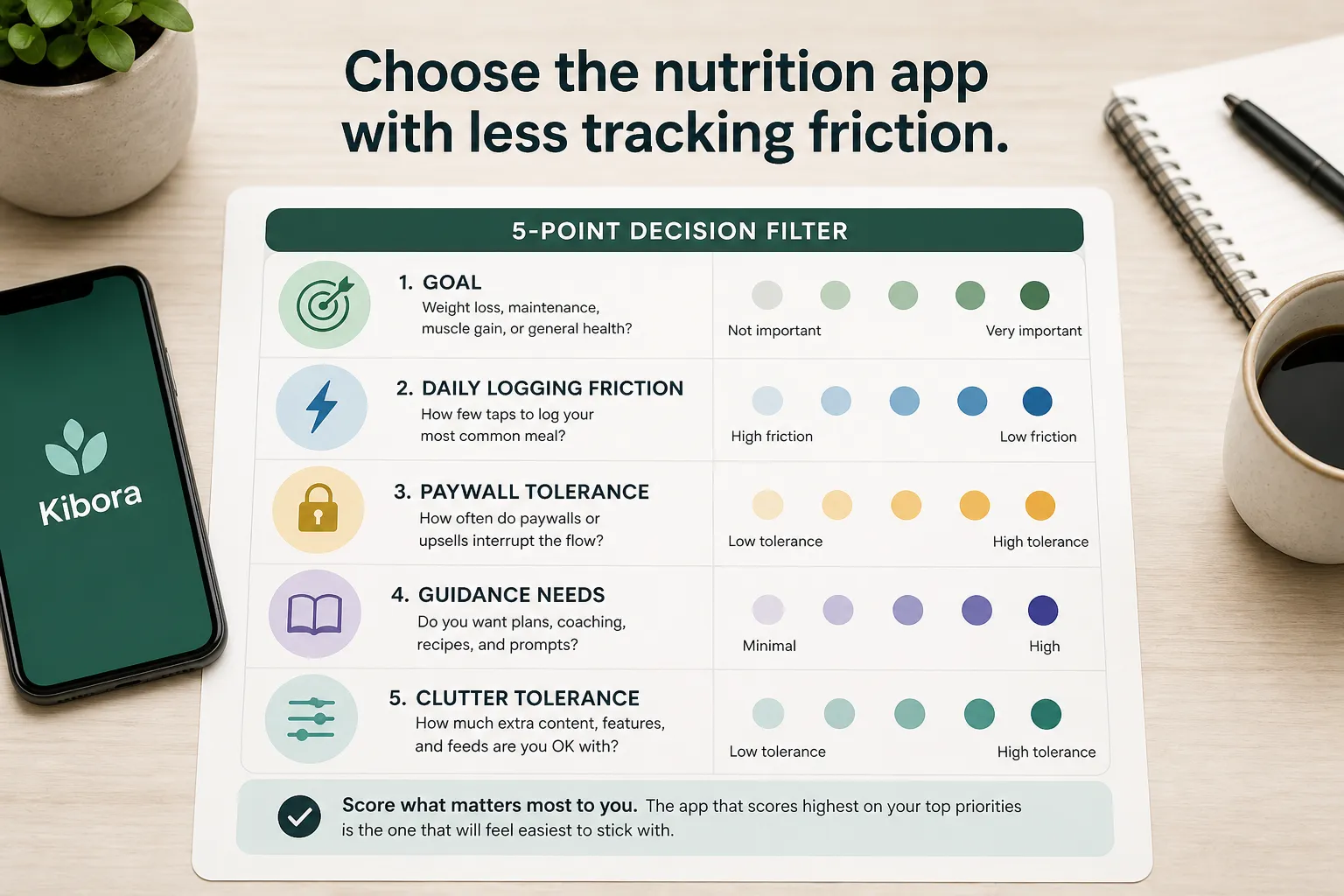
That tradeoff matters because daily consistency usually comes down to friction. If logging breakfast takes extra taps, prompts you into features you did not ask for, or sends you toward upgrade screens, the app is doing more than tracking. If an app adds more decisions than it removes, it is not simplifying nutrition; it is turning food tracking into another task to manage.
A practical way to compare any nutrition app is to ignore the feature list for a minute and score the basics:
- How few taps it takes to log your most common meal
- Whether calorie and macro feedback is clear at a glance
- How useful the food database feels for the foods you actually eat
- How often ads, prompts, or paywalls interrupt the flow
- Whether the app gives insights that change behavior, not just more data
If you already know you do not want meal plans, fasting nudges, recipe feeds, or lifestyle coaching, a simpler tracker may fit better. That is where a lighter option such as Kibora can make sense, and our guide to minimalist calorie tracker apps is a good next step.
The best rule is simple: pick the app that makes your most common meal easiest to log, not the one with the longest list of features.
Choose the app you’ll still open next month
The overlap in this Lifesum vs YAZIO comparison is real, so the best pick is the one that creates less daily friction. If you want guided eating, recipes, meal plans, and a wellness-style experience, Lifesum is the stronger first choice.
If your priority is structured tracking, calorie targets, weight-loss tools, and fasting support, YAZIO is the better fit. That is the simplest way to resolve the yazio vs lifesum decision: choose the app that matches the job you need it to do most days, not the one with the longest feature list.
Before you subscribe, verify pricing, free-tier limits, and any AI or photo logging features live in the app, since those details can change quickly. A nutrition app comparison is most useful when it reflects your actual routine, not a feature checklist.
Try this: install the app that seems like the stronger fit, log three normal days, test the barcode scanner and repeat meals, check which features are paywalled, and notice whether the app feels clarifying or noisy. Final answer: pick Lifesum for guided eating and wellness-style meal support, and YAZIO for structured tracking, weight loss, and fasting.
- Key sources
- Lifesum official website
- YAZIO official website
- Lifesum App Store listing
- YAZIO App Store listing
- Lifesum Google Play listing
- YAZIO Google Play listing
- Independent app review sites such as Trustpilot or consumer review roundups