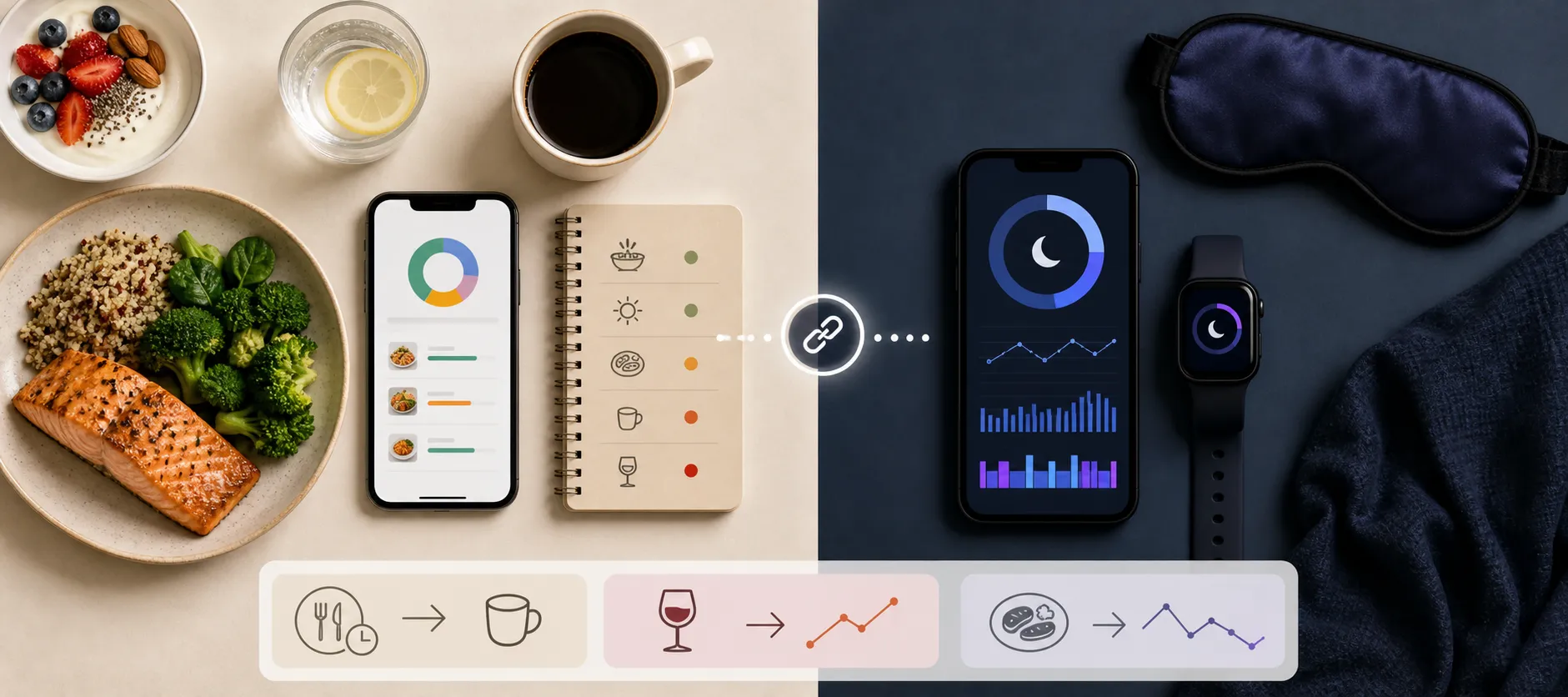
- What you'll learn
- Which apps are strongest for connecting food logs to sleep patterns
- Why meal timing, caffeine cutoff, alcohol, and heavy dinners matter more than calories alone
- Where Kibora fits when you want practical food-and-sleep interpretation
- How Cronometer and MyFitnessPal compare as nutrition trackers with sleep use cases
- When wearable-first options like Oura, Fitbit, and Apple Health are a better choice
- What these apps can reveal about patterns without proving direct cause
You can know your calories, macros, bedtime, and even your sleep score, yet still have no clear idea whether late dinners, caffeine, alcohol, or heavy meals are shaping how you sleep. That gap is why this article ranks apps by food-sleep usefulness, not by generic popularity or how many devices they sync with.
Sleep is worth paying attention to as part of overall health, as the CDC notes, but most calorie trackers and sleep trackers still live in separate worlds. An app might show 2,100 calories and a sleep score of 68 without helping you test whether lunch coffee, dinner wine, or late eating may reveal a pattern.
A true calorie-and-sleep app should help answer a behavior question, not just display two dashboards: what eating patterns seem to show up before better or worse sleep? That is the lens for the rankings ahead.
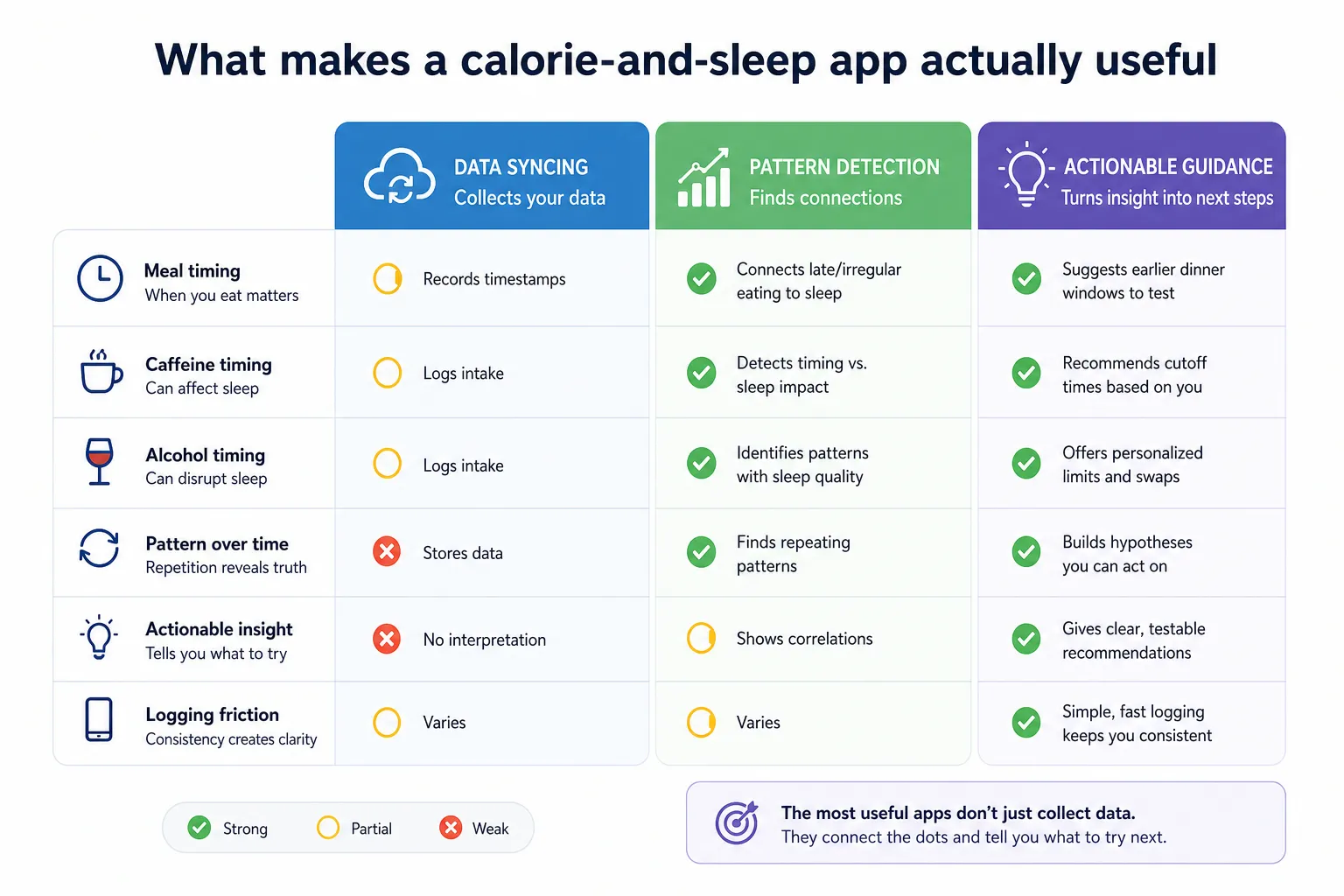
What makes a calorie-and-sleep app actually useful
The apps in this comparison are not being ranked by feature count alone. They are being ranked by whether they help you connect food behavior to sleep patterns in a way that is clear enough to act on.
That matters because, for sleep, calories alone are often not the main signal. When you ate, how heavy dinner was, whether you had caffeine or alcohol, and whether the pattern repeats usually tell you more than a perfect macro breakdown.
Meal timing belongs in the rubric because sleep is tied to circadian rhythm, and research literature regularly examines links between late or irregular eating and sleep outcomes across systematic reviews and related studies. If you want more context on why this matters, our guide to late-night eating and sleep goes deeper.
Caffeine and alcohol timing are also high-signal criteria. Caffeine can affect sleep depending on dose and timing according to MedlinePlus, and alcohol can interfere with healthy sleep even if it feels relaxing at first as NHLBI notes.
So the strongest app is not the one that simply imports wearable data. A wearable sync is useful, but if the app only shows calories, macros, and sleep duration as separate records, that is weak interpretation.
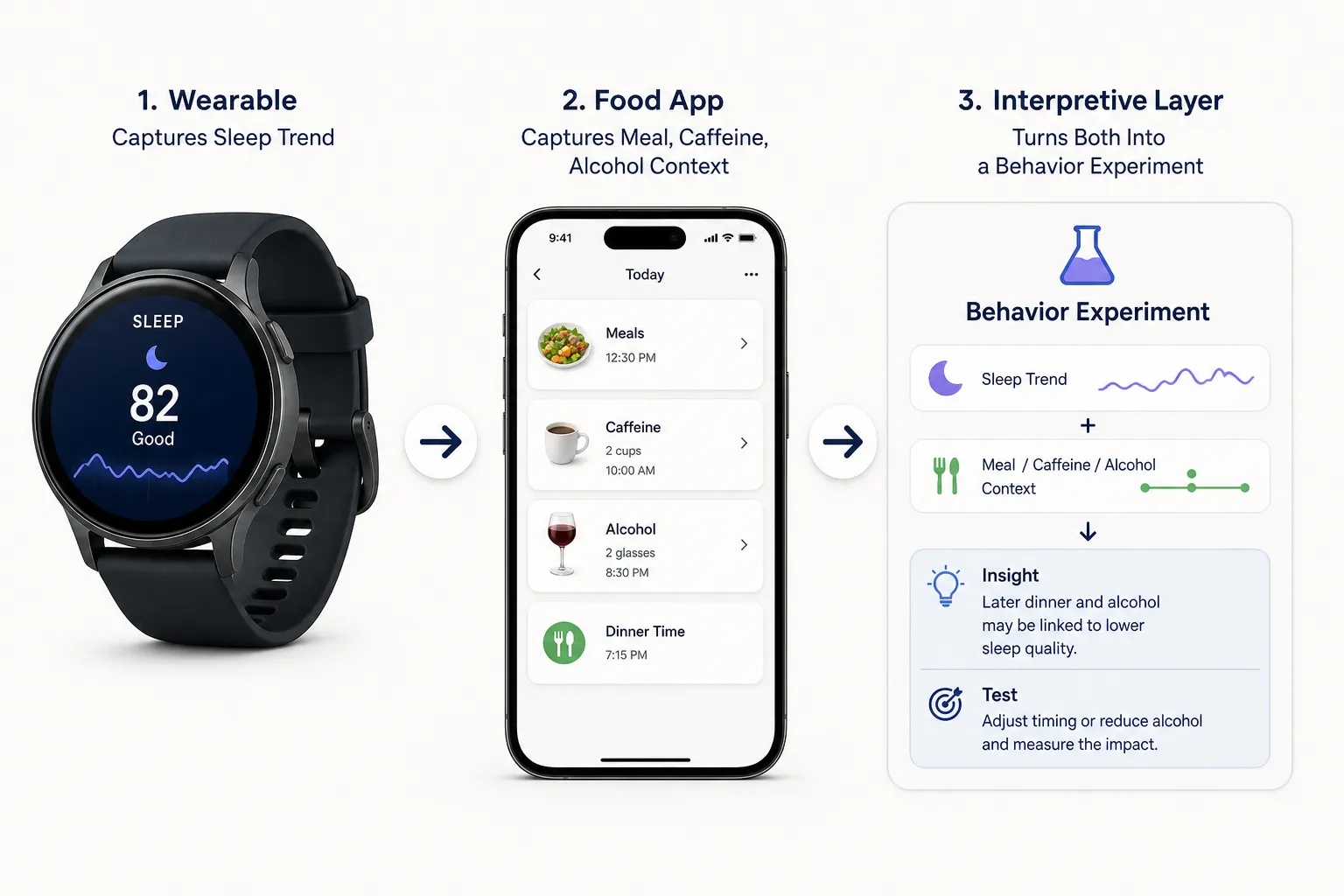
A better example looks like this: “Dinner after 9 p.m. plus alcohol tends to precede lower sleep scores for you. Try moving dinner earlier for a week.” That does not prove cause. It builds a practical hypothesis you can test.
We also score for logging friction. Food-sleep patterns only become visible when tracking is consistent, so an app that is slightly simpler but used daily can be more valuable than a deeper app that people abandon after three days.
Best overall options if you want food-driven sleep insight
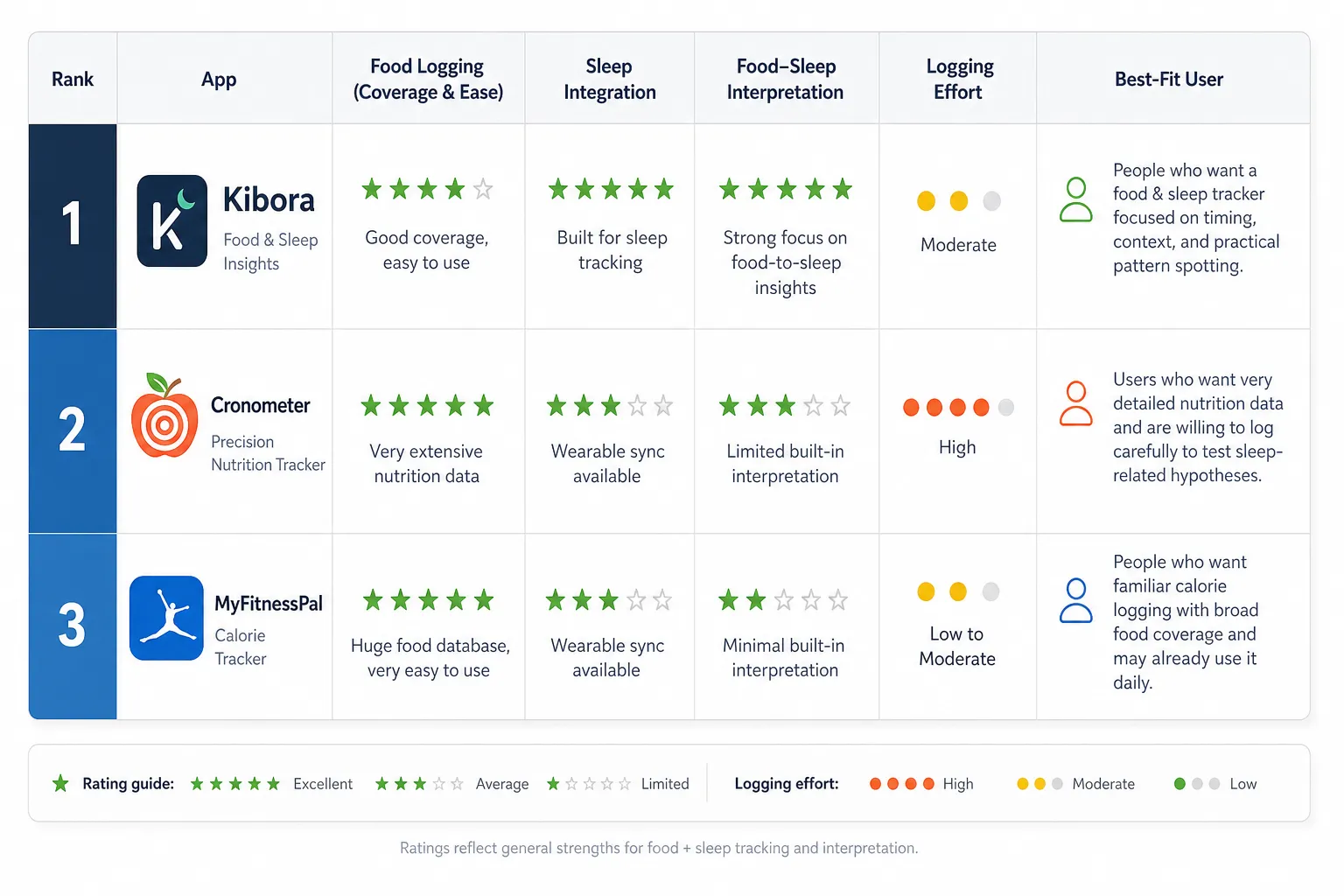
If your priority is connecting eating behavior to sleep context, the strongest options are Kibora, Cronometer, and MyFitnessPal. They do not win for the same reason. One is more useful for food-to-sleep interpretation, while the others are stronger as established nutrition trackers with broader logging ecosystems.
The key distinction is simple: the best overall choice is not necessarily the app with the largest food database; it is the app that turns food logs into a usable sleep hypothesis. In practice, that means looking for an app that helps you test patterns like late meals, caffeine, alcohol, or heavy dinners against sleep trends, not just store both data types side by side.
-
1. Kibora
Best for: People who want a food and sleep tracker that focuses on timing, context, and practical pattern spotting.
Why it stands out: Based on its documentation, Kibora is designed to interpret food-related sleep signals and prompt users around behaviors such as meal timing, caffeine, alcohol, and heavier evening eating, rather than treating sleep as a separate synced metric. That makes it the most directly aligned option when your goal is to understand what your eating habits may be doing to your nights. Readers can review its feature pages for the most current details.
Watch out for: It may be a better fit for behavior insight than for users who mainly want an exhaustive calorie database or a long-established logging ecosystem. Manual effort appears moderate, since the value depends on logging meals and relevant context consistently. Support for food-to-sleep interpretation should be verified against the current Kibora documentation.
-
2. Cronometer
Best for: Users who want very detailed nutrition data and are willing to log carefully to test sleep-related hypotheses.
Why it stands out: Cronometer is one of the strongest nutrition-first trackers for precision. If you want to compare sleep against detailed intake patterns, it gives you more nutritional depth than most mainstream apps.
Watch out for: More data is not automatically better for behavior change. If your real goal is spotting a few likely sleep disruptors, the logging burden can feel high, and nutrient depth alone does not necessarily translate into clearer food-sleep interpretation. Manual effort is high.
-
3. MyFitnessPal
Best for: People who want familiar calorie logging with broad food coverage and may already use it daily.
Why it stands out: MyFitnessPal remains a mainstream calorie-tracking hub, which makes it convenient and approachable. For users already invested in its logging flow, it can serve as the nutrition side of a calorie tracking sleep app setup.
Watch out for: Its value drops if sleep data sits adjacent to food logs without helping you interpret the relationship. Before choosing it for this use case, check whether your specific setup produces actual guidance on meal timing and sleep, or simply syncs wearable data into the same account. Manual effort is low to moderate for food logging, but interpretation may require more work from the user.
This top three works best if you separate nutrition-first insight from sleep-first ecosystems. Kibora leads when you want food behavior framed in sleep context, while Cronometer and MyFitnessPal are stronger when calorie tracking depth, familiarity, or database scale matter more than built-in interpretation.
Best wearable-first setups for sleep data, recovery, and readiness
If your priority is passive sleep capture, wearable-first platforms often beat classic calorie apps. Oura, Fitbit, and Apple Health are especially strong for sleep trends, recovery context, and day-to-day consistency. The tradeoff is that they usually show the sleep side of the equation more clearly than the food side.
Oura is the clearest example. Its platform is built around sleep score, readiness, and recovery signals, with explanations designed to help users spot when sleep quantity or timing is off according to Oura. That can be genuinely useful, but a low readiness score does not automatically explain whether late dinner, alcohol, or caffeine played a role unless you log those behaviors somewhere consistently.
Fitbit is similarly strong for accessible sleep tracking and long-term visibility. Its help documentation shows a mature sleep feature set built around wearable data, sleep stages, and trend reporting through Fitbit support. For users already in the Fitbit ecosystem, that may be enough to notice rough patterns, but the app is less compelling if your goal is a true food and sleep tracker that helps test meal timing or drinking habits against sleep changes.
Apple Health plays a different role. It is excellent as a central repository for health data from multiple apps and devices, including sleep and nutrition inputs via Apple’s Health documentation. But aggregation is not the same as coaching. Apple Health can collect the signals, yet you may still need a separate app to interpret whether your eating behavior suggests a meaningful sleep pattern.
Wearables are often better at capturing sleep; food trackers are often better at capturing the behaviors that might explain it. The strongest setup connects both without treating either one as a complete answer.
Best low-friction choices for spotting late meals, caffeine, and alcohol patterns
If you do not want a full quantified-self setup, that is usually fine. For many people, the fastest way to learn something useful is to log a few high-signal variables consistently: dinner time, caffeine cutoff, alcohol, whether dinner felt heavy, and the sleep outcome the next morning.
That often beats a detailed nutrition dashboard used twice a week. A person who tracks every micronutrient but misses the fact that dinner regularly happens at 10 p.m. is collecting more data, not necessarily better sleep insight.
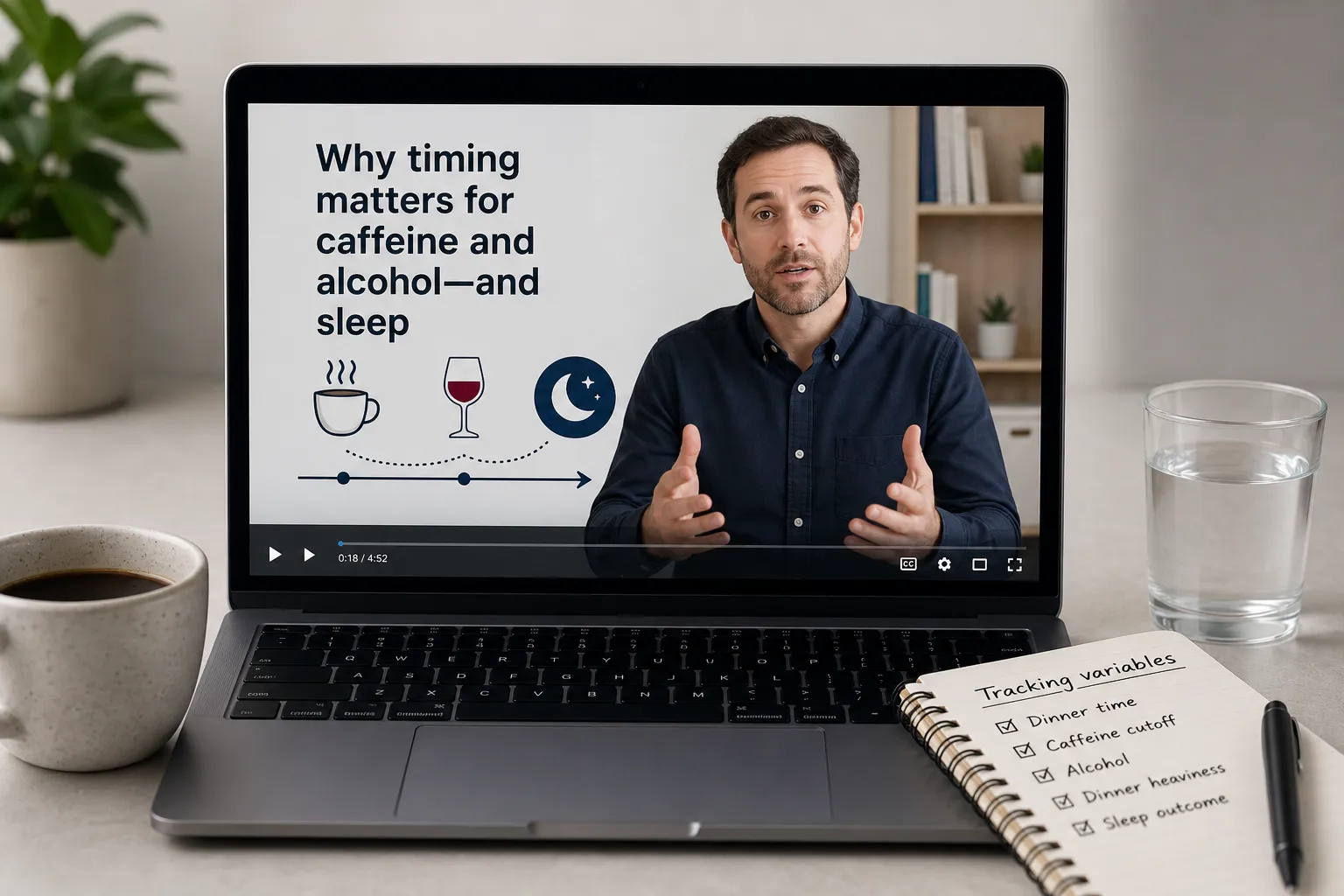
Caffeine can make it harder to fall asleep.
Caffeine timing is one of the clearest examples. MedlinePlus notes that caffeine can interfere with sleep, so a simple cutoff log, such as “none after 2 p.m.,” may reveal more than a complicated nutrient breakdown. If the goal is better sleep, a consistently logged caffeine cutoff may be more useful than an inconsistently logged micronutrient dashboard.
The same goes for alcohol and heavy late meals. The NHLBI notes that alcohol can disrupt sleep later in the night, which makes it a practical variable to track alongside sleep score or self-rated sleep quality.
A simple one-week test is often enough to surface an obvious pattern:
- Log dinner time for seven nights
- Note any alcohol and roughly how much
- Mark caffeine after your cutoff time
- Rate dinner as light, normal, or heavy
- Compare those entries with sleep duration, score, or morning sleep quality
This is where Kibora is relevant if you want low-overwhelm food-and-sleep prompts rather than a giant analytics stack. A prompt like “caffeine after 2 p.m. appears on most of your lower-sleep nights” is more actionable than raw syncs alone. If you want to compare similarly simple approaches, our guide to minimalist calorie tracking apps may help.
FoodMarble is a useful adjacent example, but in a narrower lane. Its focus is more on food-symptom relationships than calorie-and-sleep tracking, so it is better thought of as a pattern-tracking companion for certain users, not the primary answer for this category. See the FoodMarble app page for that positioning.
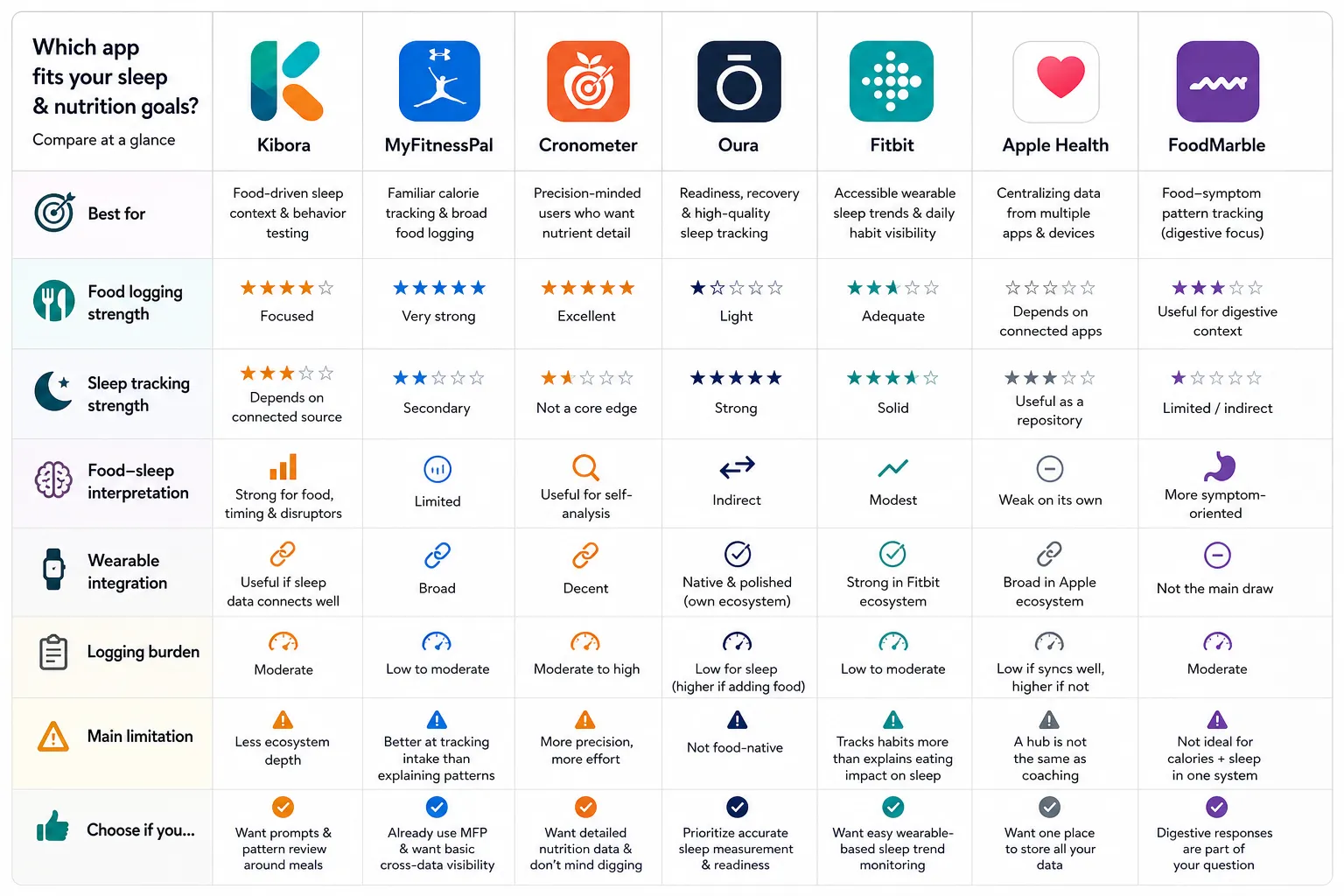
The comparison table: which app fits which kind of sleeper
The fastest way to choose is to match the app to the job you actually want it to do. Choose a food-first app if you want to change eating habits for sleep; choose a wearable-first app if you want better sleep measurement; choose a hub only if you are willing to interpret the connection yourself.
One practical caveat matters across all options: check whether the sleep and nutrition connection is native, third-party, or manual. That one detail often determines whether the app feels seamless or turns into extra admin after a week.
- Kibora — Best for: food-driven sleep context and behavior testing. Food logging strength: focused on meal timing and common sleep disruptors rather than the biggest generic database. Sleep tracking strength: depends on connected data source, so not the deepest measurement stack by itself. Food-sleep interpretation: strongest when your goal is spotting patterns around late meals, caffeine, alcohol, and heavier dinners. Wearable integration: useful if it pulls in sleep data cleanly. Logging burden: moderate. Main limitation: may not match the ecosystem depth of larger wearable or calorie-counting platforms. Choose this if you want prompts and pattern review around what you ate and when. Skip this if your top priority is elite wearable analytics or a massive food database.
- MyFitnessPal — Best for: familiar calorie tracking and broad food logging. Food logging strength: very strong, with a large consumer-facing logging experience via MyFitnessPal. Sleep tracking strength: secondary. Food-sleep interpretation: limited compared with food-first sleep tools, since syncing data is not the same as explaining it. Wearable integration: broad. Logging burden: low to moderate. Main limitation: better at tracking intake than helping you test sleep-related food hypotheses. Choose this if you already live in MyFitnessPal and want basic cross-data visibility. Skip this if you want the app to surface sleep-relevant eating patterns for you. If that sounds familiar, this guide to easier calorie-tracking alternatives may help.
- Cronometer — Best for: precision-minded users who care about nutrient detail. Food logging strength: excellent, with strong micronutrient tracking per Cronometer. Sleep tracking strength: not its core edge. Food-sleep interpretation: useful for self-analysis, especially if you suspect patterns tied to macros or stimulants, but it asks more of the user. Wearable integration: decent, depending on setup. Logging burden: moderate to high. Main limitation: more precision, more effort. Choose this if you want detailed nutrition data and do not mind digging through it. Skip this if you want lightweight sleep coaching tied to meals.
- Oura — Best for: readiness, recovery, and high-quality sleep trend measurement. Food logging strength: light unless paired with another nutrition app. Sleep tracking strength: strong, with sleep and readiness framing explained by Oura. Food-sleep interpretation: indirect. Wearable integration: native and polished within its own ecosystem. Logging burden: low for sleep, higher if you add food manually elsewhere. Main limitation: not food-native. Choose this if sleep measurement is your main goal. Skip this if you want meal timing and intake patterns interpreted in the same workflow.
- Fitbit — Best for: accessible wearable sleep trends and daily habit visibility. Food logging strength: adequate, but not its standout feature. Sleep tracking strength: solid for mainstream users, with sleep features documented in Fitbit support. Food-sleep interpretation: modest. Wearable integration: strong in the Fitbit ecosystem. Logging burden: low to moderate. Main limitation: more about tracking habits than connecting specific eating behaviors to sleep in a nuanced way. Choose this if you want easy wearable-based sleep trend monitoring. Skip this if you want deeper nutrition-led interpretation.
- Apple Health — Best for: centralizing data from multiple apps and devices. Food logging strength: depends on connected apps. Sleep tracking strength: useful as a repository, supported through Apple Health integration tools. Food-sleep interpretation: weak on its own. Wearable integration: broad inside the Apple ecosystem. Logging burden: low if apps sync well, higher if they do not. Main limitation: a hub is not the same as coaching. Choose this if you want one place to store data. Skip this if you want the app itself to explain what your late dinner may be doing to your sleep.
- FoodMarble — Best for: adjacent food-symptom pattern tracking rather than calorie-and-sleep tracking. Food logging strength: useful for digestive context. Sleep tracking strength: limited or indirect. Food-sleep interpretation: more symptom-oriented than calorie-sleep oriented. Wearable integration: not the main draw. Logging burden: moderate. Main limitation: not the best fit if your core goal is calories plus sleep in one system. Choose this if digestive response is part of the question. Skip this if you mainly want a calorie tracking sleep app.
Feature sets and pricing change often, so confirm current plans before you commit. And if two apps seem close, pick the one that reduces friction in your real routine, because the best data is still the data you will actually log.
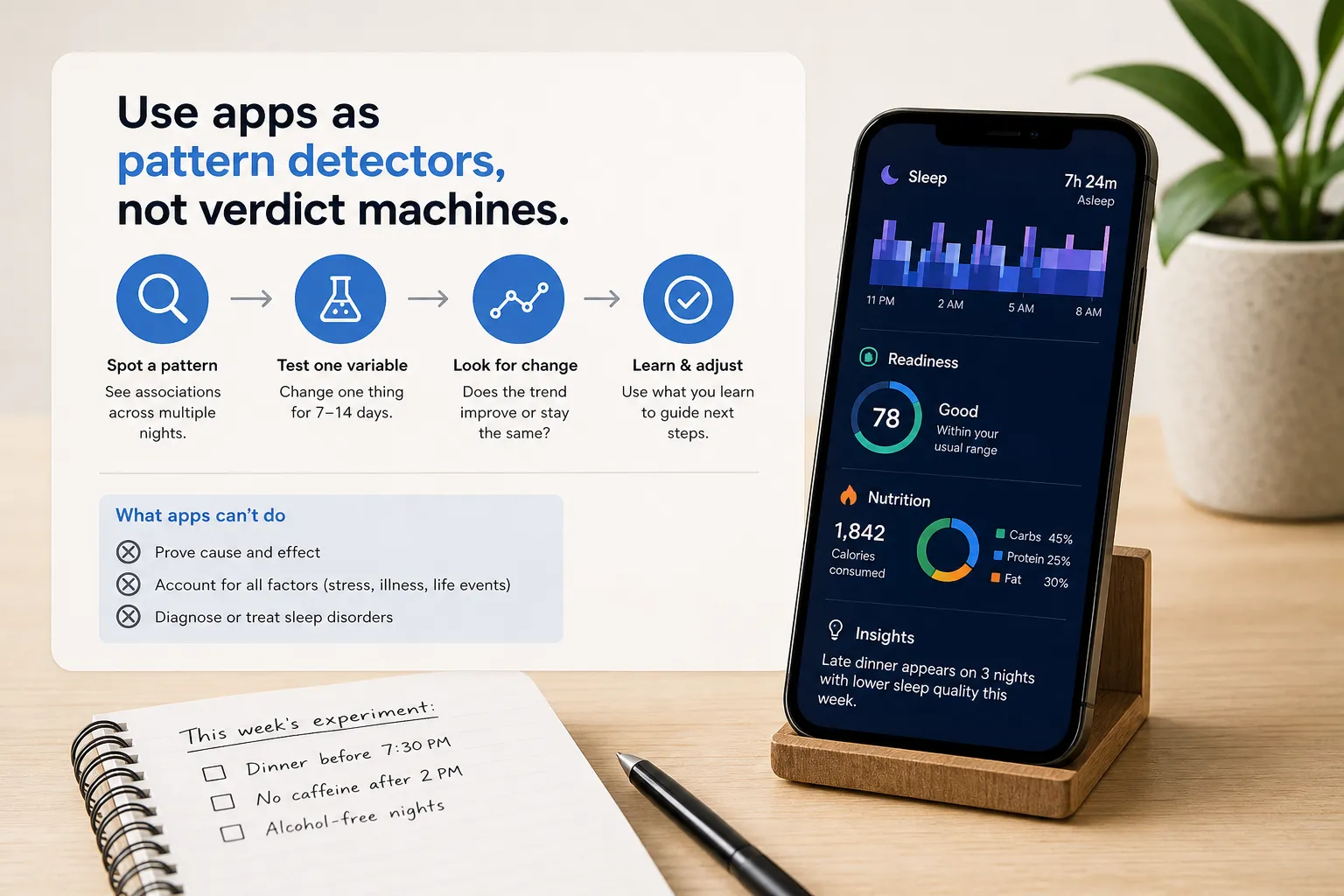
What these apps can and cannot tell you about your sleep
The most useful way to read a calorie tracking sleep app is as a pattern detector, not a verdict machine. If a late dinner shows up before poor sleep three times in a week, that is a clue worth testing, not proof that one meal caused the problem.
That matters because correlation is not causation. Research on late eating and sleep suggests there may be a relationship, but the effect can vary by person, meal size, timing, stress, and the rest of the day.
Wearable sleep data has limits too. Sleep stages and readiness scores are estimated, so repeated trends usually matter more than any single-night dip. One low score after one glass of wine does not prove anything by itself.
Alcohol may help you fall asleep, but it can disrupt sleep later in the night.
That caution is consistent with guidance from the NHLBI. A better approach is to look for the same pattern across multiple nights before deciding alcohol is affecting your sleep quality.
Food logs are imperfect in a different way. Missed snacks, rough portion estimates, and unlogged caffeine or drinks can easily distort the story, which is one reason tracking data alone often fails without interpretation.
The most reliable use case is a simple personal experiment. Change one variable at a time for 7 to 14 days, such as moving dinner earlier, setting a caffeine cutoff, or reducing alcohol frequency, then see whether the trend changes.
Use calorie-and-sleep apps as pattern detectors, not verdict machines: they are best at showing what to test next. If sleep problems persist or feel severe, an app can support your observations, but it cannot diagnose insomnia or replace medical evaluation.
The best choice depends on the question you want the app to answer
The easiest way to choose is to start with your actual question. The right app is the one that answers your real question: what did I eat, how did I sleep, or which eating habit should I test next?
If your main question is what did I eat?, a detailed food logger such as MyFitnessPal or Cronometer may be the better fit. They are often strongest when you want calorie totals, nutrition detail, and a reliable record of meals and drinks.
If your main question is how did I sleep?, wearable-centered ecosystems may fit better. Oura, Fitbit, or Apple Health setups are usually more useful for passive sleep measurement, trend views, and recovery-style context than for interpreting what your dinner, caffeine, or alcohol may have contributed.
If your main question is which eating habits seem to affect my sleep?, Kibora belongs near the top. Its value is not just that it tracks food and sleep, but that it keeps attention on the practical signals most people can actually test: meal timing, late eating, caffeine cutoff, alcohol, and heavy dinners.
A good food and sleep tracker should help you make one better decision tomorrow, not just collect more data. If the app cannot help you decide what to adjust next, it may be more dashboard than guide.
For your first week, keep tracking simple so patterns have a chance to show up:
- Log dinner time each night
- Note your caffeine cutoff time
- Record any alcohol
- Mark heavy or late meals
- Track bedtime
- Add a sleep score or simple 1 to 5 sleep rating for seven nights
That starter plan works regardless of app choice. After seven days, pick one variable to test next, because the best calorie tracking sleep app is the one that helps you move from logging to a clear, usable hypothesis.
- Key sources
- CDC: Sleep and Sleep Disorders
- PubMed search on meal timing and sleep
- PubMed search on late eating and sleep
- NIH MedlinePlus: Caffeine
- NHLBI: Healthy Sleep
- Kibora documentation link provided by user
- MyFitnessPal app page
- Cronometer app page
- Oura sleep scoring and readiness explanations
- Fitbit Sleep help pages
- Apple Health User Guide / sleep data integration support
- FoodMarble app page